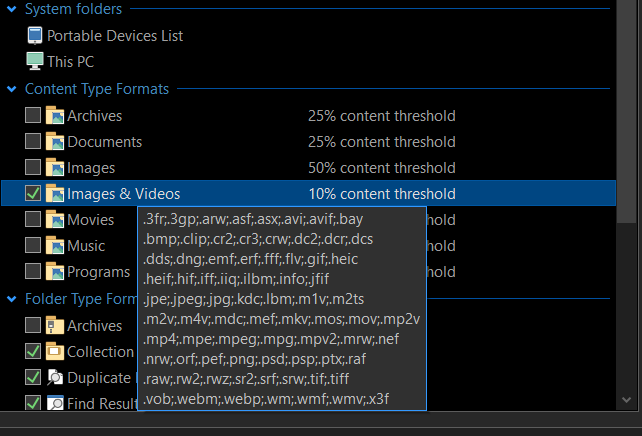
I created an File Type Group (Content Type) with all the extensions from Images & Movies.
It's not getting applied to any folder. I tried different content threshold percentages, even on folders with 100% of the images/videos with extensions from that list. Even using 'Reset to folder-type format' option sets to User Default format.
All other Content Type Formats are disabled. No conflicting path format or automatic format.
Hover over the info icon on the status bar to find out where the current format comes from. That will probably tell you what's matching the folder before the content type format is considered.
After exiting the program, and then more trial and error, when threshold is 50% or above, it doesn't set the content type format, but when threshold is 49% it does use the format. (Earlier 10% threshold was also not working for most folders, not it's working.)
When the threshold is 49% or lower:- The current folder format comes from: User Default Format + Auto-detected content type "Images & Videos".
When threshold is 50% or above: User Default Format.
This happens for folder with just two .jpg files as well (no hidden files/folders).
When testing folder formats, always close the window and open a new one. Otherwise you'll get confused by cached data being used. I suspect that's all that was happening.
But issue is still there: even in folder with all images (example from above: folder with just two .jpg files), when threshold is 50% or above, the folder format ('Images & Videos') doesn't get used, 'User Default Format' is used.