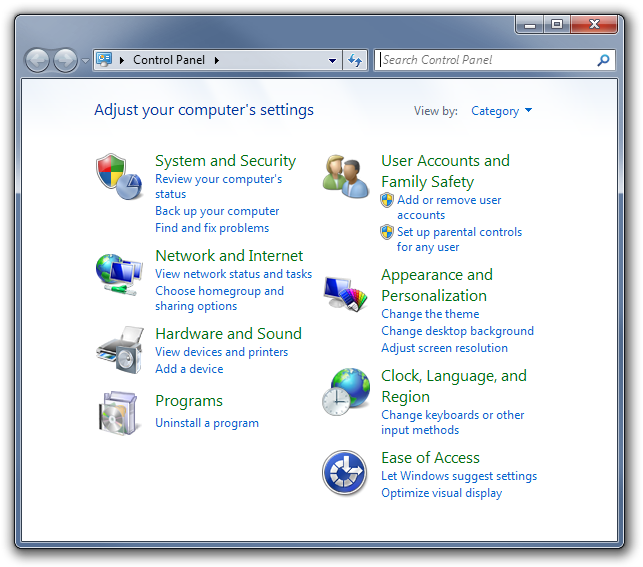
When using the Desktop option for the starting place of the Folder Tree the Recycle Bin, Networking, Libraries, and Favorites are also included in the folder tree. All of these also appear in the Windows Explorer navigation pane. By editing the registry these items can be removed from Windows Explorer which in turn removes them from Dopus. What I am having trouble figuring out is why the Control Panel (appears in Windows Explorer) is not present in the Dopus Folder Tree.
Is there a reason the Control Panel doesn't appear in Dopus while it does appear in Windows Explorer? I assume that the Control Panel is also considered a virtual folder but it does not appear in the Folder Tree. Is there a way to make it a virtual folder and add it to Dopus the way the Recycle Bin, Libraries, etc... are present? I'm aware I can make a link to it in my favorites or in the context menu but I'm curious why it isn't included by default?
In newer versions of Windows, Control Panel doesn't work properly in Opus as it's full of Explorer-specific stuff, so Opus avoids it. If you type /controls into Opus in Windows 7 it'll trigger an Explorer window to open as Opus delegates the folder to Explorer.
You can't really do much within Control Panel except double-click stuff and search for stuff, so Opus doesn't really have much to add to that particular folder. (These days, Control Panel doesn't even look like a real folder anymore. It's a program-launching UI that happens to have bits of itself hosted within Explorer windows.)
You could make a button/hotkey/menu etc. in Opus which opens it if you just want convenient access to it when using Opus.
Makes sense . I sincerely appreciate your support as I continue to discover all the goodies Dopus has to offer. I've come to the point where I can never use Explorer again
I didn't discover this tweak because I am an incredible power user, I simply found it on the net some time ago and tested and liked it as well, I am just passing it along in case there are members who are not aware of this possibility. Create a folder anywhere (I created mine under my user name, but it doesn't matter, could be Desktop, anywhere) and name it AdminMode.{ED7BA470-8E54-465E-825C-99712043E01C} , in fact the name before the dot (.) doesn't matter either, but AdminMode sounds good enough.
Open the folder and enjoy your new super powerful and flexible Control Panel. Works in Windows 7 x86 and x64.*
Some Vista users have implemented this without ill effects, whilst others have reported Explorer (the shell) going nuts, so I wouldn't recommend this to Vista users. And the reason why I'm posting this here is simply that this folder will show in DOpus anywhere, unlike the Regular (and limited by comparison) Control Panel.
Yeah, and here I am posting about the very same thing without noticing the post directly before mine addressing this particular issue. I must finish my coffee before posting.
I remembered reading about GOD Mode in Win7 but never tried it out. Thank you both very much for bringing this to my attention . This is what my Dopus looks like now:
I know I'm being a troll about this but I'm curious if I can customize it a little further. Would it be possible to make Folder Aliases appear directly in the tree or under Desktop instead of Favorites & Recent -> Aliases? For adding something simple like the Control Panel, with no plans to add further Folder Aliases, I think it looks awkward . I'd like to make it looks like this or this:
The difference between the two is how the Control Panel (Aliased Folder) is attached. On the left side it is attached to the actual tree. For the picture on the right the Aliased Folder is not apart of the tree. It appears below the tree much like the Favorites & Recent folder does.
[quote="eric_foulke"]Yes. I see it now. I guess I was trying to see something more radical. Personally I'd rather have it branching off of the tree.[/quote]That would definitely be my first choice. Unfortunately for it to be a part of the tree Dopus would have to be programmed specifically to work that way. Honestly I'd be happy if I could just toss the Favorites & Recent folder and just have each of the folder tree "groups" (Aliases, Recent, Favorites, etc...) on their own.
I'm going to go ahead and just have aliases added to the folder tree. Is there any setting in Dopus that keeps the Favorites & Recent expanded when you open a new lister? Right now I'm having to expand it every time I want to see my aliases.
Sorry if this veers of topic, but I used to have the AdminMode Control Panel in my pre-installed Win 7 HP x64. I have since nuked that horrible OEM install (no discs, SSD drve partitioned in three, losing 12GB to the Recovery Partition), and purchased a license for Windows 7 Pro x64. Partitions are gone (anyway I image my system drive to my 2nd physical drive), and everything is great. Except that after posting the other day about the AdminMode here, I went and created the folder in the same spot as before, that is under my user name, the folder is created, but is empty. It fails to be populated by the number of options that where present before.
I don't use the Control Panel very much, since once I set stuff up, there is very little chance I'd go back there, however this failure to create the launching pad has me puzzled. Has anyone experienced this behaviour?
[quote="leo"]Don't think there is.[/quote]My first real gripe about Dopus . Lack of control in the Folder Tree area. Stupid folders getting all the glitz and glam of the directory world shakes fist at the sky.
[quote="eric_foulke"]Has anyone experienced this behaviour?[/quote]The problem is that your now running the 64-bit version. After googling a few articles on the subject it appears that "God Mode" works fine and dandy for Vista and Win7 32-bit users. Unfortunately, since Vista, 64-bit users have had mixed results. The best of which is the feature works flawlessly and the worst of which is OS crashing until the folder is removed. There are a few other shortcuts, none of which I can check here at work on this XP system, which access other "God Modes" within Win7. Might be worth a look.
I'm looking into the Admin Mode right now. In the mean time I just wanted to update the suggestion I made earlier. None of the links found in the article I linked too are going to be useful.
{0142e4d0-fb7a-11dc-ba4a-000ffe7ab428} _______Biometric Devices
{78F3955E-3B90-4184-BD14-5397C15F1EFC} _____Computer Performance Assessment
{1206F5F1-0569-412C-8FEC-3204630DFB70} _____Credentials
{05d7b0f4-2121-4eff-bf6b-ed3f69b894d9} _______Customize Notification Area
{00C6D95F-329C-409a-81D7-C46C66EA7F33} ____Default Location
{62D8ED13-C9D0-4CE8-A914-47DD628FB1B0} ____Does Not Work
{15eae92e-f17a-4431-9f28-805e482dafd4} ______Install Program From Network
{1FA9085F-25A2-489B-85D4-86326EEDCD87} _____Manage Wireless Networks
{20D04FE0-3AEA-1069-A2D8-08002B30309D} _____My Computer
{208D2C60-3AEA-1069-A2D7-08002B30309D} _____Network Neighborhood
{025A5937-A6BE-4686-A844-36FE4BEC8B6D} _____Power Plan
{2227A280-3AEA-1069-A2DE-08002B30309D} _____Printers
{241D7C96-F8BF-4F85-B01F-E2B043341A4B} ______Remote Connections
{1D2680C9-0E2A-469d-B787-065558BC7D43} _____Task Scheduler
{17cd9488-1228-4b2f-88ce-4298e93e0966} ______Windows Default Programs
{4026492F-2F69-46B8-B9BF-5654FC07E423} _____Windows Firewall
Sorry about double posting here. I often write recklessly as I usually am able to edit my posts. I wanted to add that all of the links listed above, excpet those noted below, don't work for me in Dopus. All links do work just fine for me in Windows Explorer (except the link labeled "Does Not Work".
The following links did work for me within dopus:
[ol][li]{ED7BA470-8E54-465E-825C-99712043E01C} ______God Mode[/li]
[li]{15eae92e-f17a-4431-9f28-805e482dafd4} ________Install Program From Network [/li]
[li]{20D04FE0-3AEA-1069-A2D8-08002B30309D} ______My Computer [/li]
[li]{208D2C60-3AEA-1069-A2D7-08002B30309D} ______Network Neighborhood [/li]
[li]{2227A280-3AEA-1069-A2DE-08002B30309D} ______Printers[/li][/ol]
[quote="eric_foulke"]The preinstalled OS was also x64.[/quote]Will the GodMode link work from within Windows Explorer? Depending on how you have Dopus setup, running the link from within Dopus or even on your desktop may result in Dopus intercepting the shortcut. Open Windows Explorer, find the link, and see if it works. From what I can tell the problem lies within Dopus and not Windows itself.
I created the AdminMode folder in DOpus before. I haven't used Explorer since 1998. It worked just fine on Windows 7 HP x64. Now, in Windows 7 Pro x64, it creates the folder but there's nothing inside the folder. No biggie though, just curious what may cause this strange behaviour.
 . I sincerely appreciate your support as I continue to discover all the goodies Dopus has to offer. I've come to the point where I can never use Explorer again
 . This is what my Dopus looks like now:
 . I'd like to make it looks like this or this:

 . Lack of control in the Folder Tree area. Stupid folders getting all the glitz and glam of the directory world shakes fist at the sky.