I use the functionality provided by the menu item "Edit/Copy File Names/As Full Pathnames a lot. Is there a way to get this command linked to a toolbar button and/or as a keyboard shortcut?
Yes. Have a look through the tutorials and buttons forums. There's plenty of examples throughout showing how to copy buttons and create them. All you need to do is edit the existing menu item to see the commands it uses then either copy this or create a new button/hotkey. You could even just edit the existing item and add a hotkey to it.
Thanks.
your best option would be to put those commands in your right-click menu, that way it's always available to you with just one click.
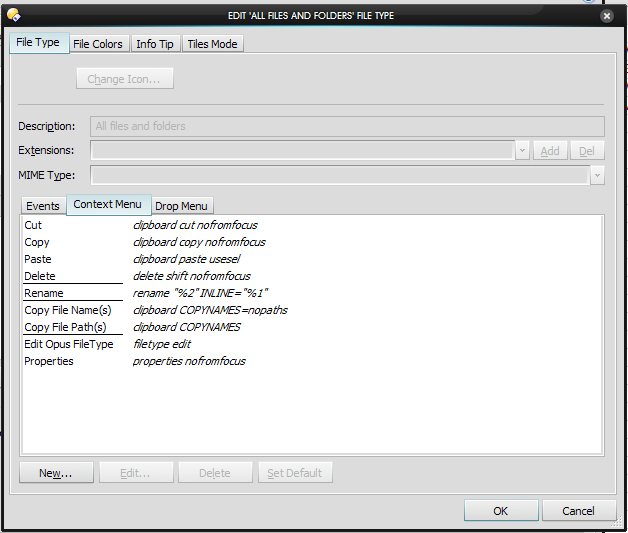
go to the file types editor, and choose All Files and Folders. then go to the Context Menu tab, and add these commands as i have set them up below.
now, you can right-click on any file or folder (or several at once) and copy that info to the clipboard.
if you prefer to use a toolbar button, just use the same commands, but in a new button instead 
How do you get to the "file types editor"?
Nevermind, I found it: Settings --> File Types...