I have this regular expression that removes 5 chars from the whole file name
Rename TYPE=files REGEXP PATTERN "(.+).(.*)#5" TO "\1\2" AUTORENAME
I am looking for a way to combine this with the Copy command, so that the effect of the button will be to copy all selected files (with 5 chars removed) to the destination lister.
I don't think there is a good way to do this unless the task can be done using simple * wildcards.
(In this case I think that'd require the 5 chars you want to remove from the end to be known in advance. Or there could be multiple 5 char extensions to remove, but you'd have to have a list of them known in advance.)
This is because the Copy/Move command can rename files using simple wildcards but doesn't support regular expressions or any of the more complex features of the Rename command.
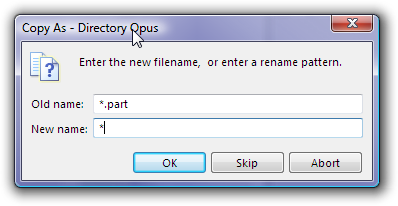
If it's not something you're going to do a lot then you don't need to create a custom button to do it, either. Just right-click the Copy button on the default toolbar and type *.part as the old name and * as the new name:
Something like this might get you started on doing that.
Copy
Select SOURCETODEST
dopusrt /cmd Set STATE=Dest FOCUS=Toggle
dopusrt /cmd Rename FROM * TO "New Name *" AUTORENAME
The above example button code only prepends "New Name" to the original file names that are copied which is essentially worthless as a practical renaming example. So you'd need to modify the last line to rename the destination files as you wish. I'm also assuming you wouldn't have anything selected in the destination lister beforehand. If it's possible you might have destination files preselected, then you'd want to add more commands to deselect destination files before copying.