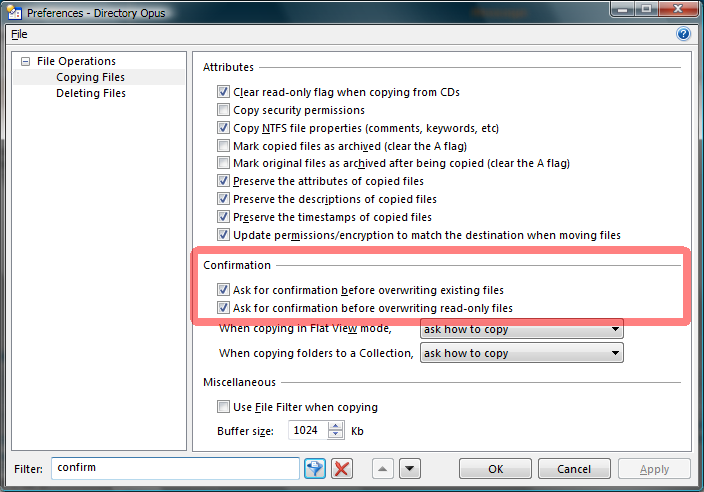
I use the copy and move buttons constantly. Somewhere, I screwed with the confirmation process, so that now it just "does it", with no user verification.
Is there a way to have it just ask once, when I've selected all the files/folders to be copied or moved "Are you sure?" before executing?
It's fast as heck this way, but it's got me real nervous...
Regards,
Try filtering preferences for "confirm".
Other than that you can edit your Copy and Move buttons and add the following code:
@confirm Do you really want to do what you just told me to do?|Yes|No
<Your Copy or Move command here>
[quote="kenalcock"]Other than that you can edit your Copy and Move buttons and add the following code:
@confirm Do you really want to do what you just told me to do?|Yes|No
<Your Copy or Move command here>
[/quote]
That would sure work. But I don't see where to edit the code for a button.
?
Regards,
Leo
June 3, 2009, 6:50pm
5
See Toolbars 1 (video tutorial) , currently at the top of the tutorials forum.
Settings -> Customize .
Then (with the customize dialog open), click the Copy button.
Right click Copy File in the resulting dropdown.
Click Edit in the resulting context menu.
[quote="rcoleman1943"][quote="CWBillow"]
[/quote]
Settings -> Customize .
Then (with the customize dialog open), click the Copy button.
Right click Copy File in the resulting dropdown.
Click Edit in the resulting context menu.[/quote]
Bob:
Got that done -- works GREAT. Thanks.
Now, is there a way to build in a "write over existing file only if existing copy is older"?
I guess I'm wanting to biuild the copy filter into a button...
Chuck