My problem was that the connection of the Computer with the smartphone has only write access to the internal memory, but not to the SD card (known Android limitation. After a long search I finally found a way. I installed the program Mixplorer on my smartphone and then set up the FTP accesses there and in Directory Oplus. At first I was lucky and it looked like everything would work. In the left lister I had the internal memory of the smartphone and in the right lister the SD card. I started copying various data from the internal memory of the phone to the SD card via Directory Opus, which also worked for a while. Then it broke down with a mistake. In Directory Opus I can still see the documents that were copied on the SD card. In Directory Opus I can see and read the documents that were copied to the SD card. On the other hand, if I search these documents on my smartphone, there is nothing to find. It is as if they had been written with another file system on the SD card. In addition, Directory Opus now crashes as soon as I tried to access the same FTP connection with both listers. Does anyone have experience with it and can give me a tip how the whole thing works reasonably, so that I can really read the documents on the smartphone after the copying process and that one FTP access is displayed on both listers?
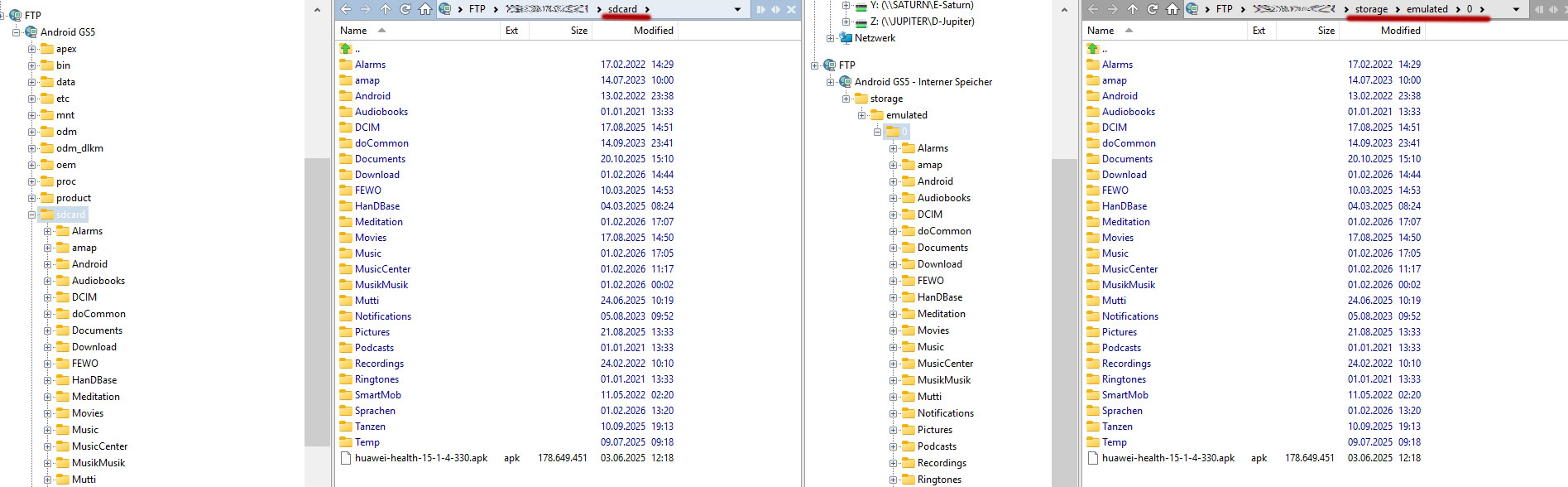
To make things worse: In my next attempts Dopus didn´t crash. But the internal memory and the SD-Card are showing the same content now, which is not the case, see screeshot. FTP adress is the same, of course.
Re the crash, please submit crash logs (there should be an option to do so in the Help menu).
For the files not appearing on the phone, have you tried the same test in any other FTP software to see if that problem is specific to Opus?
For example, some phones/apps won't notice new files copied to them without something telling them to index them (which would be up to whatever is writing the files on the phone side).
Hi Leo, thanks for your answer. Unfortunately, I have not found any minidump files on my computer. I have searched with everything. I can not create a new crash, because now I can create the FTP connection in both listers without crash. The error with the wrong display of the content, according to my screenshot, however, remains. In the meantime, I have found that Android does not allow you to create your own folders in the root directory of the memory card. Apparently, you can only create files in the files provided by Android, such as music. Beyond that, through all my attempts, the SD card has also been broken. I can still read the data, but when I connect the SD card to my computer i cannot write to the card or format the card. Maybe I just wanted too much. My goal was to move about 30 GB of music from the internal memory of the phone to the SD card. Since such actions under Android are always very fiddly, I came up with the deliberate idea to use Directory Opus. I haven't used any other FTP software.