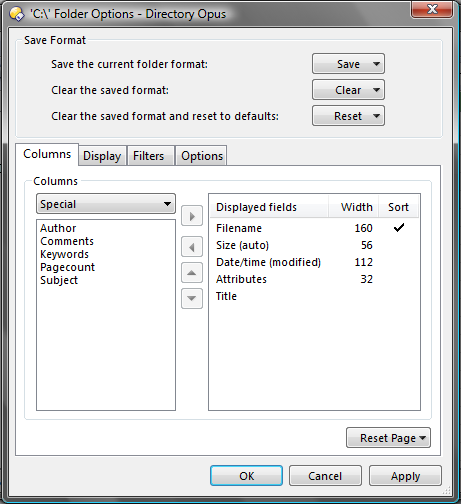
If I choose to display special -> title in details mode, I encounter a crash when switching to details mode despite there are no (visible) files. It happens in variuos directories.
I enclose crash report (sorry, but it's not in english) and a screen from my display settings.
Opus 9.1.1.6 (the newest as far as I know)
Vista Business
Columns in the Special category are generated by shell extensions.
Do you get the same crash if you turn on the same column in Explorer? (There may be multiple Title columns in Explorer; try turning all of them on if so.)
Any idea what may be behind the Title column? If it works in Explorer can you see if you can work out which types of files it shows a title for? By the look of the other columns it's probably MS Office, OpenOffice or PDF documents.
It seems that Directory Opus crashes when there is a subdir in the directory I'm viewing. I created a dir d:\ttt and tried to put there some jpg, txt, exe etc. files but everything was ok. Unless I created there an empty directory d:\ttt\abc.
I'm not using english vista and it's difficult to find column in line with "title". But what I found seemed to work ok (it didn't display nor crash anything).
Ah, I just remembered that, with Vista, Explorer no longer picks up those columns because it dropped support for the old column API and requires shell extensions to use a new one (which very few support so far).
So there won't be a way to add the same column to Explorer...
If you can't work out which component is adding the column then I doubt there is much anyone can do to try and resolve it. Of course, you can avoid the problem by simply not adding that column. Opus has a built-in Title column which shows the titles of some document types and may do what you want instead. (It's in the Documents category.)
So could you tell me how to completely disable/hide "title" column in details view?
The only method I know is to disable this column in current folder view and apply settings to all subfolders. Is there any "more global" method?