Customize Context Menu

Could you give an option for us to choose what this search does:

It opens the windows file explorer search. I would want it to open the Dopus search tool, putting in the selected folder as the target.

The “open in new tab” I don’t need there. Can we customize this context menu? (I have it set to hide third party items - hold shift to override). I would add into the main context menu the Explore with Everything, and shorten up the names. Things like that.

You can customize context menus via the File Types dialog.

That’s going to be difficult, when “all files” and “all folders” is going to override the property handlers. ? I will have to manually go through every file type and give them their own right click menu, with all their options?

They don't override, they add to. All matching entries are merged to make the final context menu.

1 Like

I can’t find that “Search…” entry anywhere. It’s not in the file types, context menu options, or anywhere.

I got rid of a search context item, but that didn’t remove it.

Search Result

It opens this thing. Is this normal, or is it because of the Media Info app?

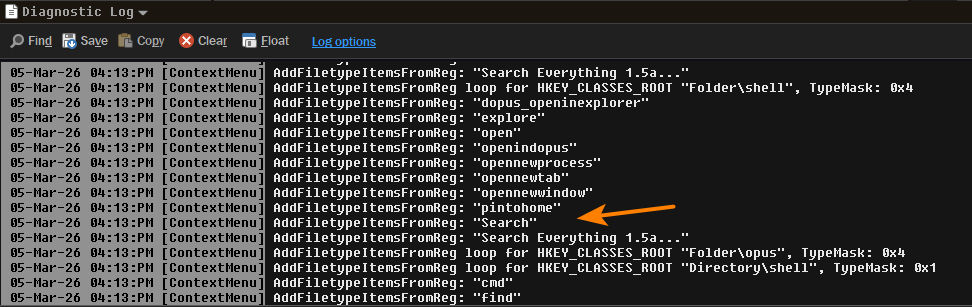
You can use Preferences / Miscellaneous / Advanced: [Troubleshooting] context_menu_debug to track down where context menu commands come from.

The unwanted “Search…” entry appears in the main menu and also the Shift + click extended menu. This is when I didn’t hold shift and clicked. This is the only entry for shift I could see. It’s missing the three dots.
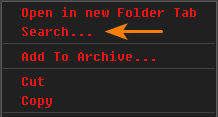

This is one is when holding shift:

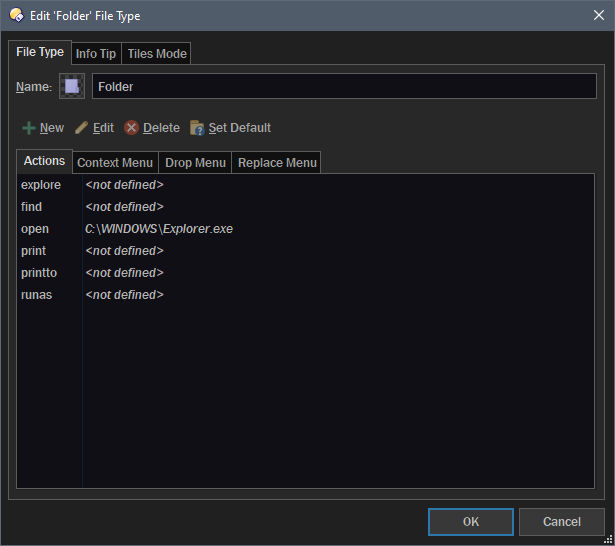
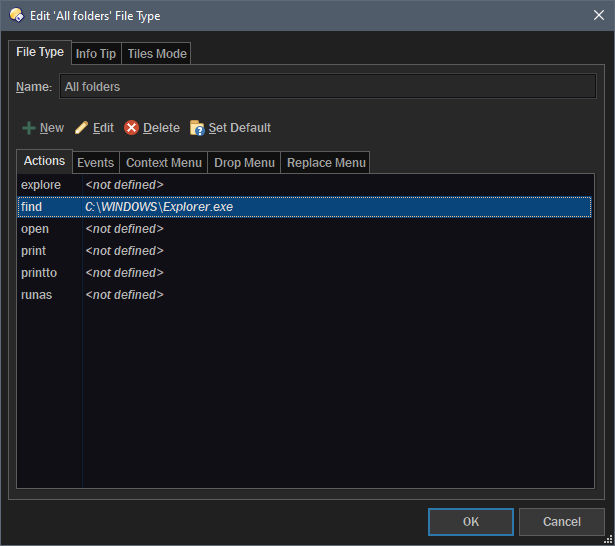
First one should be under Folder, the second one under All folders.

I found it, under the Find tab, not the Context Menu tab.

Is there a command I can put in there that will run the dopus search tool and pass the path?

Sorry that was the wrong pic.