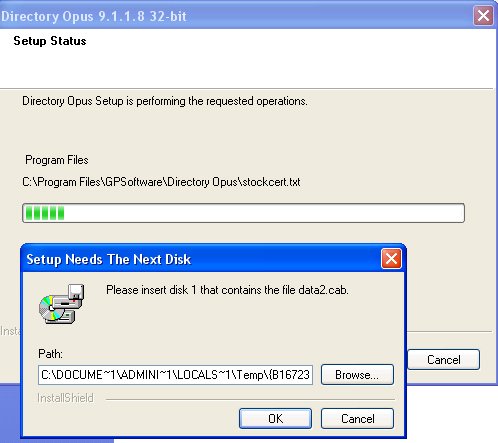
I am having a serious problem. I have downloaded a Dopus.9.1.1.8.x86.exe for several times from more then one URL including the link on the official directory opus site.
Every time i try to instal a application the setup requires
C:\DOCUME~1\ADMINI~1\LOCALS~1\Temp{B6D77CC6-63CC-4FE9-986F-B4FEDA1D1172}\Disk1
data 2.cab
I looked in the temp folder and there is no data2.cab in it.
I tried to search for data 2.cab on net but there is no such file for download.
I have full control privilege over my computer :
System: Microsoft windows XP service pack 2
AMD Athlon(tm)64x2 dual core processor
2.61 Gh 1.00 Gb of RAM
Please help
My provider only allows directory opus access and been trying to install this application almost for a month !
[ul][li]Right-click the installer and choose Properties.
[/li]
[li]On the Digital Signatures tab, click Details.
[/li]
[li]It should say This digital signature is OK.[/li][/ul]
If it doesn't say that then the installer wasn't downloaded properly. That happens sometimes if the connection drops mid-download for some reason.
That service is turned off and set to manual by default afaik. Well, at least, mine is and I've never touched it.
Perhaps an AV program is conflicting with your downloaded install files and they're getting corrupted somehow. Trying downloading it without anything else trying to 'help'.