My description column comments are disappearing from the lister for some unknown reason. This is not happening for all my description comments, but it has happened twice to one particular file. I was working on that file as I normally would, writing, saving, to another drive, etc.
I didn't do anything to delete the description column comment. I'm not sure how that's done.
I would appreciate some feedback as I'd like use that column heavily for several projects, but can't if it's unstable.
If you are re-saving files in other programs to new locations the description you set in Opus won't be copied to the new file since Opus isn't aware of what you're doing and most programs don't know about the descript.ion files that store the descriptions (though a few programs do).
If we're talking about Office documents then you can set a Comment field within the documents themselves, using Office, and have Opus display that field (e.g. instead of the Description column). Since the Comment field is part of Office it will always be carried over if you use Office to save the file to new locations.
(It's the Comment field under the Documents category in Opus. To set the comment in Word you have to open the document properties window or panel. In Word 2007, click the orb at the top-left, then click Prepare and then Properties.)
BTW, Office also saves files by renaming the old one, writing a new file and then deleting the old copy. Because it does that the description set for the file in Opus can be lost because the file it was set on was deleted. I think Opus tries to detect this happening but it doesn't always work. That problem won't affect the Comment field within Office documents since Office itself will keep that updated when it saves a new version of the file.
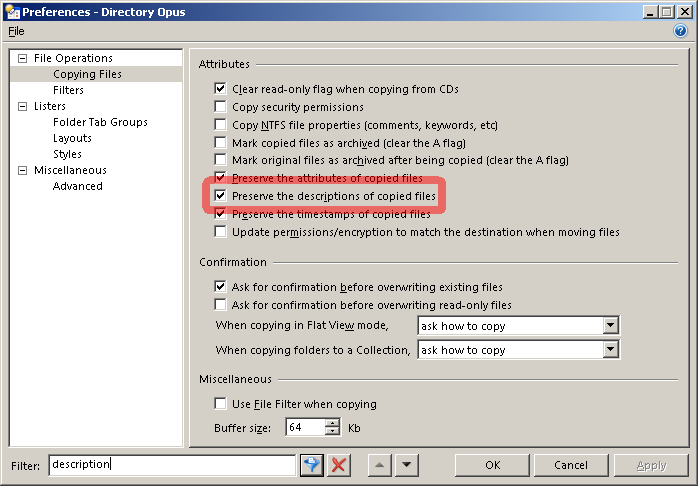
I have the files marked "preserve the descriptions of copied files" under preferences.
However, I just replicated exactly what it did.
I save on drive C, then back up to an external flash, "drive G." Then I press F12 on my keyboard to save again to C and to the exact folder. When I do this the description column is preserved.
However, if I decide I want to copy this file which I just saved to Drive "G" to a New Folder in Drive C (or if I save it accidentally to the wrong folder)--then the description comment disappears.
I have a similar problem, the contents of the "Description" column for folders vanish after being copied elsewhere (I'm not setting descriptions for files, only for folders).
Also I'm not using Office or anything similar that would mess with files, these are just plain folders with archives that aren't really in use in that sense (so it's not like anything is writing new files or anything else there).
I did check my Preferences -> file operations -> file copy is ticked to "keep descriptions in files".
In the end I just manually copied the descript.ion file (had to unhide it first from the preferences) to the target folder and now the descriptions are there. Seems I'll have to do it every time I change the description in the source folder... Maybe the probIem is that I'm copying folders only and not files? I guess I'd best file a bug report / feature request to the guys at GP.
Just to make sure - yes, my preferences are set to preserve the description (although, to be pedantic, in the preferences it says "copied files", doesn't say "folders" explicitly but it should still work).