I have a situation I was hoping you could help me out with. I have a Directory Opus license with 1 USB Export license. At my past job I was able to use this on a corporate workstation without issue. In my current job we have corporate workstations that do not allow USB flashdrives (for security/virus reasons they are blocked at the Windows OS level from loading). However, my machine has an sdcard reader and that can used. It's not connected on the USB chain, it's on the PCI Express chain which I why I can still use it. So I figured if I exported DO to the sdcard then it would work in the corporate workstation, however it does not. The license manager kicks it and reports "the USB device used to export DirOpus can not be found." I guess it's looking for the USB sdcard reader that I used on the other computer but cannot use on this one.
Is there any way to get this to work? I really dislike using windows explorer especially after getting all the benefits of DirOpus for this long. This being a corporate workstation, I don't have elevated rights to install the software directly on the machine. The USB portable was a fantastic solution at my old job. Any suggestions?
Yes, that's a good question. At the company we've had some problems with users introducing viruses via USB drives. Luckily, no ransomware at this point, but I believe that's a primary concern from the IT team. So they've taken the approach to block USB drives as a company policy. So at the company we have a variety of different computer users from typical corporate uses to open/multiuser machines on the manufacturing floor. The virus problems have been stemming from the open machines so it's my feeling that the no USB drive policy got cast a little too wide. I happen to be a remote worker and I'm the only one with access to this machine and I know how to safely screen USB drives for viruses. I was hoping to still be able to use my file manager of choice.
To your last point, I'm not asking support to indirectly bypass a lock, I can already access the SD Card on the machine and IT knows about this, but they believe the risk for SDcards is much smaller than USB. (Carrying around and inserting/removing sdcards is much more difficult compared to USB). I'm interested in whether the DirOpus license can be tied to the sdcard vs the usb device.
Have you checked the formatting of the SDcard? Is it NTFS or FAT32, maybe a linux-like file system? Try to format it to NTFS.
My 2 cents:
At the company i work at there is a similar policy. My USB works, but it shouldnt. I asked IT and they told me if i use "illegal" stuff and they catch it, first they send a notification, nothing else. So im using DOPUS for more than 7 years at the same company because no one sent me a warning about it.
It's a fact that you are not allowed using external drives (it makes no difference if USB stick or SD, and its same risk getting viruses etc.). You can do this on your own risk, but not ask others to help you breaking your office rules.
If you only would have ask for SD-usage, nobody would know about your "activities"!
@tortilladude: You are a hero, but don't cry if it's more than a notification after accidanteley "importing" a virus. Just my 2 cents.
A USB Export version of Opus needs to use something attached to the USB bus, unfortunately.
The "use as a dongle" option while exporting means the exported program itself can be copied to anywhere (e.g. local SSD) and will run as long as the USB device is seen. Whether that works in your scenario depends on if the USB device is completely invisible to the system (won't work) or if it is visible but reading files from it is blocked (should work).
Hi Leo, thanks for the reply. I tried the "use as a dongle" option and could not get it to work. I placed the SDcard in the card reader and ran DirOpus from there with the USB drive stick plugged into a USB port. The device manager on the corporate laptop recognized it in the same way as my personal laptop did and I could see it on the USB-device tree within device manager. So I'm assuming the device is visible but reading files is blocked. Nevertheless, DirOpus just gave the same license error as before.
I gave up on that method and just copied the file structure from my personal laptop (/program files/GPSoftware) to the SDCard, popped it into the computer, and ran DOpus.exe. I was expecting a UAC install prompt, but instead the program ran me through the startup options (replace explorer, FTP, etc). I selected a very conservative install (system native apps handlers) and then inputted my license info and it's working great. Life is much better again.
Thanks again for your feedback Leo, I've been using DirOpus since the Amiga 500 days, so I think I've used this app (albeit in different forms- Amiga Workbench 2 and Windows) longer than any other app.
Hi Jaycan - have you been able to replicate this with v13? I get the certificate error and have had to revert back to v12 despite having paid for the upgrade.
Interesting that you could get Opus to work just by copying the files from the "program files/gpsoftware" location. Opus has numerous files in other locations which I thought would be needed for a portable version to work successfully.
Hi - Dell Precision 5480 with a USB3.0 Dakota card reader plugged into USB-C. I have both v12 and v13.1.1 folders copy/pasted from another computer. v12 works with SD micro in the card reader and with the SD micro in the laptop card slot. v13 gives the error messages attached with both. My mistake about the certificate error mentioned above.
When using Backup & Restore (I have the v13 USB license) it works on the external card reader but not on the internal card reader - the USB bus problem. Copying the v12 C: installation folder from one computer to the SD card (or even to the second C: drive) was the only way I could get Dopus working without having a USB-C stick or worse hanging off the side of my new company laptop. Not sure why that worked for v12 or if it was against the licensing agreement, but it was a lifesaver.
Would be great if the USB license worked for SD micro cards not on the USB bus. For several years I used a mini USB3 stick without any problems, but with new laptops only having USB-C, and no similar mini USB-C stick form factors, the micro SD card becomes a very attractive option for UAC-limited machines with the internal reader.
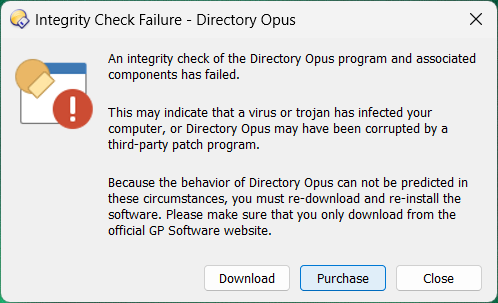
I'm suddenly getting this issue.
Been using it on my work laptop for years and they have always blocked USB drives.
Not sure why it suddenly stopped working, I don't think they've changed anything at work. I can see the drive listed in explorer with a drive letter, I just can't access it. It shows in device manager and has the correct manufacturer and IDs, etc
I tried doing a brand new export and it still doesn't work and even tried doing it to a different USB drive and nothing works anymore. I've been using DOPUS at work for decades, this is a disaster How can I go back to using Windows Explorer now? It's dreadful
So I was able to simply copy the Directory Opus and get it onto my work laptop, register it with my cert and to my surprise that worked. The problem is that I lost all of my config. I thought, no worries, I'll load my exported version up on another PC and export the config. WRONG! The backup/restore option is greyed out in the portable version. What a pain in the arse!
The config can be copied over manually if need be. You just have to copy the folders on the USB stick to /dopusdata or /dopuslocaldata, matching what's already there.
(Enter those aliases into Opus's path field to be taken to the locations. But then do the copy using File Explorer or another tool, with Opus exited via File > Exit Directory Opus.)
Thanks. I found an old post and tried copying to C:\Users\me\AppData\Roaming\GPSoftware\Directory Opus, but it didn't work, but it did work when copying to C:\ProgramData\GPSoftware\Directory Opus. Got all my file location history back as well by copying the cache folders to C:\Users\me\AppData\Local\GPSoftware\Directory Opus
Happy days, I can work again Probably not the right way about going about things though. It's annoying that the dongle method stopped working for me after all these years.




 How can I go back to using Windows Explorer now? It's dreadful
 Probably not the right way about going about things though. It's annoying that the dongle method stopped working for me after all these years.