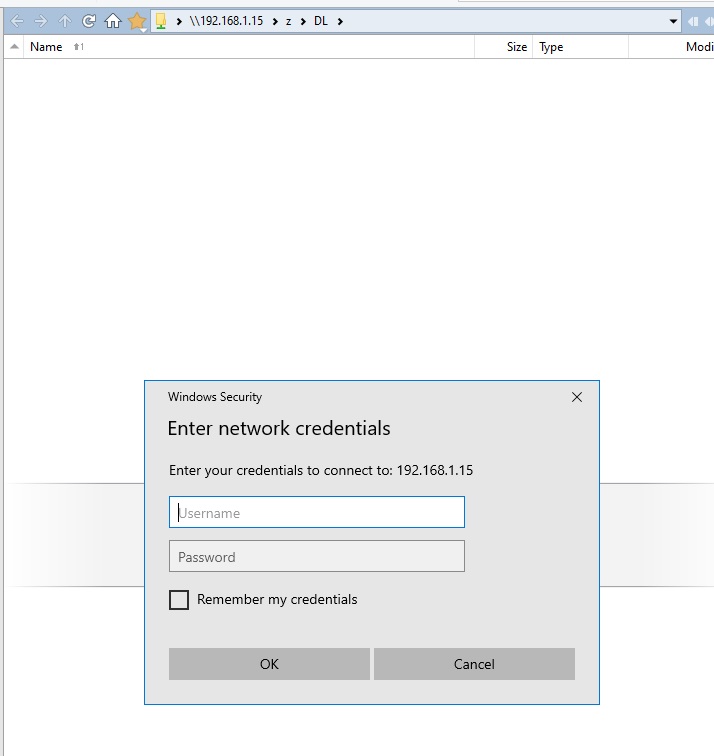
I've seen this before, but following it up this time. I have DO set to automatically reload network share views when I open DO. This one was a share that is no longer available, and when I opened DO I got a pop up shown in the screenshot to enter credentials, with DO being unresponsive other than the pop-up. If I press cancel, after a few seconds DO closes (like it's crashed) and re-opens, back to the pop-up again. If I enter my credentials, DO closes but does not automatically re-open. When I open it manually, I get the pop-up again. Either way, it seems I can't get out of this DO restart loop now.
As I type this I'm wondering how to get out of this... probably have to go back to the PC that had the share and re-enable it.
Yep, re-enabling the share on the other PC worked and DO opened normally. I've closed that share view now!
Edit: just to clarify, the PC at 192.168.1.15 was on during this, it was just the share that had gone (it was my banking information in a Veracrypt file, which I had subsequently unmounted).
Were any crash logs created when it closed & restarted?
You can use Help > Submit Crash Logs from the main menus to see if any exist for submission. (Or the Help CRASHLOGS command if your toolbars don't have the command.)
The exact same thing happened today, when trying to view a different NAS's share which doesn't have a mapped drive. This time the share wasn't already open; I was trying to open it. Entering //NAS2 triggered the same thing to happen with the same popup, and DO spontaneously closing. Doing the same on another PC with DO worked perfectly.
I think there is something amiss with this PC because I'm having odd issues even in Windows Explorer with a refusal to open available shares (I made a previous post here some weeks ago, before realising it was more likely a PC issue and different to what I initially thought it was). It seems I can open a share using the IP address, but not the network name. It's erratic though, sometimes it works with the name.
Perhaps DO shouldn't crash like this regardless though - but who knows what Windows is up to, to cause it.
I tried manually making an entry in Windows Credentials for NAS2, and then DO opened it properly when I entered //NAS2 into the address bar.
If you want me to do any testing I'm more than happy to, but if you've never seen this happen with DO before then maybe I've just got some unusual local issue, and I'll just have to figure it out, or reinstall Windows if I have to since I've not been able to determine a cause so far.
Edit just to add, the thing about using the IP address instead of the network name works in DO as well as explorer. That is reliable, whearas using the share name isn't. Sometimes entering the share name will show the shares available, but then say they are not available when clicked on. Using the IP address just works as expected.
There was a bug in the OS itself involving those credentials dialogs crashing processes that displayed them, but it was fixed in a Windows update a few years ago.
management summary: Regardless of DO crashing out, I think I have a very odd issue on this PC rather than it being a DO issue, so probably best not to waste your time on this. I noticed on another PC with DO, I had a share no longer available when I opened DO but did not get the popup or anything untoward.
I wasn't completely up to date, although all the PCs here are in an identical state (but only this one shows the issue). I've done a full offline update on them all (which, joy of joys, now makes me confirm every RDP connection every time (like 20 times a day) - thank you Microsoft!)
Also did an SFC which did find and fix something.
It's made no difference to the issue (I mean the popup and DO closing itself), which is still happening if I try to browse the share by entering //viper (the PC I most often want the shares on) or by clicking viper on the network browse list.
Oddly, some shares on other PCs work, doing it exactly the same way. I've checked DNS, WINS settings, I can nslookup my PC names without fail. RDP works flawlessly as does everything else. It's the fact that it sometimes works, but more often doesn't, that is most puzzling.
I have noticed that if I enter the ip address or //viper.foxy (my local domain everything has always been configured with) it works every time... so far. (Watch it fail as soon as I finish typing this )
I've never needed to do that before though, and don't need to for other PCs from this one. Just viper, and it seems NAS2.
If I wasn't so curious to know what's going wrong I would just wipe and reinstall.
Turned out there was something wrong with the PC I was trying to connect to. No idea what could have caused the weirdness (and only from just one other PC to that one), but I discovered something else wrong on it while trying to check that Microsoft's latest BIOS certificate was installed. Something had killed the 'Windows Device Security' programs; they seemed to not even exist. Online and out-of-band malware scans came up clean, no firewall activity was unusual and I'm a tad paranoid about PC security so would usually notice the slightest thing out of place. There has been nothing. Anyway, the only way to fix that was a full reinstall, per MS.
Now it all works normally again and it was nothing to do with DO, other than it crashing alerting me to something wrong.
 )
)