DOP how to find

I know we have been here before but I have not been able to find my groupy.dop Lister. It shows up when I right-click on my desktop, Lister Layout. So I do a search of my entire C drive and nothing comes up. When I go to my C:\Users\ameri\AppData\Roaming\GPSoftware\Directory Opus\Layouts\System it's not there nor any of my dop's. I have many dop's in this directory: C:\Users\ameri\AppData\Roaming\GPSoftware\Directory Opus\Layouts. Does the "oll" have anything to do with it.
In my Layouts & Style & Layouts. I see them listed. But I cannot search and find them on my C drive. Is there a way that I can designate the directory that I have them in using Layouts & Style/ Layouts .

Bob

*.dop files are for toolbars and stored in /dopusdata/Buttons/.

Layouts files *.oll are stored in /dopusdata/Layouts/.

Look in

C:\Users\ameri\AppData\Roaming\GPSoftware\Directory Opus\Buttons

Thank you. I see some dop files but not one of the DOP’s listed when I right click the desktop.
Bob

It now seems to me that the BOP is actually embedded in a different extension. Well, I'll go over your suggestions it will take a bit I’m slow reader><
Thanks
Bob
Amerifac
www.home2000.com

I did a search on /dopusdata/Layouts/ and found nothing.
Bob

Did you type /dopusdata/Layouts/ in the adressbar and hit the enter key? And what are you searching and why?

I was trying to figure out how I can use the term /dopusdata/Layouts/. But I think I have figured out part of my problem. Some how I have to import the .dop files. I just don't know how.

Read the docs on Aliases.

To import the .dop files, simply place them into

/buttons

and they will be immediately available here:

So far here is what I found.
C:\Users\ameri\AppData\Roaming\GPSoftware\Directory Opus\Layouts\

This directory had the following:

Directory: System

Files: ax-Belt-CHK.dop, order.xml, and Test from bob.

C:\Users\ameri\AppData\Roaming\GPSoftware\Directory Opus\Layouts\System
Files: ax-Belt-CHK.dop & default.oll,

When I go into Preferences\ Layouts and Styles\Layouts there is only one listed. I see "Test from bob", nothing else.

No surprise. The two ax-Belt-CHK.dop don't belong there. Move them to /buttons as explained above. Rename as needed.

C:\Users\ameri\AppData\Roaming\GPSoftware\Directory Opus\Buttons

That folder has a dop in it but does not show up in the Preferences-Layouts and Styles-Layouts

Not that I want to give up but will play install a Opus that can use the layouts.dop. And then upgraded to 13. It would be a horrible time consuming mission for me, but I don't want to give up

Are you confusing Layouts and Toolbars?

I don't think so. Back in 12 when I created a new lister what all the settings I wanted to be available to me and say that it would have a .dop extension
Bob

Did any of the 13 version have been import in its Preferences-Layouts and Styles-Layouts and then was removed. Because my version does not have an important.
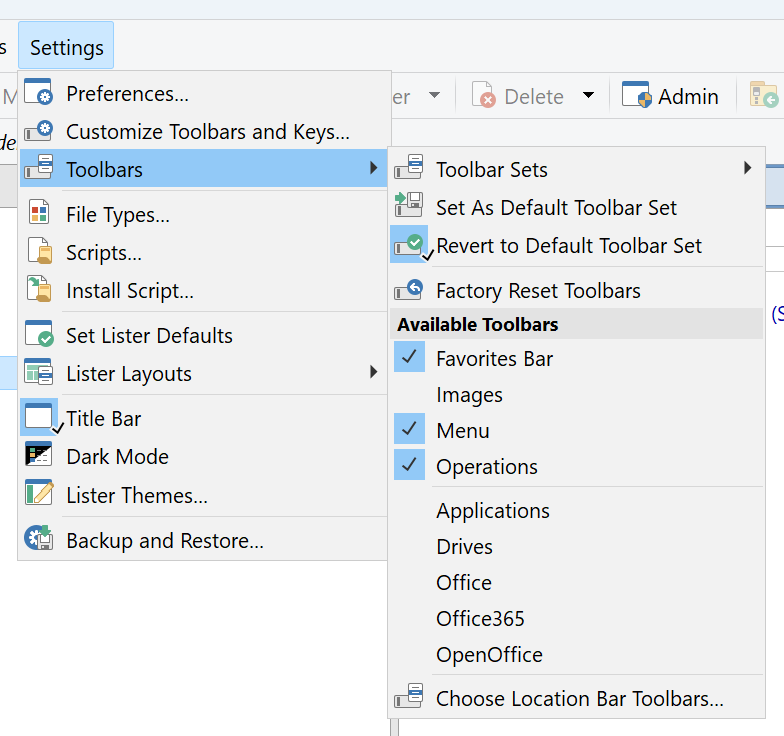
WOW! Setting-toolbar and there it is. But still, it does not show up in the Preferences-Layouts and Styles-Layouts.
Bob

Layouts, Styles, and Toolbars are three different things.

Opus organizes them like this:

Feature Extension Directory
Layouts .oll /dopusdata\Layouts
Styles .osy /dopusdata\ListerStyles
Toolbars .dop /dopusdata\Buttons
/buttons

Took me a few years, but I got it. Thanks to you.