Also would point out that the early versions of Windows didn't even have UAC. I think Linux had similar from the beginning.
It's just that the business world settled on using PCs, so Microsoft came along for the ride. If they had gone with Amiga, for instance (fat chance of doing that with something they thought was a toy), things would be different.
I really don't get this having to sudo to power down. I don't see it with Mint.
And I'm not going to do format C:\ just to see if it works or not, unless I am about to reinstall any way.
Also, I have no issues with marking files hidden. Nemo, the file manager, has the option to show all hidden files/folders, just like Windows Explorer.
I can! My car is near it's 40th birthday. o)
When doing software for this group of users, yes, otherwise no. You also don't expect Photoshop users to only use MS Paint, just because most of the people think MS Paint is complex enough, right? o)
I will not bend down! o) Instead I will teach the Linux guys some new tricks! o) I put together a little tool recently e.g., which can list "Previous Versions" of files and folders when using BTRFS snapshots. Just like we have on Windows if you open "Properties" on a file and "NTFS Shadow Copies" are enabled on that drive. For some reason, nothing like this does exist yet on Linux. If the Linux guys don't look over their fence, I just throw the missing features over to their side! hehe.. o)
Great. Amazing that it works for so long.
You also don't expect Photoshop users to only use MS Paint, just because most of the people think MS Paint is complex enough, right? o)
Yes, you are right. Good point.
which can list "Previous Versions" of files and folders when using BTRFS snapshots. Just like we have on Windows if you open "Properties" on a file and "NTFS Shadow Copies" are enabled on that drive
Sounds like a cool idea. Hope your program will take traction.
It's just "learn and repair yourself" mentality. Most cars don't die because the engine gives up. And even if that happens, you can swap an engine yourself if you want it. You just need to do to it! o)
Maintaining older cars is actually easy, it's best to have "some" of them around, so you learn how things work for that era and brand and you always have spare parts at hand. I basically drive the same car for 28 years. You know every bit and bolt after these years. I recently swapped half the ignition on the road, I already had necessary spare parts in the trunk, because you are what? Prepared! o)
Mhh, maybe it will.. o) Most users don't know this feature. To change this, let me give everyone a picture of what I am talking about..
This is the "Previous Versions" tab on of the "Properties" dialog of a file on a Windows computer with File-History / ShadowCopies enabled and scheduled on a regular D:\ drive. The screenshot is from a Windows Server 2008 R2, so this is ~20 years old technology already, nothing fancy, but Linux managed to overlook this as well of course. o)
You can also click "Properties" on the older version of the file in the "Previous Versions" tab and get another "Properties" dialog, where you can see the path to the history of your file system. This file system with that unusual path can be browsed in DO or Explorer just fine. I like that feature of Windows and it saved my butt in the past, after you decided to delete / edit / change the wrong things.
This is no plug-in replacement for a more serious backup of course, but getting some files back without booting the backup server, attaching external disks or digging the archive is quite handy now and then. It also gives peace of mind. You know that if you screw up, you probably have necessary bits back within some seconds.
You also can restore full folders of course, not just single files.
Now, spread the word! o)
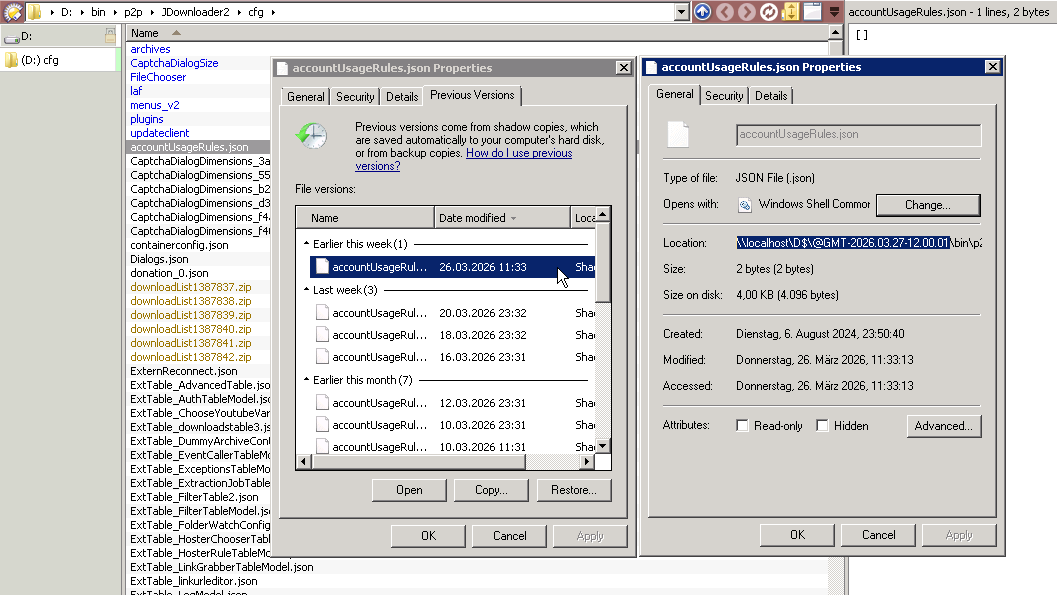
It's just "learn and repair yourself" mentality.
Yes, I like this approach. For now, I only repair my own bicycle. Car will be the next step 
I have been using Dopus for so long that I can't imagine computing without it. Microsoft is doing its best to drive me off the platform. I had an old laptop I stopped using years ago so I used it to give Linux Mint a try. I really like it, but without Dopus, I couldn't get excited. Then I installed the Bottles app, and Dopus didn't work very well at all. Next I tried Winboat and wonder of wonders, it worked! It's not as easy to run on a VM as on a regular Windows environment, but until the good folks at Dopus write the program for Linux, it will do just fine. The only fly in the ointment is not having Dopus startup with my computer and reside in my system tray. Here is a You Tube video that explains why I'm abandoning Windows. https://youtu.be/Y4WVnvW8dk0?si=IUTRI4tUO4JULQy5
1 Like
Give them a chance, they are trying to readjust, message from March 20, 2026:
Our commitment to Windows quality
Well, I need the feature to resize the taskbar rather than reposition it, but this is a good sign.
Regards
Guido
1 Like
If I can move my taskbar to a secondary monitor again, I'll remove one needle from the voodoo doll.
3 Likes
@Leo
Ja Mahn. ...( Jamacia ) !
Sorry Leo,
Pins and voodoo dolls are as much a of Hollywood Myth as Crocodile Dundee.
Not Christian but it is more a message of healing.
At least that's my understanding of it. 
While Microsoft appears to be sensitive to a rising dissatisfaction with Windows, it only makes changes when it affects their bottom line - and that is the Wall Street investors. It has nothing to do with service, as with most listed companies. Spin and marketing create the allusion of greatness over substance.
The cracks in the US system have spread apart to reveal that the world is not as secure behind the republic as the economists and politicians believed (or would have us believe). For me, the issue is bigger that the choice of an operating system. Rome is rotten when big-tech billionaires can influence the core piece in the world economic model, more than the elected leaders of the world.
The development of the Personal Computer over my adult lifetime has transformed the way I learn and work. Windows development from DOS to Windows 3.1 and onto Windows 11 has generally made computing easier, and it continued to evolve beyond the hysterical cries of people who bemoaned any change. User choice allowed us to side-step many of the unhelpful changes. Legal battles attempted to preserve competition and avoid monopolies. The endless fan battles between Windows and Apple, were peppered with reminders that LINUX was still an evolving open-source alternative for those that like to tinker, or free themselves from the commercial treadmill. And let's not forget the long-fought battles to stop subscription software dripping the money from our credit cards with minimal feature changes or development. During the last few years, we have witnessed software subscription price increases well above inflation. Software companies have programmed advertising, data harvesting, and habit monitoring into their software. The advancement of cloud technology has come at cost of privacy and security. The so-called bastion of freedom of speech and individualism has crumbled into the predicted or prophetic Orwellian nightmare. The devices and operating systems on our desks, in our TVs, and in our phones, now threaten to contain us, rather than liberate us to express ideas, protest against injustices, expose the holes in political systems or debate ethics.
It feels like Windows, and the mega computing companies have crossed over a line, and it is difficult to see how they can step back and expect users to trust them.
So, I have decided to act and move out of the Microsoft ecosystem and remove my data from the cloud. Linux is my pathway, and so far, I have been surprised by how many paid Windows based software programs can be replaced with open-sourced LINUX programs. My license Davinci Resolve Pro Video editing software works.
After my QNAP NAS hardware began to fail, I found that an existing I7 PC that Microsoft insists is too old for Windows, can easily run a LINUX based server with excellent security features. My current multimedia PC can run LINUX with virtualisation (and direct hardware access) to continue to use those Windows programs that I own. However, the more I research the more I realise that I can find the same functionality within LINUX alternatives. There is a learning curve but knowledge from those days of DOS and terminals is still in my brain. It is fun as well!
I am mindful that this is a DOPUS forum. DOPUS is one of those Windows programs that I value and would try and continue to use within LINUX. MindManager is another program that is Windows based. However, as MindManager has changed ownership several time, it has succumbed to the subscription model, shifted to a cloud centric model, and has abandoned its loyal user base. LINUX has a well-featured alternative mind mapping program. Three developers are behind DOPUS, and age makes us all weary. I expect moving from its origins to Windows was a significant decision achieved in a more youthful time. Transforming DOPUS into a LINUX program will surely require youthful enthusiasm, overcoming the resistance to change, and the promises of a peaceful retirement. Then again, successful developers never retire. They put their billions into foundations and become the icons of the modern world. 
1 Like
@Leo
Did you try "WindHawk" already? It has a plugin which seems to address your problem.
I discovered "WindHawk" some time ago, spent some hours with it and now the Win11 taskbar is kind of useful again and does not look like a toy anymore. I have a dozen "WindHawk" plugins activated and customized, the "Win11 Taskbar Styler" is probably one of the more important ones.
This screenshot shows my Win11 "custom styled" taskbar with "WindHawk" on my laptop. At the bottom is the Win10 taskbar of my desktop (which shoes these weird blue underlines for every button, how annoying). The Win10 taskbar gained lots of functionality by using "Win7TaskbarTweaker", but this tool is not suitable / functional for Win11 anymore, but "WindHawk" allows to get most of the features back on Win11.
The "Tray-Icon Clock Customizer" is another recommended plugin of "WindHawk", it allows to show network IO on the taskbar. I use it as a replacement for "NetSpeedMonitor", which added a widget to the taskbar on Win10, but Win11 does not have "widgets", so it does not work either anymore.. o(. The "clock hack" is something I can live with, what I cannot live with is, sitting in front of the computer and not knowing whether a download / update / copy progress is still going on in the background or not or if it even started.
Without "WindHawk", I would not consider to use Win11, the OEM taskbar is nothing but a bad joke.

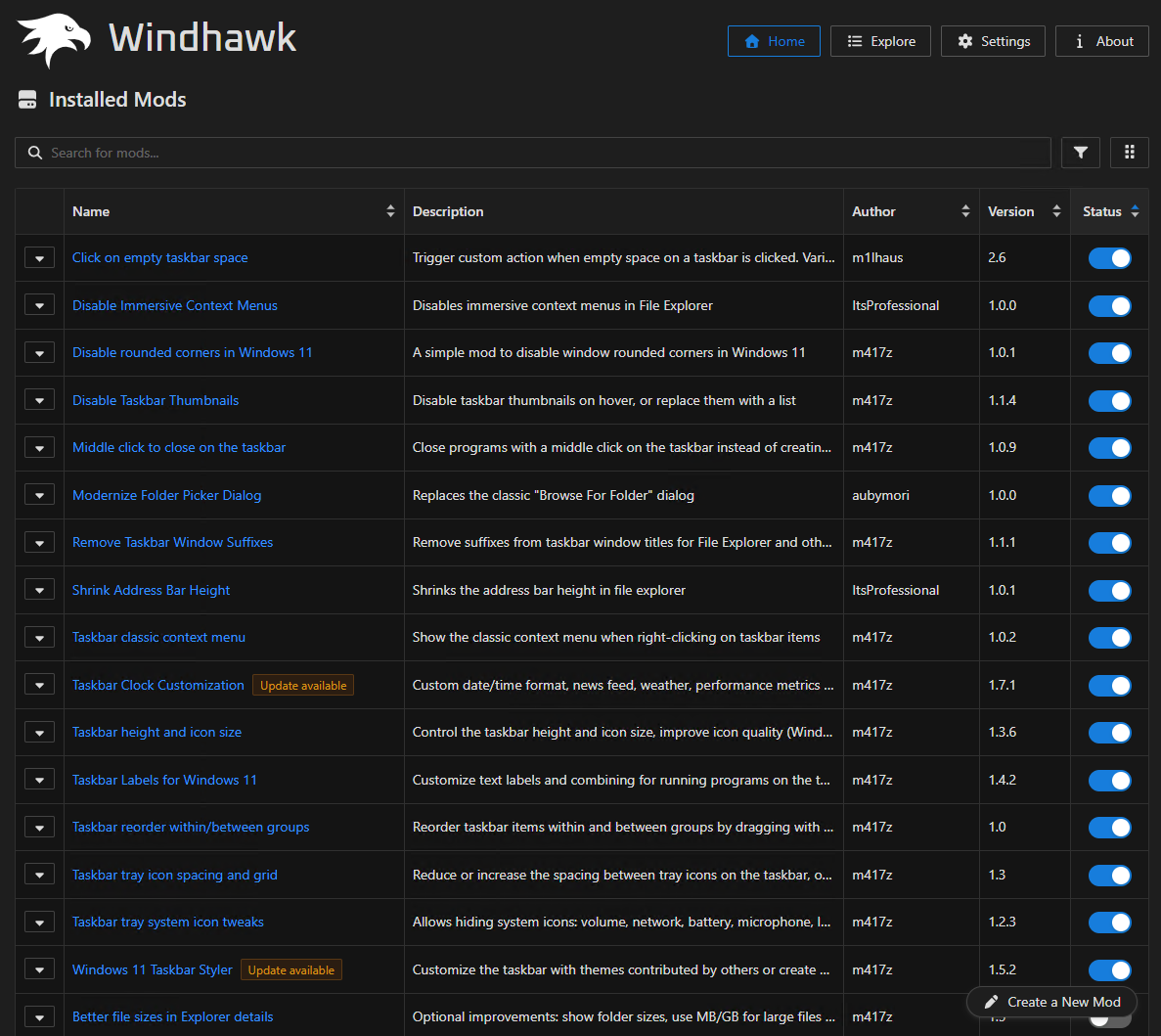
These are the plugins I have activated.. all of this should be possible with the default operating system, unfortunately it's not.. o(
How easy it is to recognize the active application on my custom Win11 taskbar! o) Look at how difficult it is to find the active window on the Win10 taskbar at the bottom, what a pain all these years! o)
EDIT: If anybody is interested in the taskbar style config, I can extract the necessary bits and pieces. For some reason, there is no complete export / import of plugins and settings in WindHawk yet, you can only copy/paste configuration JSON data for each plugin individually, would mean to copy/paste 12 different text snippets.
I could also upload my WindHawk folder somewhere, but it is over 1GB in size, because there is a complete development environment, cache, VS-Code, Electron and whatnot in there. Horribly bloated somehow, but I take it, if it's the only option to make Win11 "work".
Yes, this is a shame. Microsoft did it right in Windows XP and 7. They didn't need to do anything. They could just concentrate on bringing money to shareholders
On another matter, why are there always some ideological battles when choosing an OS? It is just a tool. It must help you achieve the task that you want. I feel we overthink it too much.
Another issue of something coming up that will drive folks to Linux: OS level age verification. Already have seen a distro that prohibits its use in California, because of its recent, complicated age verification law.
https://x.com/midnightbsd/status/2027101491211718765
I'm not sure if it was mentioned, as I only caught the tail end of it, but regarding the taskbar annoyance: there's only one real reason it has ever been like that, and that's because of their Surface laptops, which they always saw as being touch-driven. Messing around with that is just opening a cascade of complaints from the people they fear the most, which are computer-illiterate people.
I'm at least glad I can align it to the left, I guess.
I think they have been quite transparent and moving towards a more open ecosystem in a lot of ways to my surprise. I never imagined that I could ever run Linux side by side on its own kernel built into Windows, which makes me think that the next Windows is going to be a Linux with clothes on.
And I can't fault them for brining back the PowerToys suite, even if it is a collection of open source apps that they stole from github. That has got so much useful stuff. I would definitely be on Linux by now if I didn't have that customization available; it would make no sense.
I had a some issue getting Windows activated on an older PC a while ago and I used MAS to get around it. And every other activation I have ever needed for MS software. I find it ironic that they haven't taken it down from github.
1 Like
The interesting thing is that this activation script is written entirely in BAT script. ~10 thousand lines of BAT code. It is madness.
But as far as I know, it is indeed the best way to activate Windows in a way that is not particularly legal.
I never imagined that I could ever run Linux side by side on its own kernel built into Windows
Just in case, WSL2 is just a Hyper-V virtual machine with fancy integration. WSL1 was indeed close to what you said, but it is deprecated, even though Microsoft will still keep it working without new feature development.
However, Microsoft does embrace Linux. Basically, all their paid products support Linux. Also, surprisingly, Microsoft has been one of the biggest contributors to the Linux Kernel for a long time already.
1 Like
You know, I never really looked into it. I just assumed that they were going to fully integrate it it was moving in that direction from WSL1. So now I don't really see the point, if it's just a hypervisor layer.They made such grand claims that it was essentially bare metal. I wonder what the pressure was. Because HyperV has always been shaky as hell.
It's essentially a poor Kubernetes then?
Is there any benefit to it over Docker for Windows or Kubernetes?
Yeah, well, I mean, why wouldn't you be when you get all your development done for free by internet randos?
GitHub was probably their most sneaky acquisition ever. For a long time, people were praising them for keeping it open source, and I was like, isn't it clear why it's open source? Free dev
Oh and also DOS vs Linux? I rest my case. You really have to applaud them for it I think. Because there were two directions they could have gone at Vista, and I'm glad they went this one.