Up to version 13.16 Thumbnails of files and folders were always loading quickly and reliably. I have recently updated dopus to the latest version and now half of my video and folder thumbnails get stuck loading and they also load very slowly. I tried every version after 13.16 and they have all this issue for me. Even pressing refresh does not fix the stuck thumbnails. As soon as i downgrade back to version 13.16 everything is loading fast and smooth again.
I have the same problem, something has definitely changed or even bugged. Because i don't see any speed improvements, but i do see that it struggles to create new thumbnails from time to time and permanently stuck on some images even if you hit refresh many times or clean cache.
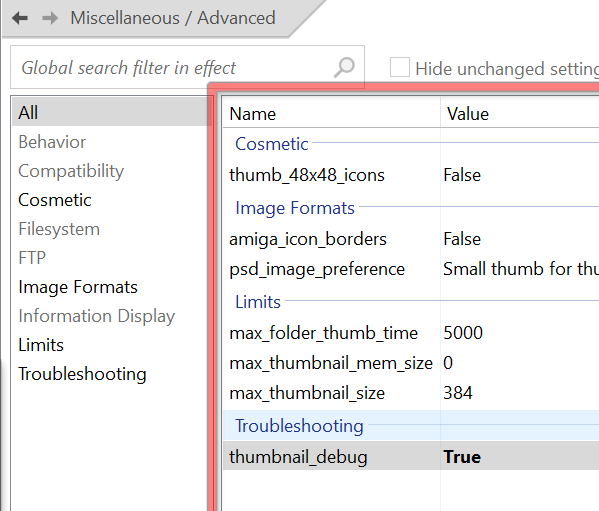
Turn it on and run either of these tools to see the output:
Once finished, turn it off again, and delete the tools if you no longer need them. (They don't need to be installed/uninstalled.)
I looked inside and files without thumbnails are just not in this log. Funny enough - if you make a copy of these files - they will get new thumbnails and log records.
What happens when you refresh the folder?
If you still see nothing, use File > Exit Directory Opus, then restart it and see if the thumbnails become unstuck (or at least generate something in the log).
After using the Exit command they finally showed up (log also looks normal, like every other file) and now i can't get them to stuck again, even if i clear the cache or exit. They have been like this for a week and i go into that folder quite often to notice this.
In version 13.16 and lower i had the occasional video thumbnail stuck and a refresh would fix them. After 13.16 even a refresh does not fix them. It is folders that get stuck the most. Folders that are supposed to just load the Folder.jpg file get often stuck too. Reloading dopus does not fix them either. When i restart my computer they will work again and then get stuck at random.
When you have one or more thumbnails stuck like this, could you please make a process snapshot and send it to us? Hopefully we'll be able to see what's going on.
I also had the same problem: if I entered a folder and immediately exited, Dopus took about 3 seconds to display thumbnails, and some folders failed to display thumbnails, only the standard Windows 11 folder icons. Refreshing and restarting didn't work, only exiting Dopus and reopening it fixed the thumbnail issue.
Oddly enough, this issue only occurred on my main computer, while my old computer didn't have the thumbnail issue. On my old computer, I only used Windows 11, Kaspersky, and Dopus, and I left Dopus settings as they were without any changes.
That's why last week I decided to install Windows 11 from scratch on my main computer, and the thumbnail issue was resolved.
My initial guess was icaros, since the thumbnail problem on my main computer started happening after uninstalling icaros, but this is just a guess.
Same issue here as already mentioned elsewhere (first, second, third).
I didn't know what to do about it, so I waited for additional reports by others. Here we are.
Thanks for the process snapshot suggestion, Jon.
If it can't be fixed by other mailings I will send my snapshot later.
Maybe the issue doesn't appear on Windows 11?
I have DOpus 13 installed only on Windows 10, the main system and one secondary device.
The issue is worse on the main system.
The other system is also affected, but the stumble starts to appear somewhat later and slightly less intense.
As commonly stated, the issue appeared first in 13.17, everything was fine until 13.16. No noticeable system changes occured during the time.
Regards
Guido
Heh i will not send my PC dumps because i am paranoid, so i guess this bug will not be fixed. 
Maybe someone else, less nervous, has sent you these dumps?
By the way, I noticed that thumbnails are generated very slowly when opening a new folder or if a folder is already open in the background but not used for a long time. Like there is a very noticeable delay (2-3 sec?) and then the thumbs are starting to show up.
I assume you changed something related to caching or thumbnail generation as it can be this slow on my PC... It might also be related to these stuck thumbnails.
While recording video for this thread Remember last position when deleting multiple thumbnails - #8 by Morbid i got stuck thumbnails (files #05 28 29)... in a VirtualBox. You really bugged something. 
Feel free to send the dumps so we can debug it.
Dump sent out to Jon! o)
What is with the other users? Any dumps and logs sent to you (Leo and Jon) already?
Everyone affected please do so! o)
Just a thing that might help what version of windows are you on? could it be a codec thing. It does the same thing to me when looking at photos on one drive sometimes. Also what view are you in? Just enlarged video and noticed that they are PNG files. Not all PNG codec are the same, that could be the issue. Does it happen in any other image formats? In windows 11 you can turn off thumbnails for certain image formats, maybe you accidently did that?
We've made a change in 13.18.8, please give it a try and let us know your results.
Wow, this was a quick response!
I can't believe it, everything works normal again!
Many thanks to Jon & Leo, this solves the issue!
From my post in the related thread:
Can you tell us who would deserve the award? 
Or was it your own idea?
Regards
Guido
@tbone was the only one of you who could be bothered sending a dump file in, so I guess the award goes to him 
Give credit where credit is due.
Kudos to @tbone!
I said "later" above and had planned to wait for 13.19 to check again and bother then...
This was a really annoying bug and great fortune that it's solved now.
Regards
Guido