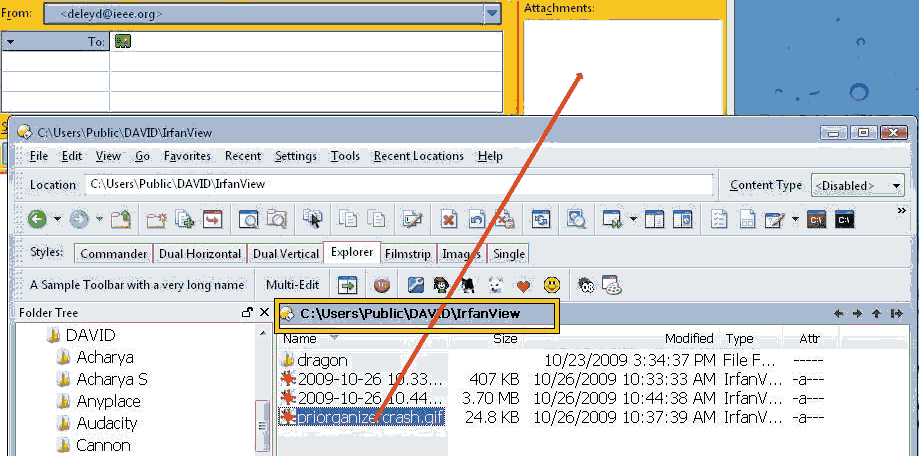
Whenever I drag a file and happen to drag it through the location bar (see attached image), Opus9 hangs for awhile and then recovers. Is there a way I can prevent this?
(other than not dragging the file through the location bar, as that approach only works as long as my memory lasts.)
Perhaps there is an option to whitelist Opus (i don´t know if this is sufficient, though). Or you could test wise deactivate that module or the anti-virus & check out, if the behavior persists.
Try turning off Settings -> Preferences -> Listers -> File Display Border: Enable hot paths in file display border.
(You'll lose the ability to use those paths as breadcrumbs, but that's not so bad when you can use the main toolbar's location field for the same thing.)
Not sure why there is that slow-down for you, though. Dragging over that line should only access, at most, the folders within that line. Whatever's causing it, it should go away with the option above off.
I'd start with the trusty Process Monitor and Process Explorer.
Process Monitor will show which files etc. are being accessed. Process Explorer can show you what the threads for a process are doing and which thread is spending the most CPU time where.
[quote="deleyd"]OK now I have the problem when I drag a file through a button, some buttons it will hang on.
On button that does this has:
LMB GO "\GARY\David\Program Source"
RMB GO \GARY\David\
and computer GARY currently isn't on in my home network. A way to stop that?[/quote]
Opus is only interested in the first command when working out which drag & drop cursor to display so you can add a do-nothing command to the button, like this:
Select *\:
GO "\\GARY\David\Program Source"
Select *: will never select anything, as no valid path would have a \ before a :, so it's a dummy command that should have no effect in any context.
The only thing you'll lose is the ability to drop files on the button to copy/move them to the place the Go command targets. (It's exactly that ability which is causing the problem.)