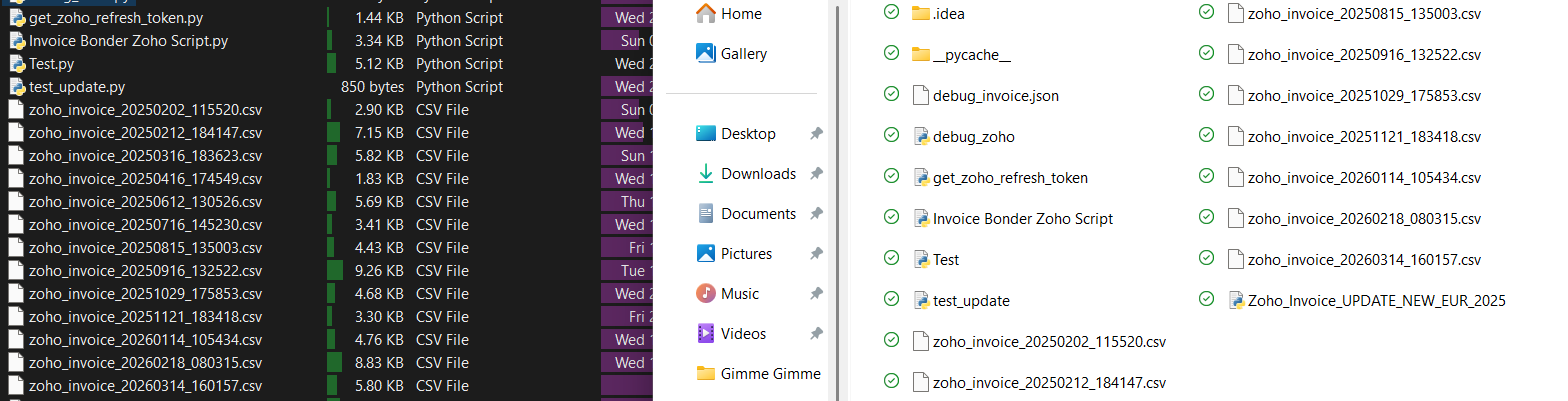
See Explorer vs. Dopus - explorer works but in Dopus it won't show.
Did anything change? I loaded my backup so the settings should have been identical,
but I'm not able to get it to show anymore.
Right-clicking still reveals the Dropbox menu so I know Dropbox works via Dopus it's just the syncing/check icons that won't show anymore.
The status column also doesn't show it correctly - it just shows the green tick at all times for all files, though it definitely used to show on the thumbnail itself before formatting.
If you turn on Preferences / File Display Columns / Options / Display extended sync attributes for cloud folders Opus will try to query for the other sync states, but it's not always that reliable.
I can confirm furthermore, it seems like the overlay icons don't render on Explorer too,
I read that maybe the new Win11 has shifted from overlay icons?
however, in Explorer the status column works while in DOPUS it always shows as synced with the green checkmark even though it's not synced yet.
so seems like only the status column works now, but it's only working for one refresh and then fails to mimic the right status. (sometimes I got it working for 2 refreshes)
now officially from Dropbox:
This has been a switch (that actually Microsoft made) in order to offer better security and tighter OS integration. So Dropbox engineers had to adapt to this specific philosophy and have changed the Dropbox UI locally, meaning the application and how its behaving on this specific part.
Dropbox updated its sync engine to use Microsoft's native API, which is standard for modern cloud storage.
So after you have formatted your PC, the new build was installed and this is why you had that change.
Hope that helps. If there is anything else you need, dont hesitate to reach out.
That explains why I don't see the sync icons overlayed anymore,
but it doesn't explain why the status column won't work correctly, or maybe it does to you?
We need to investigate this further; if Dropbox have changed from using their own proprietary system to the Windows cloud API it could possibly explain why it's no longer working, and will require changes in Opus to compensate.
We've made a change for the next beta which should hopefully identify whether Dropbox is using the Cloud Files API or not. Please let us know if it helps for you once the beta is released (probably in the next few days).