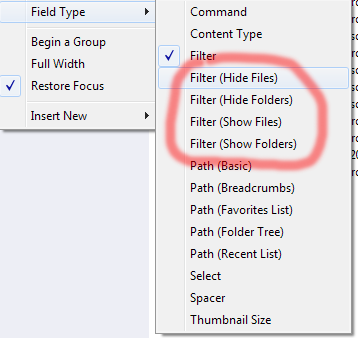
for the more unorganised of us, is there any way to configure dual filter options? For example in a mixed directory full of films... having a show filter that showed all files with "wild" in the title and a hide filter that masked all those titles containing "BBC".
thus narrowing down the search for the target film "into the wilderness", whilst filtering out bbc documentaries that also contain wild. especially helpful, if you are unsure of the exact film title.
Hi Leo, I can't quite figure this out. if I add another Filter by first creating a spacer and then right clicking to change the field type to filter, it mirrors what is entered in the first filter. (I have added arguments: realtime,partial,autocontent )
I can set one filter to hide & the other to show. however, entering data into a second filter clears the contents of the first filter.
If I set the filter type to one of the narrower field types (e.g. Filter (Hide Files), nothing happens.
Use the specific field types like "Filter (Hide Files)" and "Filter (Show Files)" rather than the generic "Filter" type if you want to have multiple different filters on the toolbar at once.
The generic "Filter" field will clear the other filters when you use it, in order to simplify using it in most cases. In this case you don't want that to happen and need to control the different show/hide filters individually, so you need to use the fields specific to each filter.