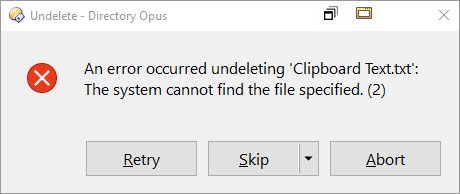
Hi when I try to undo a delete I get the following error message:
'An error occurred undeleting 'New Folder':
The system cannot find the file specified. (2)'
window11, The software version used is 13.16.
I checked the Windows Recycle Bin and found the deleted files there. Restoring them from the Recycle Bin works normally.
Was the folder the files were in also deleted in a separate action? The error message seems to indicate a folder they were deleted from no longer exists.
If not, we need details on the steps to perform to see the same error.
The folder containing the deleted files was not deleted. I have repeated the operation multiple times, using either the keyboard Delete key or right-clicking with the mouse to delete the files. Then, when I use Ctrl+Z to restore the deleted files, an error message appears, similar to the one mentioned earlier. After that, I go to the Recycle Bin in the Windows 11 system and restore the files normally, successfully recovering them. Apart from the operations described above, no additional actions were taken. Could you please let me know what further information I need to provide to you?
Does it still happen if you empty the recycle bin before doing the delete and undelete?
If it does, does it depend on the folder (or type of folder) you are in, or the type of file you deleted?
(In particular, try something that isn't your Documents or a Cloud Storage or Network folder, and a file type that isn't a document type, in case something is sometimes blocking changes to those folders/files.)
I tried clearing the recycle bin first, then deleting the file, and restoring it with Ctrl+Z, but the problem remains the same. Additionally, I have tested this in both the OneDrive folder and a regular folder not on the same drive letter as OneDrive, and the issue is the same.
In my case, it was the result of having norecycle in the button code. I think I was using one of Jinsight's buttons. Not sure if this is the case for the others.