Evaluator Column - Precise Ages

Converting the Column - Age script to evaluator columns as they are much quicker.

These three columns provide Age Modified, Age Created, and Age Accessed in YY:DDD:HH:MM:SS format, respectively.

EDIT: updated based on @lxp's excellent - and brief - code down thread.

AGE MODIFIED:

<?xml version="1.0"?>
<evalcolumn align="0" attrrefresh="yes" autorefresh="yes" customgrouping="no" foldertype="all" header="P-Age [Mod]" keyword="PAgeMod" maxstars="5" namerefresh="no" nocache="no" reversegroups="no" reversesort="no" supportmarkup="no" title="Precise Age - Modified" type="7">secs = Age(modifieddate, &quot;s&quot;);

ss = secs Mod 60                 As &quot;#2&quot;;
mm = secs / 60 Mod 60            As &quot;#2&quot;;
hh = secs / 60 / 60 Mod 24       As &quot;#2&quot;;
dd = secs / 60 / 60 / 24 Mod 365 As &quot;#3&quot;;
yy = secs / 60 / 60 / 24 / 365   As &quot;#2&quot;;

return yy + &quot;:&quot; + dd + &quot;:&quot; + hh + &quot;:&quot; + mm + &quot;:&quot; + ss;</evalcolumn>
Longer version for educational purposes
<?xml version="1.0"?>
<evalcolumn align="2" attrrefresh="no" autorefresh="no" category="date" customgrouping="no" foldertype="all" graphbehind="3" header="Age [Mod - y:d:h:m:s]" keyword="AgeModifiedExact" maxstars="5" namerefresh="no" nocache="no" reversegroups="no" reversesort="no" supportmarkup="no" title="Age [Modified - Exact]" type="0" widthpx="150">if (operation == &quot;sort&quot;)
	return modifieddate; // Enable sorting by generic modifieddate

secs = Abs(DateDiff(&quot;s&quot;, Now(), modifieddate)); // Get difference in seconds between current second and second folder/file was last modified

s = secs Mod 60; 
m = secs / 60 Mod 60;
h = secs / 60 / 60 Mod 24;
d = secs / 60 / 60 / 24 Mod 365;
y = secs / 60 / 60 / 24 / 365;

// SECONDS
if (s == 0) ss = &quot;00&quot;;
elseif (s &lt; 10) ss = &quot;0&quot; + s; // 0 &lt; s &lt; 10
else ss = s; // s &gt; 9

// MINUTES 
if (m == 0) mm = &quot;00&quot;;
elseif (m &lt; 10) mm = &quot;0&quot; + m; // 0 &lt; m &lt; 10
else mm = m; //m &gt; 9

// HOURS
if (h == 0) hh = &quot;00&quot;;
elseif (h &lt; 10) hh = &quot;0&quot; + h; // 0 &lt; h &lt; 10
else hh = h; // h &gt; 9

// DAYS
if (d == 0) dd = &quot;000&quot;;
elseif (d &lt; 10) dd = &quot;00&quot; + d; // 0 &lt; d &lt; 10
elseif (d &lt; 100) dd = &quot;0&quot; + d; // 9 &lt; d &lt; 100
else dd = d; // h &gt; 99

// YEARS
if (y == 0) yy = &quot;00&quot;;
elseif (y &lt; 10)	yy = &quot;0&quot; + y; // 0 &lt; y &lt; 10
else yy = y; // y &gt; 9

return Trim(yy + &quot;:&quot; + dd + &quot;:&quot; + hh + &quot;:&quot; + mm + &quot;:&quot; + ss); // yy:ddd:hh:mm:ss</evalcolumn>

AGE CREATED:

<?xml version="1.0"?>
<evalcolumn align="0" attrrefresh="yes" autorefresh="yes" customgrouping="no" foldertype="all" header="P-Age [Cre]" keyword="PAgeCre" maxstars="5" namerefresh="no" nocache="no" reversegroups="no" reversesort="no" supportmarkup="no" title="Precise Age - Created" type="7">secs = Age(createddate, &quot;s&quot;);

ss = secs Mod 60                 As &quot;#2&quot;;
mm = secs / 60 Mod 60            As &quot;#2&quot;;
hh = secs / 60 / 60 Mod 24       As &quot;#2&quot;;
dd = secs / 60 / 60 / 24 Mod 365 As &quot;#3&quot;;
yy = secs / 60 / 60 / 24 / 365   As &quot;#2&quot;;

return yy + &quot;:&quot; + dd + &quot;:&quot; + hh + &quot;:&quot; + mm + &quot;:&quot; + ss;</evalcolumn>
Longer version for educational purposes
<?xml version="1.0"?>
<evalcolumn align="2" attrrefresh="yes" autorefresh="yes" category="date" customgrouping="no" foldertype="all" header="Age [Cre - y:d:h:m:s]" keyword="AgeCreatedExact" maxstars="5" namerefresh="yes" nocache="no" reversegroups="no" reversesort="no" supportmarkup="no" title="Age [Created - Exact]" type="0">if (operation == &quot;sort&quot;)
	return createddate; // Enable sorting by generic modifieddate

secs = Abs(DateDiff(&quot;s&quot;, Now(), createddate)); // Get difference in seconds between current second and second folder/file was last created

s = secs Mod 60; 
m = secs / 60 Mod 60;
h = secs / 60 / 60 Mod 24;
d = secs / 60 / 60 / 24 Mod 365;
y = secs / 60 / 60 / 24 / 365;

// SECONDS
if (s == 0) ss = &quot;00&quot;;
elseif (s &lt; 10) ss = &quot;0&quot; + s; // 0 &lt; s &lt; 10
else ss = s; // s &gt; 9

// MINUTES 
if (m == 0) mm = &quot;00&quot;;
elseif (m &lt; 10) mm = &quot;0&quot; + m; // 0 &lt; m &lt; 10
else mm = m; //m &gt; 9

// HOURS
if (h == 0) hh = &quot;00&quot;;
elseif (h &lt; 10) hh = &quot;0&quot; + h; // 0 &lt; h &lt; 10
else hh = h; // h &gt; 9

// DAYS
if (d == 0) dd = &quot;000&quot;;
elseif (d &lt; 10) dd = &quot;00&quot; + d; // 0 &lt; d &lt; 10
elseif (d &lt; 100) dd = &quot;0&quot; + d; // 9 &lt; d &lt; 100
else dd = d; // h &gt; 99

// YEARS
if (y == 0) yy = &quot;00&quot;;
elseif (y &lt; 10)	yy = &quot;0&quot; + y; // 0 &lt; y &lt; 10
else yy = y; // y &gt; 9

return Trim(yy + &quot;:&quot; + dd + &quot;:&quot; + hh + &quot;:&quot; + mm + &quot;:&quot; + ss); // yy:ddd:hh:mm:ss</evalcolumn>

AGE ACCESSED:

<?xml version="1.0"?>
<evalcolumn align="0" attrrefresh="yes" autorefresh="yes" customgrouping="no" foldertype="all" header="P-Age [Acc]" keyword="PAgeAcc" maxstars="5" namerefresh="no" nocache="no" reversegroups="no" reversesort="no" supportmarkup="no" title="Precise Age - Accessed" type="7">secs = Age(accesseddate, &quot;s&quot;);

ss = secs Mod 60                 As &quot;#2&quot;;
mm = secs / 60 Mod 60            As &quot;#2&quot;;
hh = secs / 60 / 60 Mod 24       As &quot;#2&quot;;
dd = secs / 60 / 60 / 24 Mod 365 As &quot;#3&quot;;
yy = secs / 60 / 60 / 24 / 365   As &quot;#2&quot;;

return yy + &quot;:&quot; + dd + &quot;:&quot; + hh + &quot;:&quot; + mm + &quot;:&quot; + ss;</evalcolumn>
Longer version for educational purposes
<?xml version="1.0"?>
<evalcolumn align="2" attrrefresh="no" autorefresh="no" category="date" customgrouping="no" foldertype="all" header="Age [Acc - y:d:h:m:s]" keyword="AgeAccessedExact" maxstars="5" namerefresh="no" nocache="no" reversegroups="no" reversesort="no" supportmarkup="no" title="Age [Accessed - Exact]" type="0">if (operation == &quot;sort&quot;)
	return accesseddate;

date_now = Now();
when_accessed = accesseddate;

secs = Abs(DateDiff(&quot;s&quot;, date_now, when_accessed));

s = secs Mod 60;
m = secs / 60 Mod 60;
h = secs / 60 / 60 Mod 24;
d = secs / 60 / 60 / 24 Mod 365;
y = secs / 60 / 60 / 24 / 365;

//SECONDS
if (s == 0) ss = &quot;00&quot;;
elseif (s &lt; 10) ss = &quot;0&quot; + s;
else ss = s; // s &gt; 9

//MINUTES 
if (m == 0) mm = &quot;00&quot;;
elseif (m &lt; 10) mm = &quot;0&quot; + m;
else mm = m; //m &gt; 9

//HOURS
if (h == 0) hh = &quot;00&quot;;
elseif (h &lt; 10) hh = &quot;0&quot; + h;
else hh = h; // h &gt; 9

//DAYS
if (d == 0) dd = &quot;000&quot;;
elseif (d &lt; 10) dd = &quot;00&quot; + d;
elseif (d &lt; 100) dd = &quot;0&quot; + d;
else dd = d; //h &gt; 99

//YEARS
if (y == 0) yy = &quot;00&quot;;
elseif (y &lt; 10)	yy = &quot;0&quot; + y;
else yy = y; // y &gt; 9

return Trim(yy + &quot;:&quot; + dd + &quot;:&quot; + hh + &quot;:&quot; + mm + &quot;:&quot; + ss);</evalcolumn>

To use any of these columns, open Preferences > Evaluator Columns > Add.

2 Likes

You could save a few lines by calculating the age with Age(), and zero-padding the results with As, e.g. dd = d As "#3";.

This is as slim as I can get it, but it is not as precise. Days, hours, minutes, and seconds are slightly off. What might I be missing?

<?xml version="1.0"?>
<evalcolumn align="0" attrrefresh="no" autorefresh="no" customgrouping="no" foldertype="all" header="Age [LXP]" keyword="AgeLXP" maxstars="5" namerefresh="no" nocache="no" reversegroups="no" reversesort="no" supportmarkup="no" title="Age (LXP)" type="0">

yy = Age(modifieddate, &quot;yyyy&quot;) As &quot;#2&quot;;
dd = (Age(modifieddate) Mod 365) As &quot;#3&quot;;
hh = (Age(modifieddate, &quot;h&quot;) Mod 24) As &quot;#2&quot;;
mm = (Age(modifieddate, &quot;n&quot;) Mod 60) As &quot;#2&quot;;
ss = (Age(modifieddate, &quot;s&quot;) Mod 60) As &quot;#2&quot;;

return yy + &quot;:&quot; + dd + &quot;:&quot; + hh + &quot;:&quot; + mm + &quot;:&quot; + ss;</evalcolumn>

Age() will return rounded values, so only seconds will always be correct for the intended purpose. Let's stay with your original formula and just apply the formatting:

secs = Age(modifieddate, "s");

ss = secs Mod 60                 As "#2";
mm = secs / 60 Mod 60            As "#2";
hh = secs / 60 / 60 Mod 24       As "#2";
dd = secs / 60 / 60 / 24 Mod 365 As "#3";
yy = secs / 60 / 60 / 24 / 365   As "#2";

return yy + ":" + dd + ":" + hh + ":" + mm + ":" + ss;
2 Likes

I believe this is two beverages of choice I owe you...

Thanks @lxp!

@Chuck

Do you have an updated version of Column - Age?

The short piece of code posted by @lxp (2 posts upwards) works perfect - just paste it in the evaluator code field (Settings > File Display Columns > Evaluator columns), give it the name ā€œAgeā€, choose the category Date and Time.

I posted an update to the original script in that thread. Will be moving forward with this one.

I also updated the original post to reflect @lxp's wisdom.

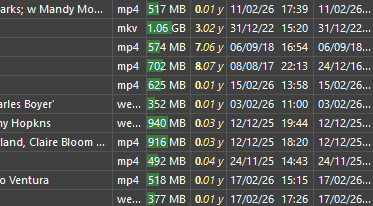
I liked this Age column idea, but my own preferred version aims at ā€œquick impressionā€ of age rather than precision. I also use createddate instead of modifieddate, because I’m not so much interested when I made the last change, I want a quick impression how long files have been on my system. I also use the ā€œSupport markupā€ option in the evaluator column setup to make the year stand out.

So this is my version:

days = Age(createddate, "d");
mm = Ceil((days Mod 365) / 30.4) As "#2";
yy = days / 365;
return "<b>"+yy+"</b><i>."+mm+" y</i>";

This is what it looks like, year plus number of months:

2 Likes

Nice addition with the bold. Need to look more at that...

1 Like

In your updated code blocks I think you missed the first line in each; the definition.

Created:
secs = Age(createddate, "s");

Modified:
secs = Age(modifieddate, "s");

Accessed:
secs = Age(accesseddate, "s");

Ok it is in there, at the far right, but my script log threw a syntax error.
So this version works fine:

secs = Age(modifieddate, "s");

ss = secs Mod 60 As "#2";
mm = secs / 60 Mod 60 As "#2";
hh = secs / 60 / 60 Mod 24 As "#2";
dd = secs / 60 / 60 / 24 Mod 365 As "#3";
yy = secs / 60 / 60 / 24 / 365 As "#2";

return yy + ":" + dd + ":" + hh + ":" + mm + ":" + ss;

I receive no syntax errors when running any combination of the precise age columns here.

Comparing the code I have with your revised code, it's literally the same with the exception of the variable spaces before 'As "#"'

secs = Age(modifieddate, "s");

ss = secs Mod 60                 As "#2";
mm = secs / 60 Mod 60            As "#2";
hh = secs / 60 / 60 Mod 24       As "#2";
dd = secs / 60 / 60 / 24 Mod 365 As "#3";
yy = secs / 60 / 60 / 24 / 365   As "#2";

return yy + ":" + dd + ":" + hh + ":" + mm + ":" + ss;

Do you recall the syntax error? Maybe it's involving another evaluator column or script?

I don’t think you can change accesseddate.

On my first try I used the copy button from your first post, so the syntax error is line 1 position 1, the xml header.

Copy

Getting rid of that xml text, it works. And then I had another error, a ā€œbad actingā€ error. I thought it’s because you missed the first line in the eval, but you didn’t, my fault.

Oh? Well date accessed is basically a paperweight anyway, because the system can touch the date, and consider that ā€œaccessedā€. I had a huge rant about this a while back. I’m not sure how many people actually find date accessed useful. The reason it’s not popular is probably because it’s logically nonsense.

Maybe it is ā€œlogicallyā€ nonsense, but for sensitive data I guess logging last accessed date would make sense. By contrast, being able to alter it (falsify it) would not make any ā€œlogical senseā€. In a way, being able to change any of these dates via editing does not make any ā€œlogicalā€ sense whatsoever.

Ya. Accessed by whom is my issue.

Did the system access the file or the user? And what is meant by system? And how was it accessed? If I open a document program that on its welcome dashboard is a list of recent files, are those files considered accessed because the system had to read them to display them in the list? Or is only opening the file in the interactive gui considered accessed? And if it’s a program (not the OS) that executes a read function, is that still system or is it user? If a program is set up to do something automatically but the user set that up, is that still system or is it now user?

Is an antivirus scanning things considered accessed? What about an onboard cloud service updating files? I have to ā€œsaveā€ a file, overwriting it to be ā€œmodifiedā€ but what about even programs like Dopus displaying metadata in its columns? It has to read the files to display it. Does that touch the accessed date? And if those kinds of things do, then accessed is entirely useless, since that data is whitewashed every time you open a folder and look at the contents.

Wouldn’t it be nice to see exactly what is reading files and when, and how often? And if and when files are copied/exfiltrated from their place. Just like the ā€œwhat is locking this programā€ tools, where are the Windows functions for ā€˜accessed’ metadata info? If we take an interest in keeping an eye on programs that have access to our sensitive property (and by that, what would we even call ā€œsensitiveā€, when talking about things that belong to us? Do we let strangers sit in our living room?), we can see if programs are taking liberties on our computer and take it up with the company. And of course warn the world of what we find.

Wouldn’t it be nice to quickly see all the things you did recently? Text like notes and books, when did I last read that? A game, when did I last play that? A video, when did I last watch that? This info isn’t worth manually tracking but for it to be automatic would be helpful. But we can’t know any of this because we don’t know accessed by whom and how. The last time I read a particular book could have been last week but since the system read the file yesterday, the ā€œdate accessedā€ says yesterday? Get out of here with that.

Proper accessed info not being standard practice on Windows is actually pretty gross.

Such deep monitoring actually sounds a bit scary. There’s no doubt the CCP can do exactly that, but whether my OS needs to be equipped for that I have my doubts. Although I would like it if some app could tell me how much I have understood of the books I’ve read. Or maybe not… The risk of depression makes me hesitating a bit here.

Why does date accessed exist if we can’t use it?
I would like to hear even one testimony of someone who finds it useful, uses it on a regular basis, and how they use it. And how they know for sure the date they are looking at is what they think it is.

Date Modified too. We know what the term ā€œmodifiedā€ means, but a simple an an optional expanded info block about this would make it more useful. What is the modification? Click to expand the date to the expanded version, to see what modified it. Some ideas:

Modified on (date + time) - user > file saved (overwritten) in program
Modified on (date + time) - user > metadata changed > Directory Opus 13
Modified on (date + time) - user > file copied
Modified on (date + time) - program > filed copied > (backup software name)
1 Like