In installing all my apps after an upgrade of hard drive (SSD) and Windows 7 (32-bit to 64-bit), I find that I would have use of a field where I could put a path and a folder/file and be taken to the folder/file in question. Ex.:
Field where I could put this and then hit Enter or the like: C:\ProgramData\Microsoft\Windows\Start Menu\Programs
Is there a way to put such a field in DOpus?
I have looked in Help, but did not really know what to search on. Also, I must say that I am overwhelmed by the sheer amount of time needed to reinstall all apps, set previous settings (backed up when possible), etc.
[quote="HansL"]I would have use of a field where I could put a path and a folder/file and be taken to the folder/file in question. Ex.:
Field where I could put this and then hit Enter or the like: C:\ProgramData\Microsoft\Windows\Start Menu\Programs
Is there a way to put such a field in DOpus?[/quote]
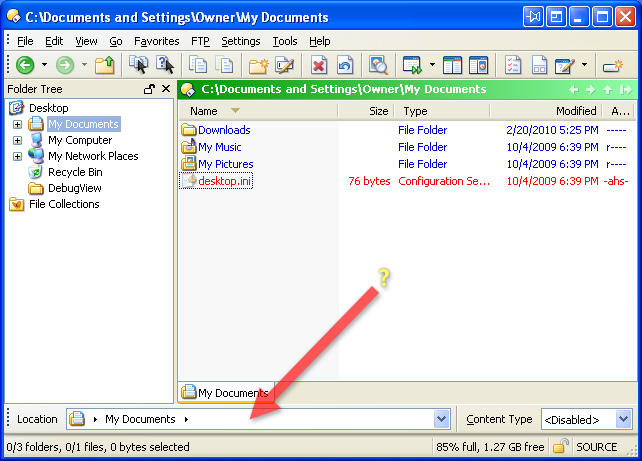
You mean this, in the default config?
If it's gone from your config, go to Settings -> Customize -> Commands and type path field into the filter at the bottom, then drag one of items it finds to your toolbar. Path Field (Breadrcumbs) is the best/normal one for most people, and the one in the default config.
You can also (by default) push Ctrl-Return to make a temporary path field appear if you don't want one on your toolbar all the time.
 Had forgotten that this toolbar existed. I have activated it now. Thanks, Leo.