I just downloaded into my Windows 11 system a freeware program called "File Converter" which is gotten from File Converter - Convert & compress everything in 2 clicks!. The documentation says: File Converter allows you to convert and compress files using the context menu in Windows Explorer. While it works in Windows Explorer as described, can this program be accessed within Directory Opus? If not, is that something that can be requested in a future release of Directory Opus?
Directory Opus: 13.19.2 Build 9401 x64
OS: 10.0 Pro 22H2 Build 19045.5247
Hardware: Intel Core i7-1065G7 • 16GB DDR4 RAM
Clarification: I don't have Win 11, but it works in Win 10
I'm not sure how to interpret your detailed reply...are you saying that the File Converter doesn't work in Directory Opus in Win 11, but it does work in something else? Please advise.
Does it appear if you open the context menu while holding shift?
When a pdf file is selected, it does appear in the context menu in Opus while holding shift and right clicking.
If that's the case, then probably Hide Windows & third-party items on file context menus (Shift overrides) is checked. If you don't want to show all the other entries, you need to enable that one specifically.
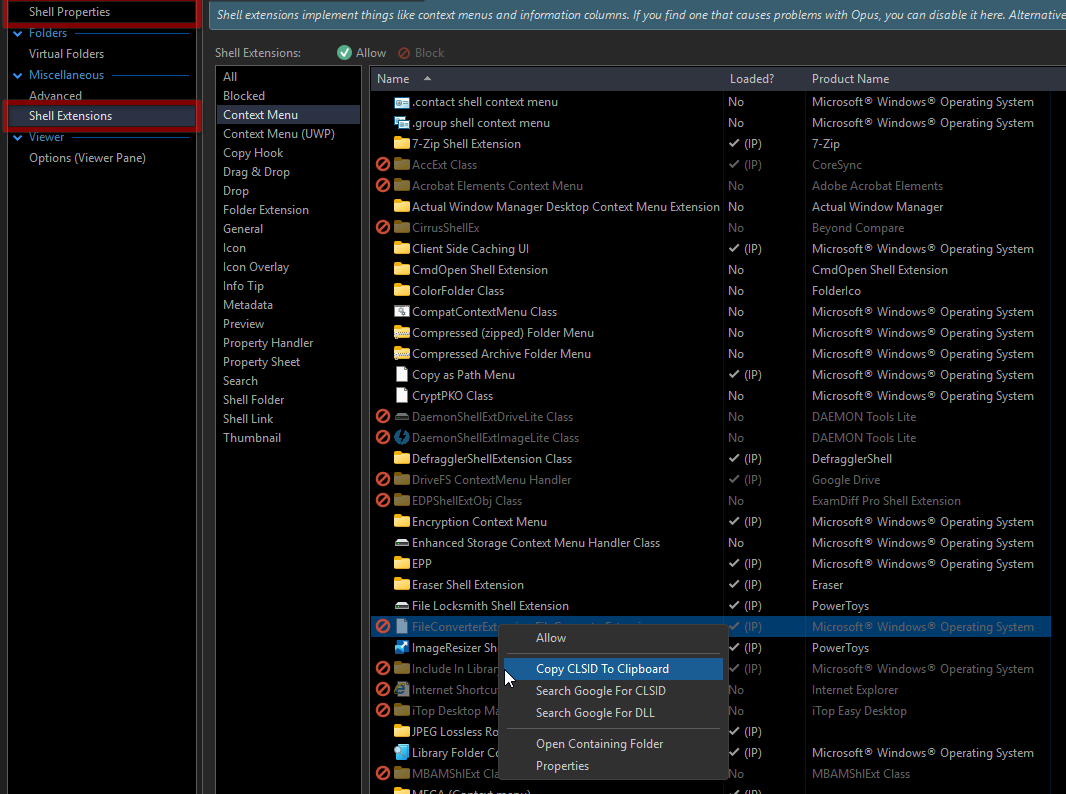
Does it appear listed in Misc / Shell Extensions / Context Menu (or UWP) ?
If it does, right click it and choose Copy CLSID to Clipboard.
Then in FileTypes / All Files / Context Menu, create a new entry and then paste:
FileType CONTEXTFORCE CONTEXTMENU={CLSID}
Where {CLSID} is the value you just copied from the desired menu entry.
If is not listed, then you need to check the CLSID in the registry.
Most likely, it's listed under HKEY_CLASSES_ROOT\*\shellex\ContextMenuHandlers\
YES. When I hold SHIFT and right mouse, the FIle Converter does show for both JPG and PDF. I thought that I was going to have to hold shift anytime I wanted to see the File Converter, but NO, after doing that ONCE, it appears that every subsequent time doing a right click, the File Converter appeared in the context menu. Thanks.