MegMac
June 29, 2026, 2:27pm
1
I have been trying to figure out a way to find files with matching data in different fields, like:
Filename Stem matches Title
User Comment matches Description.
Release Date matches Encoded Date.
File Created Date matches File Modified Date
If it's possible to do that by adding a new filter clause (not sure if that's the correct terminology), I would like to request that feature.
lxp
June 29, 2026, 4:07pm
2
Already covered by the Evaluator:
Find FILTERDEF =Stem(name) == title
Find FILTERDEF =userdesc == comments
Find FILTERDEF =created == modifieddate
MegMac
June 29, 2026, 4:50pm
3
Thank you.
I'm so glad there is a solution, however, I just recently started figuring out Evaluator possibilities, and this is the first Evaluator column I am trying to create, so please excuse my ignorance.
'Find' is not a recognized Evaluator function.
I confess, I have no idea what to do with the code examples you provided.
Any guidance would be appreciated. I will continue to research and investigate.
lxp
June 29, 2026, 5:31pm
4
Using these expressions in an Evaluator column is perfectly fine, but probably not what you want.
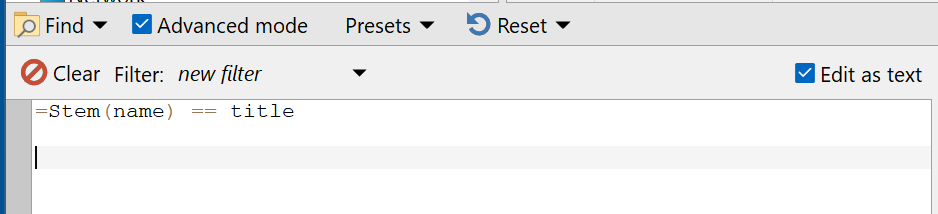
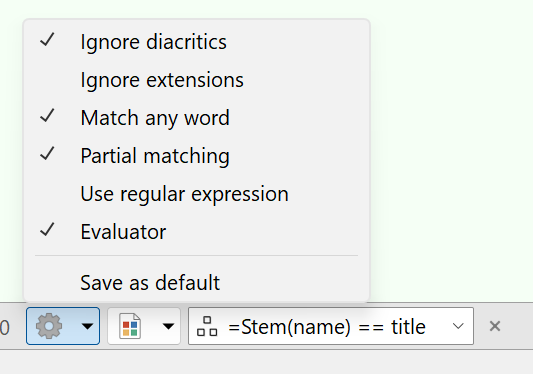
You could run one of the Find commands from above in a button to search the source, or use the eval expression in the Find panel:
They are also great as Quick Filters:
XML
<?xml version="1.0"?>
<button backcol="none" display="both" hotkey_label="yes" label_pos="right" textcol="none">
<label>QF</label>
<tip>Stem(name) == title</tip>
<icon1>#filterfolder</icon1>
<function type="normal">
<instruction>Set QUICKFILTERFLAGS=evalon,regexpoff,flatviewoff,ignoreextensionsoff,ignorediacriticsoff,anywordoff,partialoff QUICKFILTER="=Stem(name) == title"</instruction>
</function>
</button>
MegMac
June 29, 2026, 9:00pm
5
Excellent. Thank you. I had tried pasting into a filer in 'Edit as Text' mode before, but that didn't work. I suppose because 'Find' is not supported.
Now I am wondering if the Evaluator is limited to 'regular' DOpus columns. Seems to use only Set ATTR Keywords. Is that correct?
Thank you.
Leo
June 29, 2026, 9:13pm
6
If the column name contains a :, you may need to use Val("...") to access it (due to : not being allowed in normal variable names).
More detail (and other related/useful stuff):