I have quite a number of files where (I think International characters?) e.g. é is translated in a 'box'ed character. Like this.
In most of the cases I know it should be either something like í ú é whatever.
Going thru all the files would take many hours... (a lot of files are involved)
Now, I cán select such 'boxed'-character, copy it and paste it in DO search panel and do a search.
DO will list the files containing these characters and in fact they should all then be (e.g.) é
Sad enough DO has no way to replace these characters in the files found with (e.g.) an é.
Anybody out there has a solution ?
(Or has a solution outside DO shd DO has no solution for this)
Right.. but, I very much regret: have no idea how to do this... sorry.
I did try to solve this within DO but I donot see how.
Installed a filerenamer but that crashed a few times when searching for such a 'boxed' character.
Change the font in the application to a font which would correctly show each "boxed" letter. The "boxed" letter substitutes for a non-existing character in your font when it is filtered through a font to the screen or to the printer.
The letters you discuss should be in every font except the one you're using!, so it should be an easy effort to assign a different one and see if they show properly. These accented letters are in all current fonts.
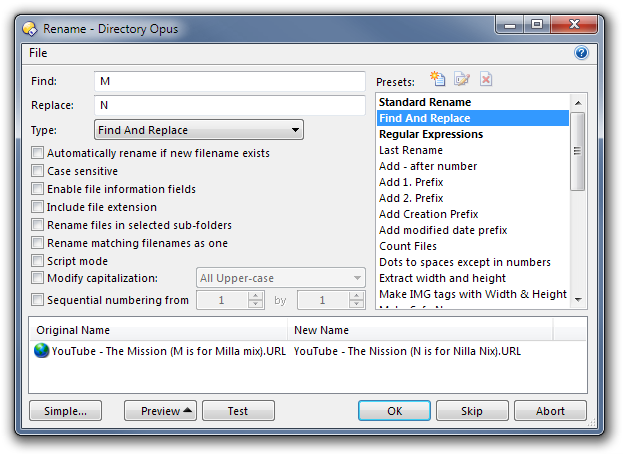
You just select the files you want to rename, click the Rename button on the toolbar (if the basic rename window opens, click the Advanced button to open the full rename window), then set the type to Find and Replace and put in the things you want to find and replace.
The files involved are .flac files and the Flac.exe does not process these files because of these 'boxed' characters.
All other files are processed properly, but just these one aren't.
Leo: Many thanks for the hint, your solution definitely helped me out!thanks again. Wouldn't have found this one
myself as obviously and I confess .. , I was looking at the wrong place and ignored the advanced Rename option...
(i.e. I never used it before, as I am using FlashRenamer to do all the renaming jobs. However FR cannot handle
these special characters).