I use short aliases such as eb for my eBooks folder and ebs for my eBooks/Sports subfolder.
When I type eb, DOpus prioritizes ebs instead of the shorter (and exactly matching) eb alias.
The FAYT find mode has a Preferences / Filtering and Sorting / Find-As-You-Type / Find Mode / Prioritize shorter filenames option. However, there’s no such option for folders mode (and aliases in particular).
Can this please be improved? Ideally, by prioritizing exact matches. Thanks.
Thanks @Jon. That’s interesting - do you mean there isn’t any defined sort order for FAYT results? To me it seemed that DOpus first lists items I’ve recently picked (by hitting ENTER).
I still think prioritizing exact matches would be helpful.
Yes, go mode not folder mode, without changing the quick keys. In the default config, just type the alias name in (starting with the slash) and it should work.
Understood. I’m not using the default config (but folder mode instead) and think this mode should implement some kind of sort order, at least prefer exact matches, along possibly other features like “most recently used”. Thanks.
I’d like to revisit this issue. I’d be very helpful if FAYT folder mode auto-selects exact matches for aliases.
Example of the current behavior: I have an alias nc and when typing /nc, (/ triggers folder mode), DOpus selects the last item that happens to contain nc in it’s path. That’s impractical.
I understand you could implement all kinds of prioritization mechanisms in there and this is non-trivial, but I think adding “prefer exact matches” would make a useful and quick improvement.
/ should not trigger folder mode. That the whole problem really. Use a different key for folder mode, and type aliases into the normal go mode (starting with a /), and it'll work how you want.
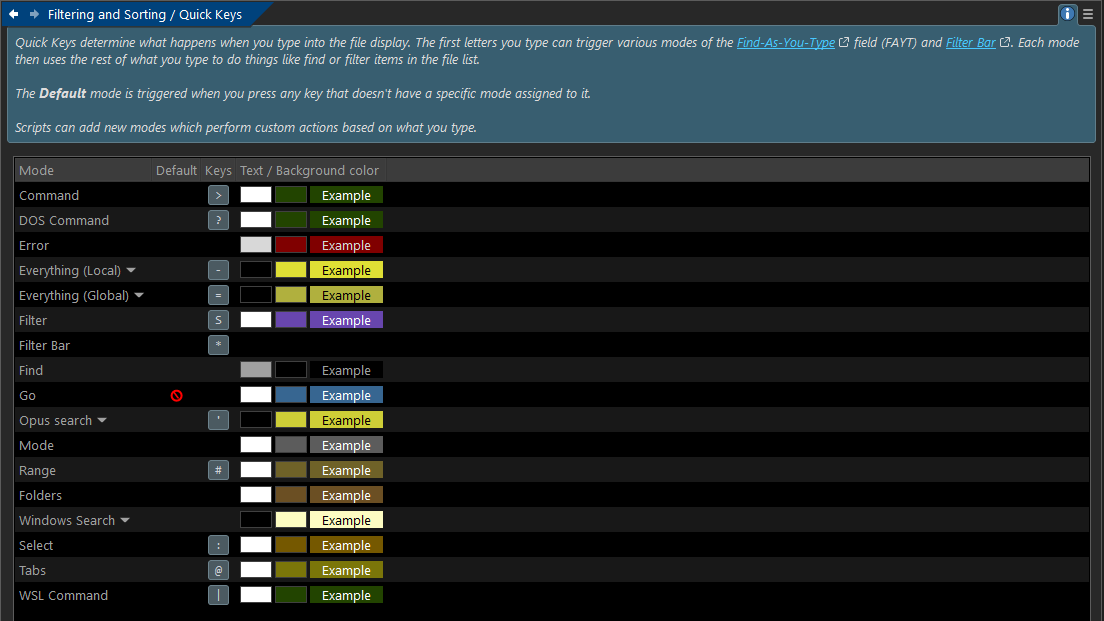
I can’t seem to set Go mode as the default and can’t set a hotkey either. There’s a “stop icon” when I hover over it with the cursor, see the screenshot below.
That said, I think Folder mode is more powerful than Go mode (esp. including favorites) and I have the option to configure it as the default (or using /), so why shouldn’t it work as expected?