I've been using the FIND function for simple text searches across large directories for years, but it's stopped working completely and I cannot for the life of me work out why this has happened. Here's a screen shot of the function as I've configured it. I would appreciate any advice anyone can offer.
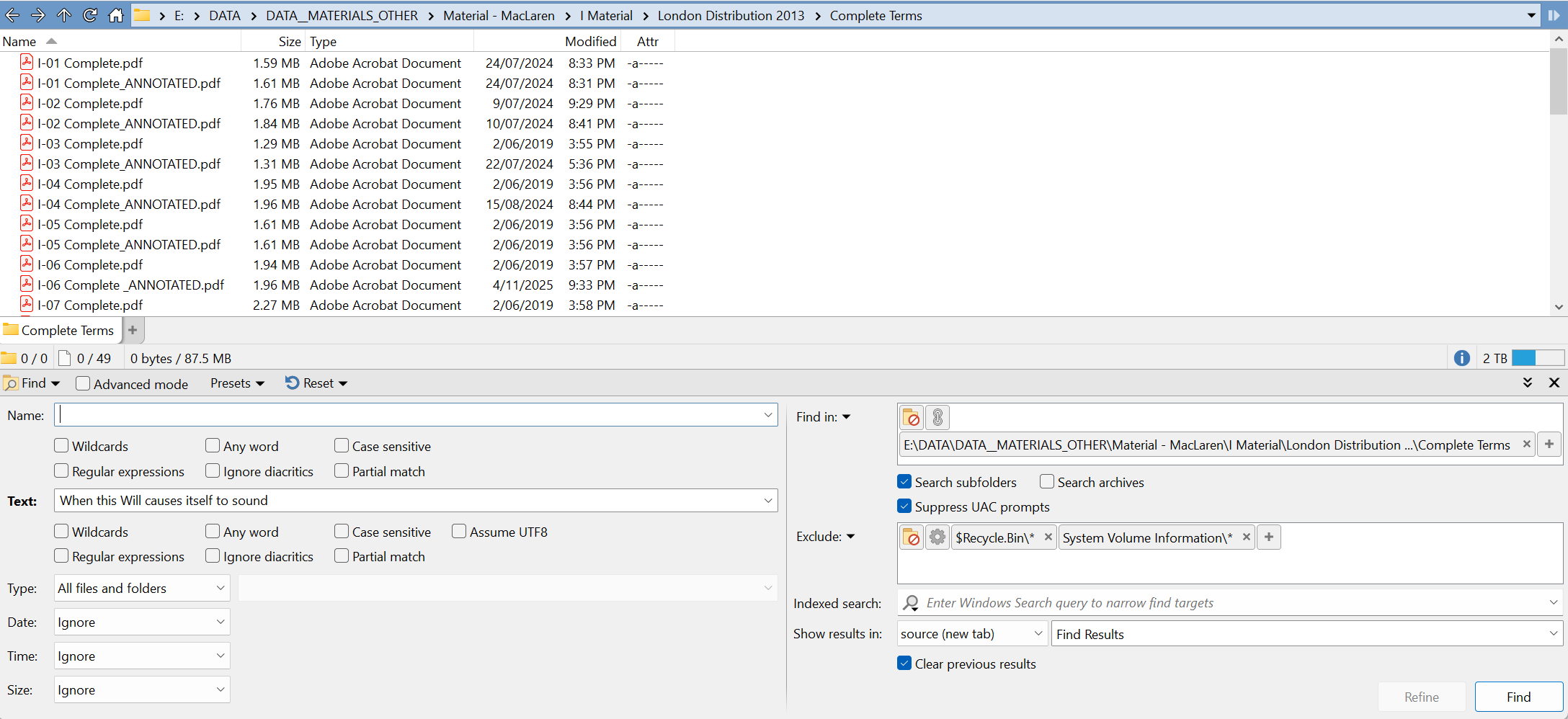
Assuming the text is in the PDFs, if it’s not being found it probably means the IFilter for searching PDF content is broken.
Reinstalling your PDF viewer may repair it.
I also see that the folder path you’re in is very long. That may also cause problems, as some IFilters may not work with very long paths. (This is outside our control, and will affect anything using the same IFilters to search PDFs, e.g. File Explorer.)
Thank you for your response, and apologies for the late response. I've reinstalled Acrobat, but to no avail. That re-installation created its own problems, requiring a windows registry tweak to make the PDF files readable (Oh to be free of tyrannical updates!). I've also changed the directory for a minimal folder path. Again, to no avail. I'd be grateful for any other suggestions.
Sounds like the PDF file type or viewing software is broken more generally than just the IFilter.
That's often due to a conflict with multiple PDF tools installed at once and fighting over the registry settings.
As an alternative there’s Agent Ransack.
SearchFilterView can also be useful if you want to see the state of IFilters on your system.
Leo, Jon:
Something is definitely going on with PDF iFilters and Opus.
Tested on Windows 11 26100.7840
I tried searching in a specific folder where I already know there is a file that contains the word room, using two providers: Sumatra and PDF-Xchange Viewer. So plain room as query is used.
- Both return the result in File Explorer (FWIW I have the indexer disabled).
- Both return the result if I search using Everything 1.5 (FWIW I don't have content indexing enabled). This should demostrate that other third-party apps can use iFilters normally.
- In Opus, I don't get any results, even after toggling all available search options. I start getting results if I enable wildcards and type something like
r*o*o*m(I also get some other false positives).
Since I rarely search inside PDFs in general, I hadn't noticed this until now. It's not a problem for me, but I imagine it could be for others.
Is there any way to debug what exactly is going wrong during the search and why I need to add wildcards?
These tools can be used to diagnose what IFilters are doing:
(SearchFilterView from my previous reply is also worth checking, to see which IFilter you're actually using.)
Thanks for the info.
I wasn't able to use those tools with the Sumatra iFilter (not sure why), so I switched to the PDF-XChange one, and using filtdump I can see that it does return the text without changes. That is, there are no spaces or anything unusual between characters, at least none that I can notice.
Just to make it clear, AFAIK, Everything also doesn't have a native text handler for PDFs, so it should be using the same iFilters as Opus. Everything does return the expected results when searching by content. It's Opus that (at least in my case) needs wildcards between each character. Tested with Sumatra and PDF-XChange (those are the only PDF iFilters I have installed according to SearchFilterView util).
Thanks to those who are working to resolve this. To be clear, the search function fails on text files as well as WORD documents, not just PDF files. There's definitely some kind of bug in OPUS. I don't have the expertise to assist with resolving this, but I sure hope it gets fixed. In the meantime, I've downloaded AGENT RANSACK.
As in plain-text files with .txt extensions? Those would not normally involve IFilters. Searching them works OK here when I try it, for what it's worth.
Please zip an example text file that the problem happens with, and tell us the details of what you're searching for, and we'll try the same thing on the same file to see if we can reproduce it.
Most likely in this case you just need to change some search flags, like enabling "Partial Match" or "Assume UTF 8".
In this case, I suggest using Everything v1.5 instead. You can also use it from within Opus.
(I noticed that Everything has a neat option that lets you override the default iFilter based on its CLSID. For me, the one that works best is the Sumatra one. The Microsoft PDF iFilter also works fine.)
This happens in Opus when using the Sumatra iFilter. I retract my previous post about wildcards, it seems that just by typing random characters returns wrong results.
In the video below you can see the content of a test PDF. If I search for the word room with Opus it finds nothing, but searching for a character that doesn't exist (say z) does return (wrong) results. The same thing happens if you switch to wildcards.
Comparing it with the equivalent search in Everything inside Opus, content:room returns the expected result, content:z returns nothing (as it should). So I think something is going on between the PDF iFilter and Opus.
I don't know if others can reproduce the issue, I'll leave the PDF for tests and the video as a guide.
pdf test.7z (23.7 KB)
Does it make a different if it's on the C drive or external drive just a thought
After investigation, it looks like a recent Windows 11 update broke the API we've used to load IFilter for the last 20 years.
We've found a workaround which will be in the next beta (likely 13.22.1).
Thank you Leo. Most relieved that the next Beta will fix the broken API. Thanks Errante for the suggestion of Everything v1.5. What a little whopper! Yes, it works within Opus, but so does Agent Ransack AKA FileLocater. Why did you recommend one over the other?
A bit off topic, but I was talking about doing it without even leaving Opus. You can use all the Everything muscle in an Opus search, which I don't think you can do with that other app.
Because IMHO it's the best tool for doing searches in Windows. You can get instant results for most things because it manages an actual database and is highly customizable. To be fair, I've never tried the program you mentioned, since Everything covers all my search needs (plus you can combine it with Opus searches).