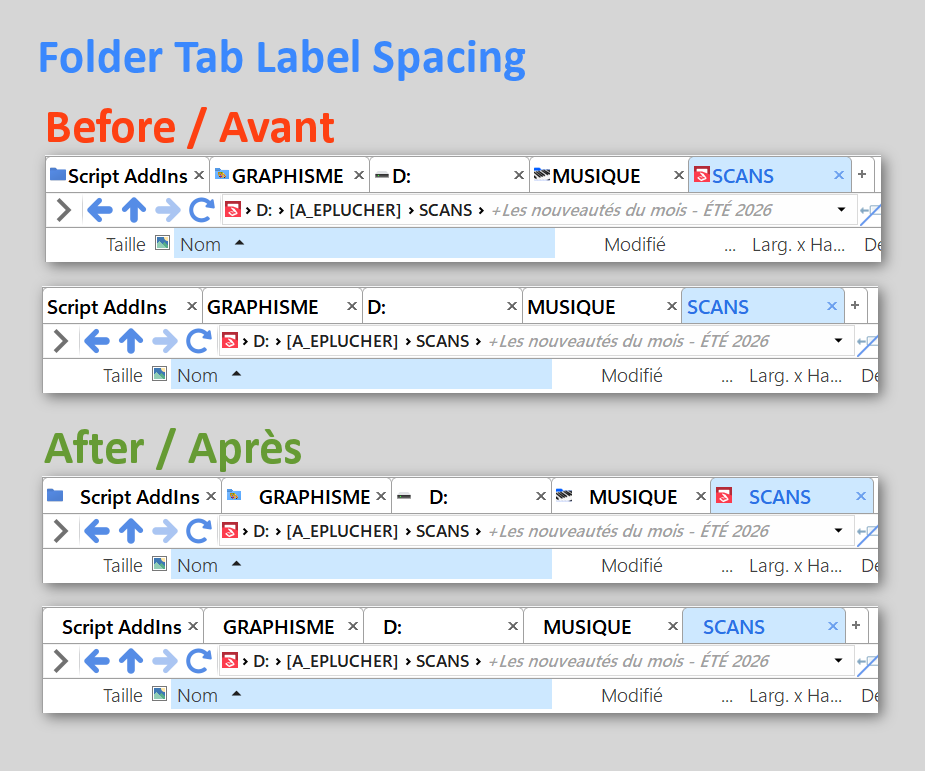
Folder Tab Label Spacing
 ENGLISH
This small script automatically adds spacing between the folder icon and the name of every folder tab in Directory Opus. It makes folder tabs slightly easier to read. As far as I can tell, Directory Opus does not provide a native setting for adjusting this spacing.
To increase or decrease the spacing, simply change the number of \u00A0 sequences in the cmd.RunCommand line.
My small scripts are nothing fancy, but I have chosen to share them in both English and French so that French-speaking DOpus users are not left out. The descriptions, comments, and instructions will therefore be bilingual. Only the JavaScript filenames will remain in English.
 FRANÇAIS
Ce petit script ajoute automatiquement un espace entre l’icône du dossier et le nom de chaque onglet dans Directory Opus. Cela améliore légèrement la lisibilité des onglets de dossiers. À ma connaissance, Directory Opus ne propose aucun réglage natif pour ajuster cet espacement.
L’écart peut être augmenté ou réduit en modifiant simplement le nombre de séquences \u00A0 dans la ligne cmd.RunCommand du script.
Mes petits scripts sont sans prétention, mais j'ai choisi de les partager en français et en anglais afin qu’ils restent accessibles aux utilisateurs francophones de DOpus. Descriptions, commentaires et instructions seront bilingues ; seul le nom du fichier JavaScript restera en anglais.
function OnInit(initData) {
    initData.name = "Folder Tab Label Spacing";
    initData.desc = "🇬🇧 Automatically adds a space between the icon and the name of every folder tab.\r\nTo adjust the spacing, change the number of `\\u00A0` sequences in the `cmd.RunCommand` line.\r\n\r\n🇫🇷 Ajoute automatiquement un espace entre l’icône et le nom de tous les onglets.\r\nPour ajuster l’écart, modifier le nombre de \\u00A0 dans la ligne cmd.RunCommand.";
    initData.version = "2026-07-31";
    initData.default_enable = true;
    initData.min_version = "13.0";
    initData.copyright = "© 2026 Fredisland";
}

function OnAfterFolderChange(data) {
    if (!data.result) return;

    var cmd = DOpus.Create.Command();
    cmd.SetSourceTab(data.tab);

    // Non-breaking spaces followed by the dynamic folder name.
	// Espaces insécables suivis du nom dynamique du dossier.
    cmd.RunCommand('Go TABNAME="\u00A0\u00A0%N"');
}
FolderTabLabelSpacing.js.txt (956 Octets)
1 Like
Merci. Je n'avais pas trouvé comment modifier le nom de l'onglet avec la commande "select", et apparemment, cela se fait avec la commande "Go" - ce qui me semble contre-intuitif mais ça fonctionne parfaitement.
Je l'utilise un peu différemment, mais selon le même principe. J'utilise le paramètre dans DOpus pour afficher le nom du lecteur dans l'onglet. Mais je ne voulais pas gaspiller d'espace en affichant (C:) partout; Donc, je supprime le "(C:)" toujours avec ce script. MODIFICATION : dans la nouvelle version, je crée la lettre de lecteur directement dans le script.
ENGLISH:
Thanks. I hadn't found a way to change the tab name using the "select" command, and apparently it's done with the "Go" command - which I find counter-intuitive, but it works perfectly.
I use it a little differently, but on the same principle. I use the DOpus setting to display the drive name in the tab. But I didn't want to waste space displaying the (C:) drive everywhere - so I eliminate that one with the script. EDIT: in the new version I create the drive letter directly in the script.
= = =
EDIT: script rewritten because the OnAfterFolderChange method was buggy. It now adds the drive letter all by itself (except if the drive is "C") so the option "Display drive letter in tab label" in DO options Preferences / Folder Tabs / Options is supposed to be turned off.
function OnInit(initData) {
	initData.name = "AltTabActor";
	initData.version = "1.1";
	initData.copyright = "(c) 2026 Fredisland (adapt. Bennjmin)";
	initData.url = "https://resource.dopus.com/t/60196/2";
	initData.desc = "Does things with tabs when they open or change";
	initData.default_enable = true;
	//initData.min_version = "13.0";
}
function OnOpenTab(OpenTabData) {ChangeTabLabel(OpenTabData.tab);}
function OnAfterFolderChange(AfterFolderChangeData){ChangeTabLabel(AfterFolderChangeData.tab);}
function ChangeTabLabel(tab)
{
	var vec = tab.path.Split();
	var drive = vec(0).replace(/^(.*):.*$/,"$1"); drive = drive=="C" ? "" : '('+drive+') ';
	var label = drive+vec(vec.count-1);
	var cmd = DOpus.Create.Command();
	cmd.SetSourceTab(tab);
	cmd.RunCommand('Go TABNAME="'+label+'"');
}
1 Like
You mean you're just hiding the (C:) volume, not the other drives?
Tu veux dire que c'est juste le volume (C:) que tu masques, pas les autres lecteurs ?
Yes, I just removed the "(C:)" when I detected the "C".
But I have changed my code, as you can see above, because something didn't work well - the tab label did not change anymore when the lister location changed for that tab.
For the new code above, I disabled the DOpus option to show the drive letter, and the add-on script now generates itself the drive letter (taking the first part of the tab's path from the vector). And when it detects that the drive is C, it just ignores it. The new code is therefore simpler, and works correctly. (I can now also make the drive letter shorter of course: e.g. "(F)" for an F-drive, instead of the longer "(F:)" that the Opus option would generate. You can make it even shorter of course (just "F/" or "F " or "f ").