I recently started using ftp. I enter my ftp user id + password in the ftp settings but everytime i connect or quick connect it doesn't remember my login. I also check the save user id and password box both in ftp settings as well as when i enter press connect but it doesnt work.
And also if i go to menu>ftp> ftp://site it opens my firefox while i have opus as default ftp handler
How can i solve these problems. Anybody have ideas ? thanks in advance.
So you've created an FTP Address Book for the site and put your username & password into that FTP Address Book entry?
If you still get prompted for the password when you use the FTP menu connect via the address book entry, it usually means the password you entered was wrong. The FTP log (Tools -> Output Window -> FTP) should tell you if that's the case.
When you use the Quick Connect window and select the site from the drop-down, does the username/password get filled-in in the window?
Is the address book entry named the same as the site's address/URL? Name it a word or phrase instead to ensure you're selecting the address book entry and not just some kind of cached IP address. (Not sure if that matters or not, but worth checking.)
Not sure what you mean by menu>ftp> ftp://site, sorry.
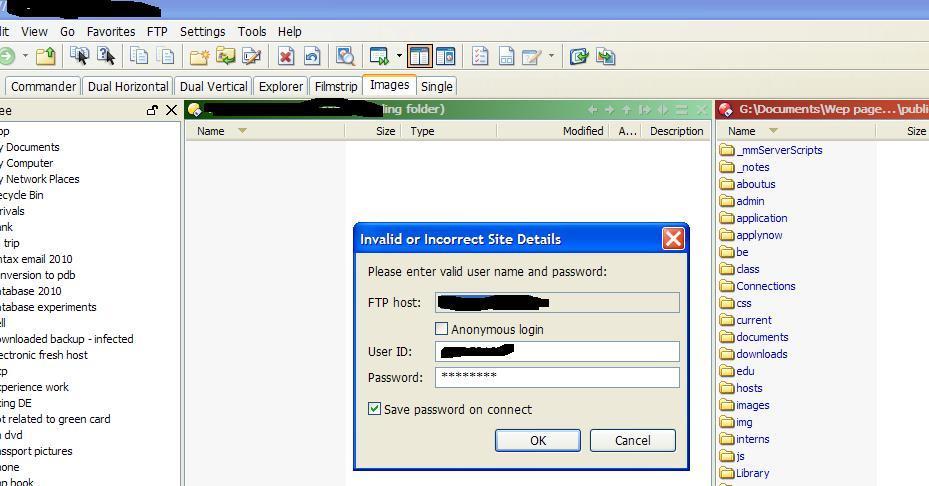
similar problem here. I saved multiple Lister Layouts with one lister opening a ftp session. All works great but after I changed the ftp password on the server I get the Invalid or Incorrect Site Details window that asks me for news password.
This makes sense but what follows does not. I type in the new password and click the checkbox to Save password on connect. I get a connection but the password is NOT saved. Each time I try to use this lister I need to reenter password.
Work around is to recreate all saved Lister Layouts.
I think this is a bug that should be addressed, this has been happening in all versions for the last year.
thanks!
greg
I think layouts store the full address, login and password rather than a reference to an address book entry. (That way they can save sites that don't have address book entries.)
[quote="leckig"]screenshot attached. the "save password on connect" has no effect - the password is not saved.
The only way to make it work is to type the new password and after the ftp session starts you have to redefine the lister.[/quote]
It may be daft, but have you checked that you don't already have an FTP connection open to the same site?
I say this because earlier today I was in mid stream with an FTP transfer and wanted to look for something else. I saw the same symptoms that you describe ... until I had cleared the earlier connection.
If you connect to the site using the FTP address book, instead of the saved Layout, does it use the saved password? That's what I'd expect that checkbox to update.
I'm not sure how relevant this might be to leckig's problem but FWIW here's how I handle FTP password change situations and layouts.
Whenever one of my saved layout ftp sites has a change of password, I'll update the entry in the FTP address book to use the new password, then I'll manually connect to the FTP site using the FTP address book (with the new password). Once I'm connected I'll edit my saved layouts, select the one I'm working with, and click the new layout button. That replaces my old layout which used the old password, with the new one which uses the new. From then on to connect to that site again with the new password, I just use that saved layout.
JohnZeman - yes, this is what I do. But I believe this is a workaround - the lister layout whouls update its settings with new password once the checkbox is ticked.
Leo: yes, I updated the address book previously and it works fine. What bothers me is that the layouts dont update the password even though I reenter it and tick the check box. The only way to update the lister layout is to recreate them just like JohnZeman suggests. Clearly, this does not work the way it was designed since the checkbox does not serve any purpose.
(Personally, I don't let Opus store my passwords at all; I use Keepass so they are encrypted with a master password and let it auto-type into the Opus password prompts.)
I’ve noticed this same issue! I worked around it by adding the user/password into the folder address and it worked fine from thereafter. But it had to be from scratch with a new lister or layout.
The buggy part for me was after creating a saved layout with the plain ftp address it would never take hold of the above example format without deleting the layout and creating a new one with the example format from the start, then it works fine thereafter.
Just make sure you use the above address format from scratch when creating a new layout or lister or maybe any other applicable use.
This may not be a true bug but something to do with the way Opus remembers the default layout or such. i.e. some setting may correct this issue.
 I renamed the address book entry to just a single word and it started working. Yup, it was definitely worth checking.