Hi Folks
I am a big user of the "/" feature. (What is this called?)
That is when hitting that key a field appears at the foot of the lister as shown:
Now I want to do something similar but to open a predefined file.
Is this possible? Let a 1000 flowers bloom!
Checked:
FAQ
Search forums with keywords "shortcut"
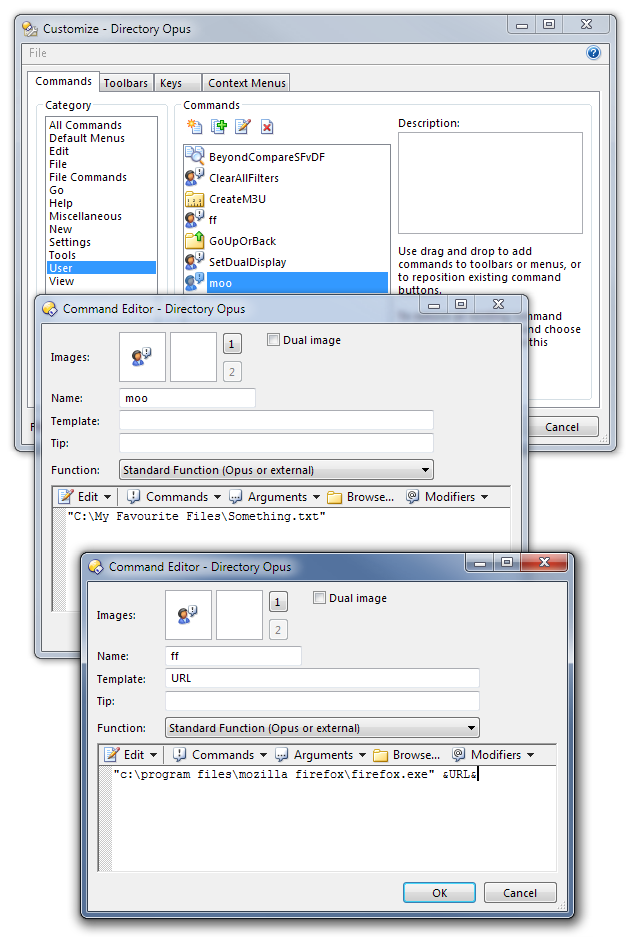
Aliases can only refer to folders but you can create a User Command which opens a file and then run it by typing >moo (where "moo" is the name of the command).
To create a User Command, use Settings -> Customize, click the Commands tab and then the User category. You'll then see a list of User Commands on the right, probably empty if you've never made one before.
Click the New User Command icon above the list, give it the name you want and set it to run the file you want to open. Put the file path in quotes if it has any spaces.
You can also create commands that let you pass arguments to other programs. The second User Command in my screenshot lets me do things like type >ff www.google.com to make Firefox launch Google.
(User Commands can also be run from other Opus commands/buttons/menus/hotkeys. They're not just for running via the > key.)
Thanks as ever Leo. As usual it is already there. Tell me what is this feature called: When I hit "/" to bring up the "Go" field and I press "a", I can then press the down arrow key to cycle through the defined aliai I have starting with a. Indeed as I type the alias I want there is this predictive text thing going on where the field will complete for me. Is there something similar happening when I press ">" to bring up the command field?
Thanks again...