Get tooltip / info tip content by script or command for multiple items

Hello! o)

Is there a way to get access to the tooltip of one or multiple selected items with a command?
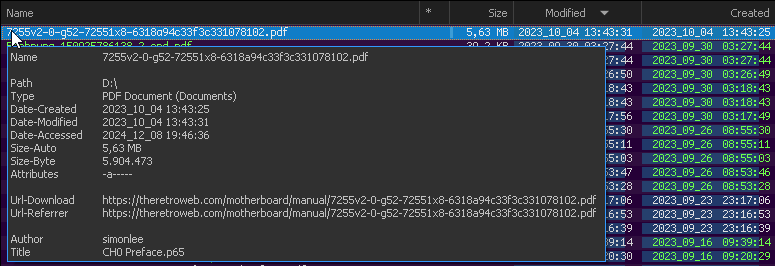
This tooltip or info tip I mean:

I configured my my tooltips quite nicely I think, so I often make use of the hidden / hard coded "CTRL + SHIFT + ALT + C" hotkey to get the full tooltip content into clipboard and save that into a "sidecar" file for various downloads e.g., but..

  1. the default hotkey is hard to use (but can already be worked around it seems)
  2. I need visible tooltip (automation no-no)
  3. specific mouse position to make tooltip show up
  4. no way to access multiple tooltips at once
  5. creating the sidecar files cannot be automated

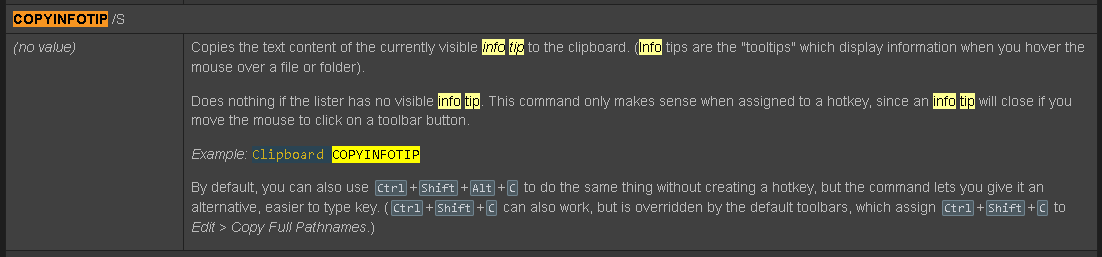
I found this in the docs for the Clipboard command:


This would help to assign a custom hotkey I guess (point 1), but it does not solve points 2-5.

Would it be possible to have some script method to get the tooltip text of any DO item into a string?

Thank you! o)

So the aim is to write some metadata fields into another file, using info-tips as a way to define what gets written?

I would have the script build up the text itself without using into-tips, as that frees you from having to keep your info-tips looking a certain way everywhere just for one script.

Yes. The info tips configuration already is a somewhat nice central place to maintain what metadata is of interest. Leveraging or reusing it to some extend, is probably not the worst idea?! o)

Small use case demo:
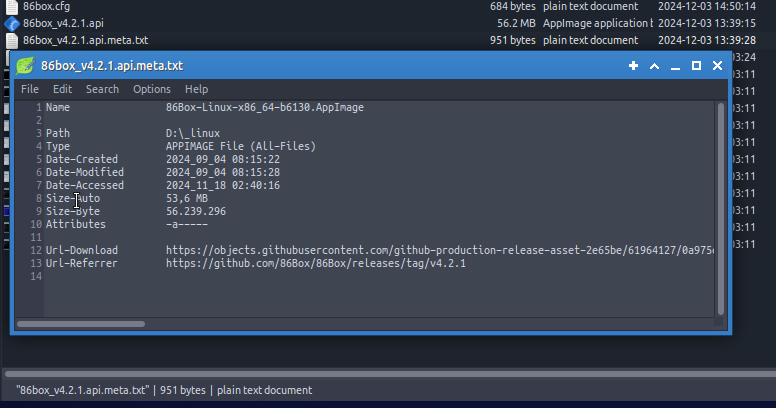
To keep track of what file came from where, I create this *.meta.txt file for all the weird Linux executables I get from odd places e.g.. Then I put it onto the Linux box side by side to the downloaded file I already copied and renamed there, to reflect software version. The original file name, MOTW (download URL source / referrer from ADS) and time stamps get lost this way, but the *.meta.txt file will tell me in the future.

Currently, a script cannot reuse this info tip configuration I guess, so it would need to recreate the formatting and what properties / metadata to fetch and maybe also the grouping of file extensions (although I remember some file type group scripting functionality).

A major hurdle though, is the missing access of a script to values provided by other script columns. So scripts would need to be rewritten / refactored to make use of "@include" and expose relevant methods for metadata extraction.

Not an impossible task, but since the wanted info tip text is already there, in the desired form and function, I would think the idea of getting that as it is, is quite reasonable?

No need to invent things twice or overhaul a lot of existing scripts. Getting access to script column values from a script, would be nice to have some day as well of course, but for now, getting the info tip as it is, seems like a low hanging fruit? o)

Maybe that makes more sense to you now, not sure, will see! o)

We've added a way to do this in the next beta.

Really? This is very welcome, because I still do the SHIFT+CTRL+Alt+C "torture" daily! o)

My DO "subscription" ran out some days ago for the first time, I expected to find reasons to extend it very quickly, confirmed! o)

Thanks again! This works great so far.. o)

I had to replace a "< bs>" tag appearing in the infotip text for an yet unknown reason with "\" (backslash), but no problem! o)

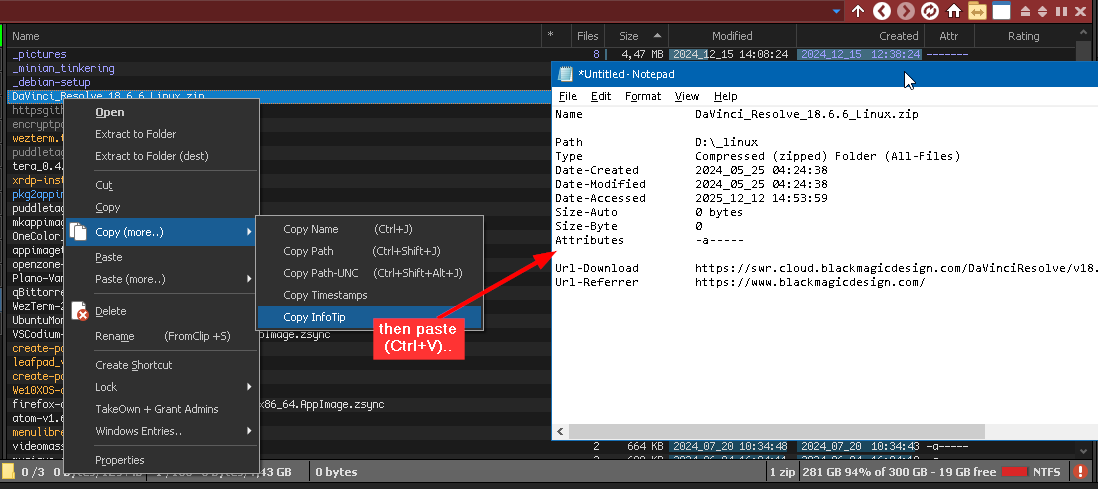
Now I can use my own hotkey, don't need to position the mouse, don't need to wait and I can also just get the InfoTip(s) right from the context menu, even for multiple items, very excellent! o):
See you! o)

Some installation instructions for anybody interested:

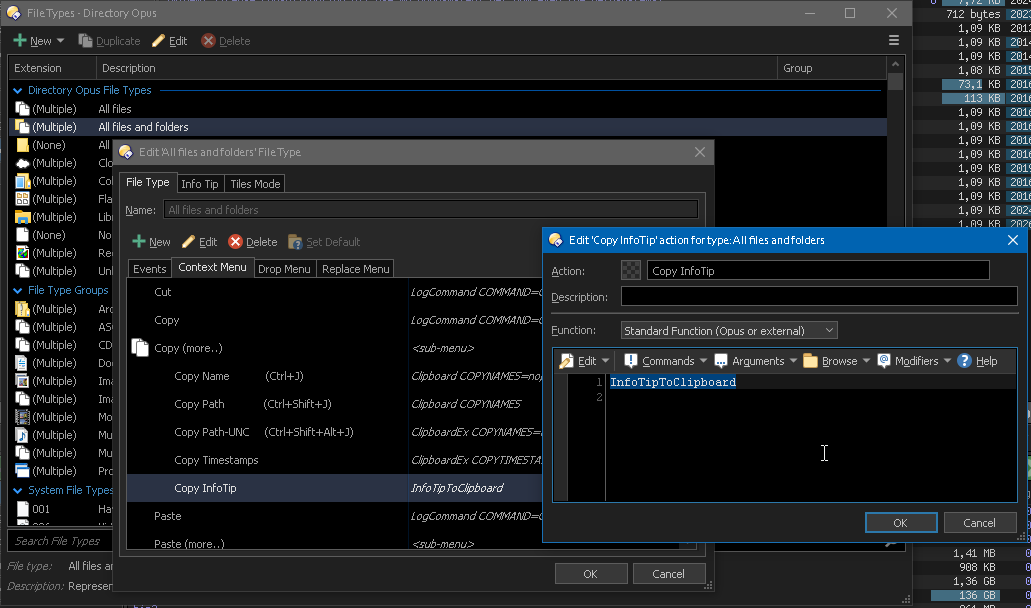
User command "InfoTipToClipboard" button code:

// todo: add to ClipboardEx script addin
///////////////////////////////////////////////////////////////////////////////
function OnClick(data){
	var f = data.func, c = f.command, tab = f.sourcetab;

	if (tab.selected.count == 0) {
		DOpus.Output("No items selected, aborting.");
		return false;
	}

	var clipText = "";
	for(var i=0; i<tab.selected.count; i++) {
		var item = tab.selected(i);
		if (tab.selected.count>1) {
			clipText += "################################################################################\r\n";
		}
		clipText += item.infotip() + "\r\n";
	}
	DOpus.SetClip(clipText.replace("<bs>", "\\"));
	return true;
}

Button xml for easy copy and paste..

<?xml version="1.0"?>
<button backcol="none" display="icon" textcol="none">
	<label>InfoTipToClipboard</label>
	<tip>Copies InfoTip content of selected items to clipboard.</tip>
	<icon1>#usercommand</icon1>
	<function type="script">
		<instruction>@script JScript</instruction>
		<instruction>// todo: add to ClipboardEx script addin</instruction>
		<instruction>///////////////////////////////////////////////////////////////////////////////</instruction>
		<instruction>function OnClick(data){</instruction>
		<instruction>	var f = data.func, c = f.command, tab = f.sourcetab;</instruction>
		<instruction />
		<instruction>	if (tab.selected.count == 0) {</instruction>
		<instruction>		DOpus.Output(&quot;No items selected, aborting.&quot;);</instruction>
		<instruction>		return false;</instruction>
		<instruction>	}</instruction>
		<instruction />
		<instruction>	var clipText = &quot;&quot;;</instruction>
		<instruction>	for(var i=0; i&lt;tab.selected.count; i++) {</instruction>
		<instruction>		var item = tab.selected(i);</instruction>
		<instruction>		if (tab.selected.count&gt;1) {</instruction>
		<instruction>			clipText += &quot;################################################################################\r\n&quot;;</instruction>
		<instruction>		}</instruction>
		<instruction>		clipText += item.infotip() + &quot;\r\n&quot;;</instruction>
		<instruction>	}</instruction>
		<instruction>	//DOpus.Output(clipText);</instruction>
		<instruction>	DOpus.SetClip(clipText.replace(&quot;&lt;bs&gt;&quot;, &quot;\\&quot;));</instruction>
		<instruction>	return true;</instruction>
		<instruction>}</instruction>
	</function>
</button>

File Type Editor..

1 Like