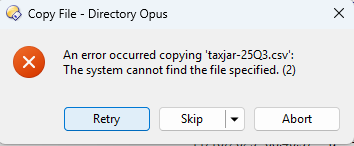
I am just right clicking a file in one folder, selecting "Copy", then going to another folder in the same lister/tab, and right clicking and doing "Paste" and I get this error. Or if I right click and drag for "Copy here" I get this error.
I have tried restarting and rebooting.
Works fine in Windows Explorer.
Version 13.18.0.0 (be nice if that were somewhere easier to find - nvm I had hidden the Operations bar and it's there))
Do you get a similar error if you select the same .csv file and then open the Edit menu and use one of the Calculate Checksums options? (If that also fails, something is probably blocking Opus from accessing the file.)
Can other files be copy & pasted? Or the same file to other destinations?
When I copy that file (from C drive) to another drive, Opus asks to upgrade UAC and then it worked onto that drive. However, copy/pasting within the original drive still gives the error.