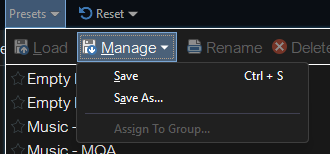
Groups for Filters

I'd like to request that groups be added for saved filters - as there are for rename Presets. If anyone else would like this, please say so!
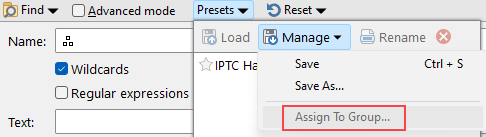
Simple Mode has the option to assign filters to a group. Please add this for Advanced Mode.

It already works in both modes. Select the filter you want to move to a group in the list, then the Assign To Group option is available.
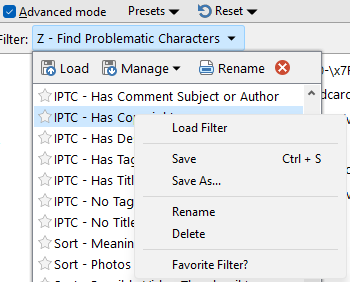
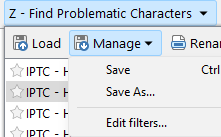
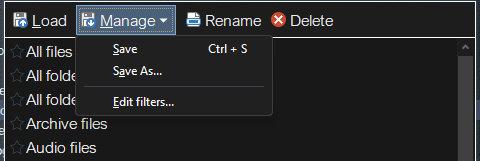
Well, I don’t see it! It’s not a right-click option or a ‘Manage’ option.

Filters don't (currently) support groups, but we do have this suggestion on the list.

The 'Assign to Group' command in your screenshot is for Find Presets, which aren't the same thing as saved filters.

Good to know the suggestion is on your list.

The UI makes it seem that Simple Find and Advanced Find are two versions of the same feature, but apparently, they are not.

I'd say Simple Find offers easy access to Find's "Essentials", while Advanced Find delivers peak performance for true connoisseurs who demand nothing but the best :wink:

lxp,

Exactly. You just gave a good definition of the two versions.

They are. I don't know why you'd think they weren't.

Because Jon said that Find presets aren't the same thing as Saved filters, which indicates to me that at least Jon sees them as different features as opposed to one feature with two different interfaces: Simple and Advanced.

I hope this feature gets added!
+1 for groups to be added to filters please

Please!

I think this is more f a ‘fix’ that a feature request, and when in Advanced Mode, the Presets menu for Simple more is shown. A bit confusing.
image

The presets menu handles both modes. I don’t see anything broken there.

No, it doesn’t.

I have a lot of Filters saved as Presets. None of them are visible when I click the ‘presets’ button:

image

My Presets are only visible if I click the dropdown arrow to the right of ‘new filter’:

and I can’t make groups of Filters, as is possible in Basic Mode.

Groups would be nice to have - here's a workaround

Those are filters, not Find Panel presets. The two drop-downs show different things. (One type of thing can contain the other, plus other details of the whole Find panel. They aren't the same thing, and the two menus won't list the same items. There would be no point having both drop-down lists if they were the same.)

If the Presets list is blank, it's because you have not saved anything into it. There's no bug shown in your screenshots.

Please add the ability to create GROUPS in Advanced Mode.

and…

Having the ‘Advanced Mode’ check box next to the Presets dropdown is confusing. I found it confusing at first, but I’ve help some new DOpus users while screensharing, and their instinct is to click the ‘Presets’ drop down arrow.

image

The wording in the UI and the manual suggest they are the same thing, but ‘Advanced Mode‘ just has more options.

Hopefully these images will help with the confusion around which parts of the Find panel the various controls affect.


Advanced mode checkbox switches the part configuring the search filter:


Filter preset dropdown lets you load and save filters (can also be configured in Preferences / Filtering and Sorting / Filters):


Presets dropdown lets you load/save find the settings for the whole Find panel, including the filter if in advanced mode.

I’m not confused about how they function / what they do. I have no idea why you would think that.

Please allow Groups for saved filters (Advanced Mode)

and having the presets dropdown next to the ‘Advanced’ checkbox IS confusing to people! I have witnessed that confusion when screensharing with students. When in Advanced Mode, they cllick the ‘presets’ dropdown, ant the Filters dropdown.

image