How do I create: rename control key to insert date modified

I want to use the evaluator for a rename control key similarly to the insert date control key, except this would insert the last modified date on the given file/folder.

How should I accomplish this? Is there any way to access file/folder metadata codes from within this context?

Thanks.

The rename control key lets you rename using an existing rename preset. You can first create a rename preset for inserting date, and then use it in the control key.
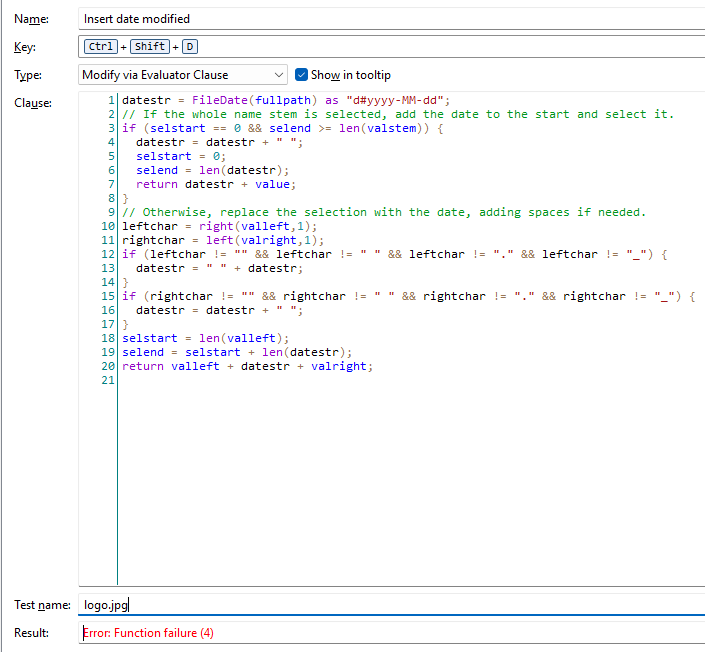
In the next beta, we'll add some things to the Evaluator to let you insert the file's date when renaming.

You can re-use the code from the default Ctrl+D (Insert Date) key.

You'll just need to change the first line from:

datestr = now() as "d#yyyy-MM-dd";

to something like:

datestr = FileDate(fullpath) as "d#yyyy-MM-dd t#HH-mm-ss";

(Using the date/time format of your choice.)

Awesome, thank you so much!

Testing this out. It works when I am renaming files "live" but the test file functionality returns an error in Preferences.

EDIT: Also getting this when I try to sample FileSize(). Other examples work fine.

This may be because the test here is just a string, not an actual file, so there is no proper evaluator context.

I think it would be better if, like the evaluator column, it allowed selecting a real file for testing.

Yes, it's just failing because there is no real file there for it to look up the date of.