Has something changed or have I simply forgotten how to add a screenshot to a post? My recollection is that one simply drags a window onto the post editor, but that doesn't seem to do anything for me now.
Never mind. I think I've got it now.
Has something changed or have I simply forgotten how to add a screenshot to a post? My recollection is that one simply drags a window onto the post editor, but that doesn't seem to do anything for me now.
Never mind. I think I've got it now.
Or if the screenshot goes to the clipboard you can simply Ctrl-V the image into the post. No need to save it as a file first.
yes, it did change.
EDIT: The post interface changed. It used to have another section on the right where one added screenshots, images etc.
Nothing changed AFAIK.
You’ve never been able to drag an entire window into another program.
You can drag or paste images into a web browser and the forum’s post editor, including screenshots of windows in the clipboard, but you can’t drag the windows themselves, and never could.
I still can’t make this work.
I guess I have a screenshot in the clipboard. If I’m viewing another folder and Ctrl-V, I get a file Clipboard Image.jpg which seems to be the screenshot, but if I Ctrl-V while typing this post, nothing happens.
What browser are you using? I guess it's possible Ctrl-V doesn't work in some browsers - maybe try it in Edge if you're using something other than the major ones.
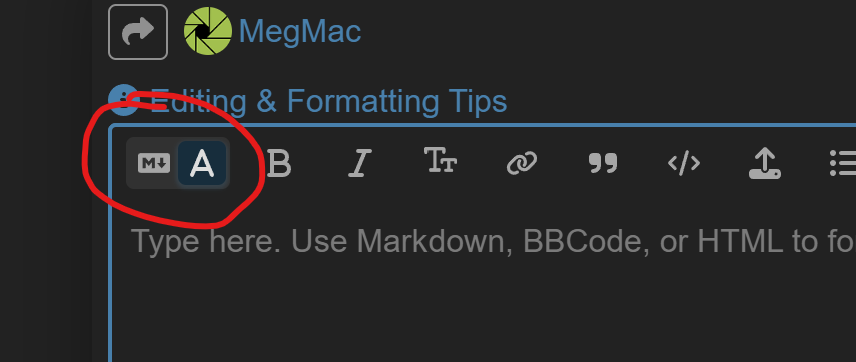
The forum software introduced a new “rich” editor which doesn’t show a separate preview (since the editor itself is WYSIWIG). That’s probably what you’re thinking of.
You can switch back to the old editor with the separate preview by clicking this button:
The new editor supports Ctrl-V to paste images just like the old editor did, however.
Everyone should be on the old editor already now, as I changed the default over the weekend.
Using Firefox.
It's not Firefox itself. Appears to be something about my Firefox profile/configuration.