How to collect different files to Clipboard?

Hello,

I like to collect multiple files like .txt, .jpg or even complete directories to the clipboard in one batch.

These files are stored on different places so I have to put them each after into the clipboard and lke to paste them in one batch to a nother place.

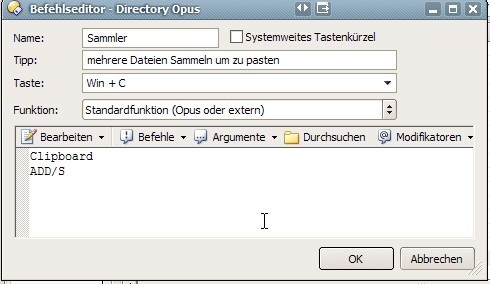
I tried to set a new shortcut like WIN+C for collecting and WIN+V to paste them.

Regretable I did´nt understand the Syntax of the shortcut editor in dopus.

ADD/S doesnt work right now.. pls. have a look on the editor attached.

How could I collect the files and may also play a sound when I put something into the clipboard?

Thank very much for any hint.

regards.

Markus

The command should be Clipboard ADD on one line.

Arguments to commands need to be on the same line as the commands.

The "/S" is in the manual to indicate that the argument is a switch, i.e. something that is on or off and doesn't take any further details. You don't write the actual /S in the command, though.

If you use the menus in the command editor (Befehle, Argumente, etc. in your screenshot) then it's usually easier as Opus will take care of many of these rules for you. Check out the Toolbars 1 video in the tutorials section of the forum for some examples.

Hello Leo,

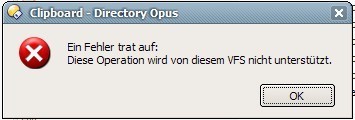
thank you for reply. Regretable I get an error message when I try my clipboard funktion.

Any idea?

Regards

Markus

Sorry, change the command to this:

Clipboard COPY ADD

(or Clipboard CUT ADD)

Clipboard ADD by itself doesn't work. As per the manual:

Hello Leo,

thank you very much for your explanation. Now I understand this a bit better. The Help is regretable in this section in english :frowning:

Anyway, the Copy function works now, but I can´t found a command which would empty the clipboard if I select wrong file f. e.

I tried on Shortcut WIN+DEL the command: Clipboard Delete ALL
But I get the VFS Error which seems that the syntax is´nt correct.

Any idea how to empty the clipoard via shortcut?

Best regards.

Markus

There isn't a built-in command to clear the clipboard but you could do one of these things:

[ol][li]If you've made a mistake, find the first file that you do want to copy and put it in the clipboard normally using Ctrl-C or Ctrl-X (which run Clipboard COPY and Clipboard CUT). After that you can use the other commands to put more files on the clipboard. They will "stack up" on top of the first file you put in.

...or...
[/li]
[li]Use my small SetClip tool and create a button or hotkey which runs SetClip.exe -e to clear the clipboard.[/li][/ol]

BTW, you can't "stack up" combinations of copy and cut. Everything on the clipboard must either have been cut or have been copied, and not a mixture of the two. (This is because the list of files is kept in a format compatible with Explorer etc. and that format doesn't let you mix operations.)

You also could use this small tool:

softpedia.com/get/Office-too ... lear.shtml

You can make a shortcut for directly emptying the clipboard. I recently started using the CLIPBOARD COPY ADD function, & this also well, except SetClip surely has some more useful features. What i´d like to see in Opus, btw, would be a way to show clipboard contents in a lister (i´m not sure, if maybe SetClip has a convenient way to show the contents).
I also switched to SetClip now, using the -e switch. For the show clipboard idea, of course not the whole contents, but more something like:

F:\Progamme\example.exe
F:\Programme\applicationx.exe
F:\Programme\pic.png
<Text Clip 01>
<Text Clip 02>
L:\Games\Galacta.zip
L:\Music\song123.mp3
L:\Music\song456.mp3
<Text Clip 03>
L:\Progs\DOpusInstall.exe

That would be an example, of how the contents could be viewed, & perhaps even the ability to remove items.