I am dragging the PDF file from my WeChat chat history to the Directory Opus software interface, but the file has not been dragged to the corresponding location. But dragging it into the built-in file explorer of Windows was successful. How do I configure it?
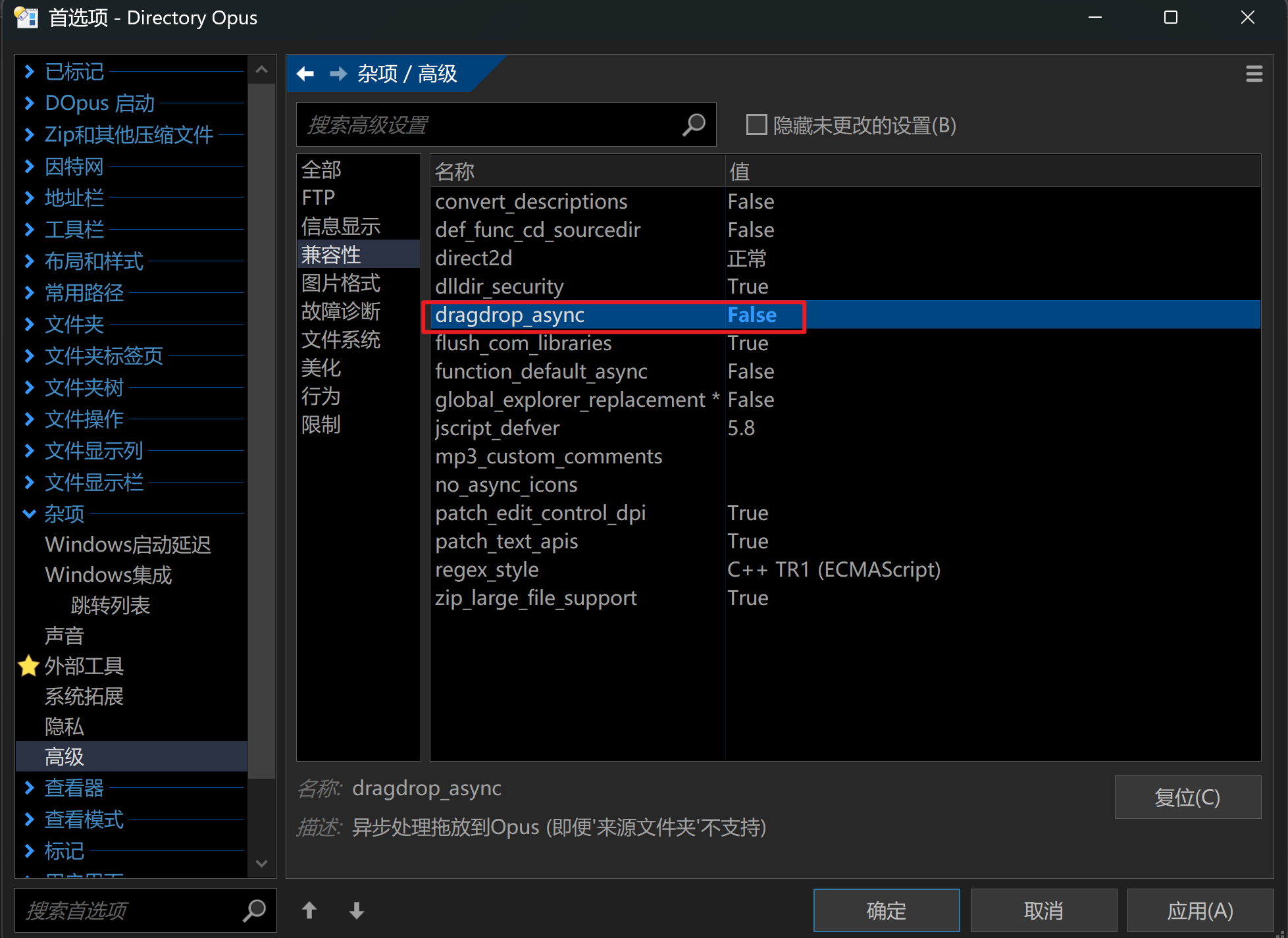
We're not able to get WeChat to test with, but if someone could do this and report back the results, we might be able to make it synchronous by default:
-
Download DebugView - Sysinternals | Microsoft Learn, unzip it and run it.
-
In Opus, go to a directory, and create a sub-directory called:
dragdrop-debug -
Drag from WeChat over the
dragdrop-debugfolder.
That should generate lots of output from Opus in DebugView, describing what the drag & drop data looks like. If you can save that to a file (File >Save As from DebugView) and send it to us, we'll see if we can detect drops from WeChat that way and make them work automatically.
Hi, Leo. I can't capture anything, whether dragging to Dopus or Windows Explorer, the DebugView window has no output  .
.
I tried dragging a file from a WeChat window to an Opus window, and everything seemed normal; the file appeared in the correct location
This is the log of my normal file drag
Opus.7z (1.2 KB)
Many thanks, we've made a change to auto-detect drops from WeChat and make them synchronous. It will be in the next beta.
Hi, Leo
I just tested version 13.19.6 Beta, and I still can't drag and drop files normally. I captured some logs using DebugView, including logs from both version 13.19 and 13.19.6 Beta. These logs look different from @ririliu's.
Hi, @ririliu, which version are you using? It seems that WeChat 3.x can drag and drop normally without changing anything, but 3.x has been banned from logging in , so I cannot provide logs. WeChat 4.x is a QT-rewritten version, and it only works if dragdrop_async = False is set  .
.
wechat-dragdrop-debug.zip (5.9 KB)
That version isn't adding the "WeChat_Wx_Format" clipboard data/format which we're using to detect drops from WeChat.
It looks like the only indication it's from WeChat with that version is the file path, but that seems to be user-configurable so I don't think we can use it as a detection. (It's xwechat_files below the Documents folder in that log, but under WeChat files below D:\ in the other.)
I successfully bypassed the login restrictions of WeChat 3.x and captured some logs.
The logs are the same as @ririliu's, all containing WeChat_Wx_Format, and the file path structure is also similar, which indicates that @ririliu is using WeChat 3.x.
I can also confirm that version 3.x can successfully perform file drag-drop without setting dragdrop_async to False.
In other words, version 13.19.6 Beta doesn't need to detect WeChat_Wx_Format to handle WeChat in a special way; version 4.x is no longer use WeChat_Wx_Format, so this update for that seems unnecessary  .
.
You're right, this is configurable. But WeChat 4.x always stores files in the xwechat_files subfolder,. It seems possible to handle it by detecting whether the path contains xwechat_files?
Personally, I think this is not very reliable. DOpus doesn't need to handle this specially; it should be left to the WeChat team to resolve .
So the user can choose the parent folder, but the files are always below a xwechat_files sub-dir which WeChat itself creates?
Yes, the files are always under xwechat_files, and what the user actually changes is the location of xwechat_files.
The previous log I provided was indeed from WeChat 3.x. Strangely, I didn't need to make any changes; that version of WeChat has always been able to log in and function normally. That system is Win 10, and the dopus version is 13.19.2.
Now, I've tested it on another computer, and I can still drag files from WeChat to dopus. The WeChat version is 4.1.4.17, the system is Win 11 25H2, and the dopus version is also 13.19.2. The log file is as follows:
dopus_2.7z (1.2 KB)
That's because you dragged and dropped an image (it shows up directly as a picture in the chat).
You can try dragging and dropping non-image files like .pdf or .txt, or image formats that WeChat doesn't support like .avif or .jxl—they won't work.
When dragging and dropping images, the UniformResourceLocator value in the log is not found, while for other files, it is a path starting with file:///.
I think DOpus can identify drag-and-drop from WeChat by detecting UniformResourceLocator, file:/// and xwechat_files.
Thank you!
We've made a further change for the next beta (which will be 13.19.7). It should mean it detects drops from WeChat 4 as well as 3.
Please let us know if there are still any issues after the next beta is installed.
13.19.7 (Beta) works well, thank you .