How to keep folders always on top, but also make .exe files sort above other non-folder items (while still sorting by name within each group)
Easiest way is probably to make an evaluator "Is exe?" column, then do a multi-column sort with that as the first column and Name as the second.
 It’s a little difficult for me.
This is suboptimal and a little ugly but you could group using something like the following script. I use many categories but i deleted them for this example. I wouldn't add the column itself, rather i would group according to doc category in folder format settings.

// DocCategory – fixed group order, easy category edits, optional auto-collapse
// Language: JScript (Directory Opus Script Add-in)
// J.Fourie

var SETTINGS = {
    autoCollapseOnFolderChange: false,

    // Column name/label (change if you make variants).
    columnName: "DocCategory",
    columnLabel: "Doc Category",

    // Define your categories here, in the order you want them grouped.
    // 1) "Folders" is handled automatically (item.is_dir) — keep it first.
    // 2) For simple extension-based categories, just add to `exts`.
    // 3) For logic-based categories, supply a `match(item, ext)` function that returns true/false.
    categories: [
        { name: "Folders",   special: "folders" }, // reserved; handled by item.is_dir
		{ name: "Exe",       exts: [".exe", ".shortcut"] },
        // NOTE: "Other" is the catch-all. Keep it last.
        { name: "Other",     exts: [] }
    ]
};

// ---------- INTERNALS (you generally don't need to touch below this line) ----------

// Build a quick lookup from extension -> category name for fast classification.
var EXT_TO_CAT = (function buildExtMap(){
    var map = {};
    for (var i = 0; i < SETTINGS.categories.length; i++) {
        var c = SETTINGS.categories[i];
        if (c.exts && c.exts.length) {
            for (var j = 0; j < c.exts.length; j++) {
                var e = ("" + c.exts[j]).toLowerCase();
                map[e] = c.name;
            }
        }
    }
    return map;
})();

// Build the explicit group order string for the column (semicolon-separated).
function getGroupOrderString() {
    var names = [];
    for (var i = 0; i < SETTINGS.categories.length; i++) {
        names.push(SETTINGS.categories[i].name);
    }
    return names.join(";");
}

// Return the category name for an item.
function classifyItem(item) {
    if (item.is_dir) return "Folders";

    var ext = (item.ext || "").toLowerCase();
    if (EXT_TO_CAT.hasOwnProperty(ext)) return EXT_TO_CAT[ext];

    // Fallback to any function-based category rules (rare case)
    for (var i = 0; i < SETTINGS.categories.length; i++) {
        var c = SETTINGS.categories[i];
        if (typeof c.match === "function") {
            try {
                if (c.match(item, ext) === true) return c.name;
            } catch(e) {
                // ignore match errors; fall through to Other
            }
        }
    }
    return "Other";
}

// ---------------- Opus Hooks ----------------

function OnInit(initData) {
    initData.name = "DocCategory";
    initData.version = "1.4";
    initData.desc = "Custom document category column with fixed order and folders on top (auto-collapse optional)";
    initData.default_enable = true;
    initData.min_version = "12.0";
	initData.group = "Column";

    var col = initData.AddColumn();
    col.name = SETTINGS.columnName;
    col.method = "OnDocCategory";
    col.label = SETTINGS.columnLabel;
    col.justify = "left";

    // We supply explicit group order and group labels; no auto-grouping.
    col.autogroup = false;
    col.grouporder = getGroupOrderString();
    col.autorefresh = true;
}

function OnDocCategory(colData) {
    var label = classifyItem(colData.item);
    colData.value = label; // visible cell text
    colData.group = label; // group header text
}

// OPTIONAL: Auto-collapse groups on folder change (so "Other" begins collapsed).
// This affects all groups (Opus limitation). Toggle via SETTINGS.autoCollapseOnFolderChange.
function OnAfterFolderChange(data) {
    if (!SETTINGS.autoCollapseOnFolderChange) return;
    try {
        var cmd = DOpus.Create.Command();
        cmd.SetSourceTab(data.tab);
        // Collapse all groups in this tab. There is currently no official way
        // to collapse a single named group (e.g., "Other") only.
        cmd.RunCommand("Set GROUPCOLLAPSE=Off");
    } catch (e) {
        // swallow; nothing critical
    }
}
Leo's idea in a few easy steps:
- Create a column (we show the name because it looks nicer)
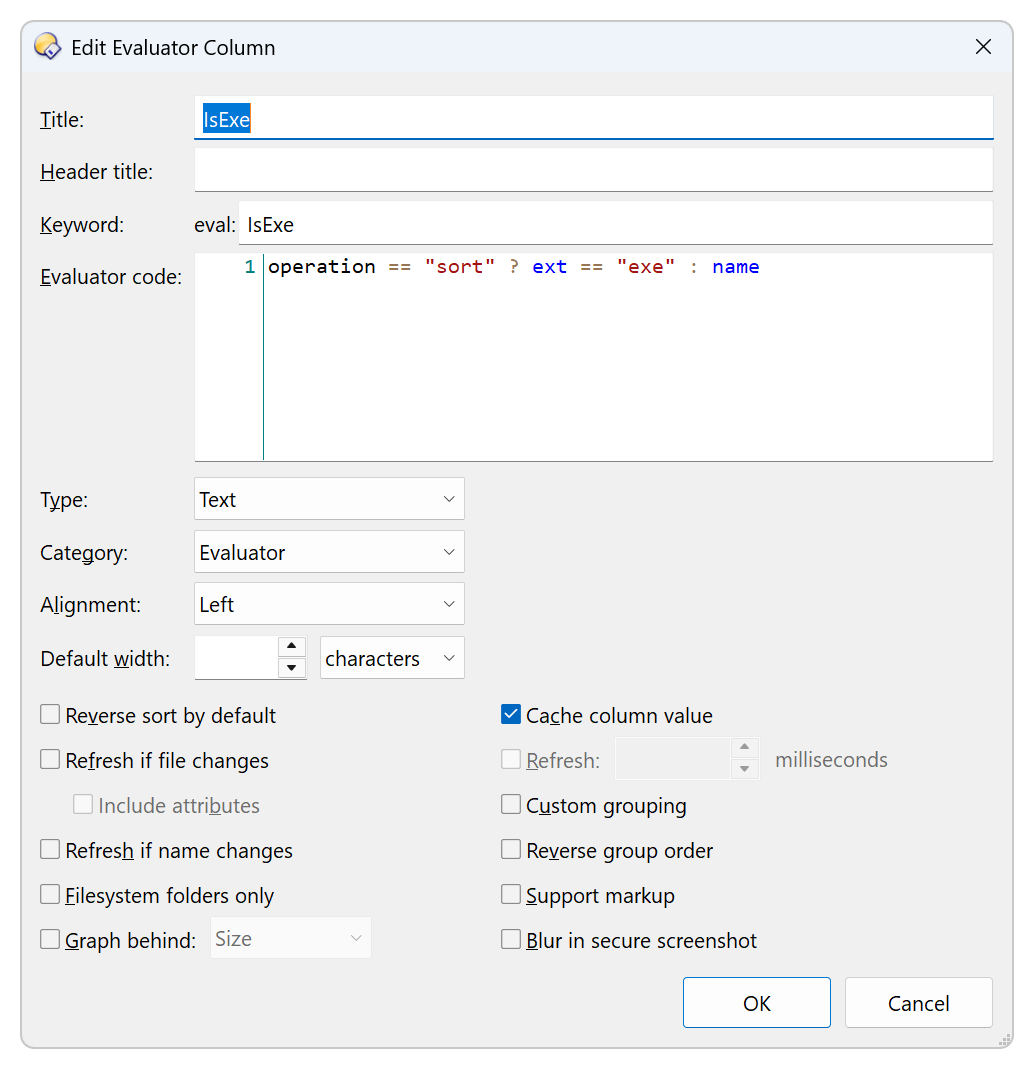
operation == "sort" ? ext == "exe" : name
XML
<?xml version="1.0"?>
<evalcolumn align="0" attrrefresh="no" autorefresh="no" blurrable="no" customgrouping="no" foldertype="all" keyword="IsExe" maxstars="5" namerefresh="no" nocache="no" reversegroups="no" reversesort="no" supportmarkup="no" title="IsExe" type="0">operation == "sort" ? ext == "exe" : name</evalcolumn>
- Show the column in the FD
Set COLUMNSTOGGLE=eval:IsExe
- Multi-sort by new column and
name
Set SORTBY=eval:IsExe,name
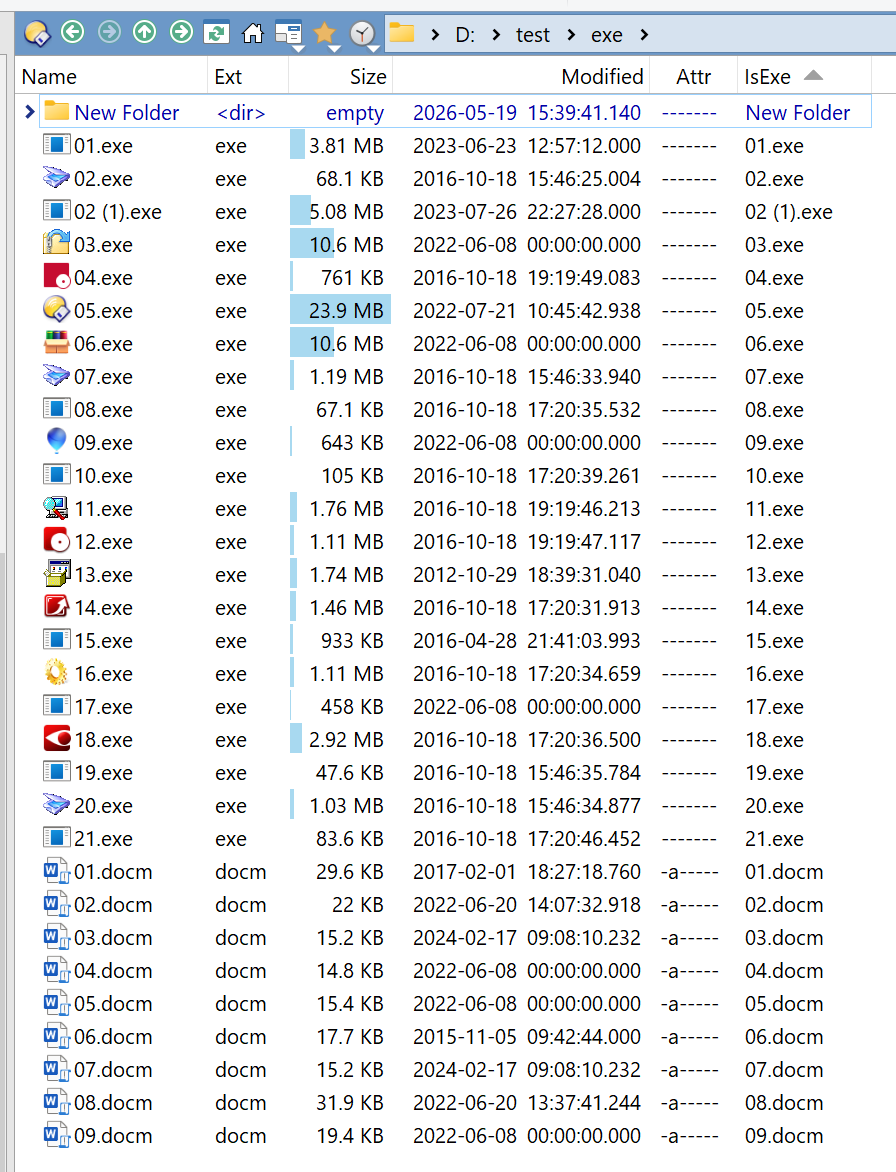
Thank you very much to Leo for the guidance and to lxp for the answer. It's already being used, and I'm very happy about it.