I just upgraded Windows 10 to Windows 11.
I have 7zip installed.
I cannot figure out how to delete the context menu entry for a zip file that says "Extract all...".
The option is not selected in 7zip.
I have deleted a sub-key in KEY_CLASSES_ROOT\CompressedFolder\ShellEx\ContextMenuHandlers
called {b8cdcb65-b1bf-4b42-9428-1dfdb7ee92af}.
But no luck.
I cannot find an entry in preferences in Opus that would allow me to turn this off.
I am running the latest version of Windows 11, 7zip, and Opus.
Any ideas?
I don't think "Extract all..." is from 7zip, since I have that installed and don't have a menu item with that name.
Tip: Organise and Speed-Up Context Menus has general suggestions on ways to remove context menu items.
Apparently you can do it by creating a new entry in the registry here (might have to create the 'Blocked' folder)
HKEY_LOCAL_MACHINE\SOFTWARE\Microsoft\Windows\CurrentVersion\Shell Extensions\Blocked
Where you add a new string value named as the CLSID:
{b8cdcb65-b1bf-4b42-9428-1dfdb7ee92af}
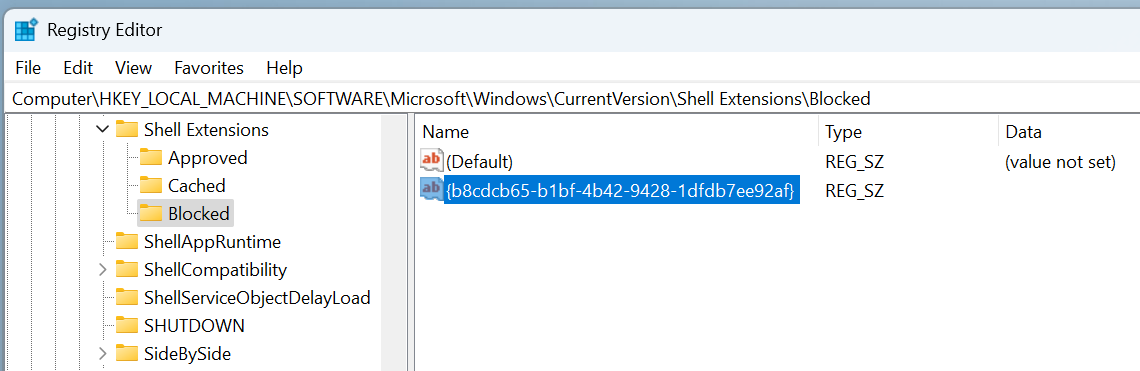
Then log out and back in, or just restart explorer like with Powershell:
Stop-Process -Name explorer -Force
I wasn't aware of that registry location before but it works. Found it by checking how WinAero tweaker was able to block it.
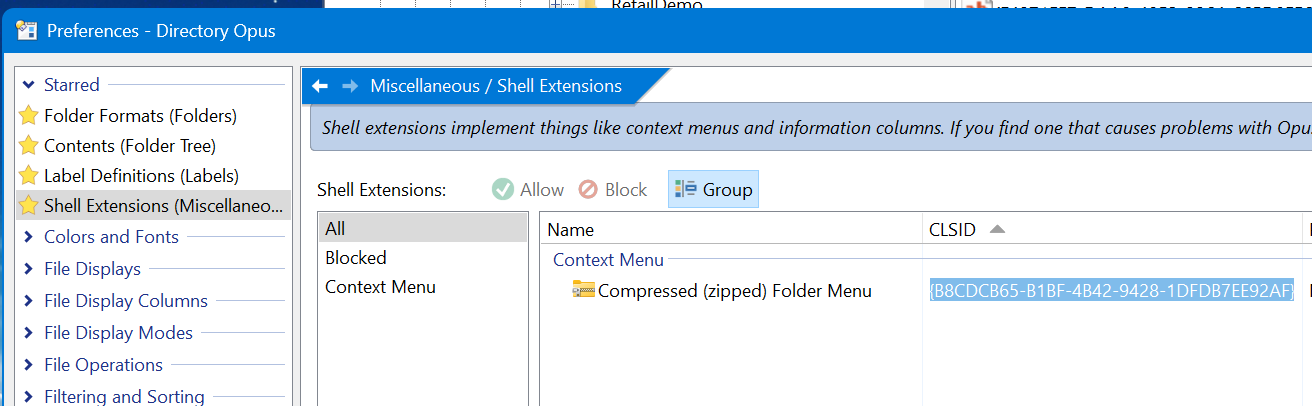
Or if you just want to block it in Directory Opus you can do that from the Shell Extension preferences:
Lots of good and unknown info here! Thanks very much,