As shown in the figure, when I use ssh/sftp to connect to a remote server to access data, I always get an error。Always pop-up window reminds me。
Is there any way to eliminate the error and prevent it from popping up?
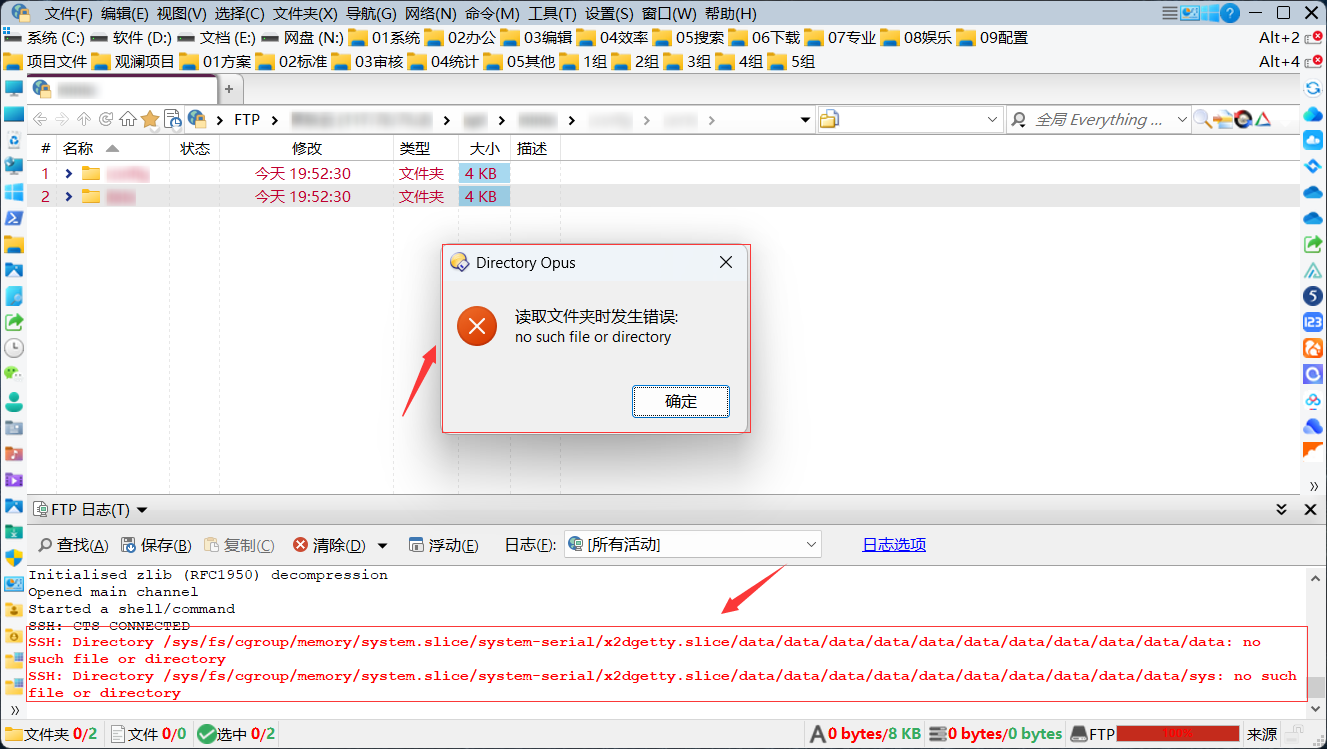
Difficult to guess how the path in the error message relates to the path in the file display since it's been blurred out.
Does the FTP address book entry you're using specify an initial folder? Does that folder still exist?
Is that "data" sub-dir in the error message a softlink pointing to itself, or pointing to something that no longer exists?
Do you get errors when connecting with other clients and checking their logs?
The initial folder I set is the cloud server root directory.
Every time you open a folder, the background reads the directory
For example, the address "/sys/fs/cgroup/memory/system.slice/system-serial/x2dgetty.slice/data/data/data/data/data/data/data/data/data/data/data/data/data/data/data/data/data/data/data/data/data/data/data/data/data/data/data/data/data" does not exist.
I used dopus to try other ftp links and also got an error
But I didn't get an error when I opened the file when I accessed the ftp link on xshell
I suspect dopus' handling of sftp paths is problematic: there is \ in the address of the sftp connection, which the linux system treats as part of the file name, and dopus treats it as a path separator "/" when processing
A backslash in a directory name could definitely confuse things. I am not sure there is a workaround for that, at least at present.
Well, thank you.
Is there a way to only display an error in the ftp log without pop-up prompt
If I open an ftp path, there will be countless pop-up warnings. How can I ignore them and continue to operate?