Hi Folks. I'm not sure if this should go in the Icon subforum(?)
Anyway: In Opus' Preferences, when viewing the Internal Icon Set by Cris [I like the Glass ones ] if you go to the File menu you can export an icon template XML file. However, it seems like the set that is in the bottom preview window doesn't match up with the names in the XML file...
EDIT: Incorrect assumption on my part... See replies below!
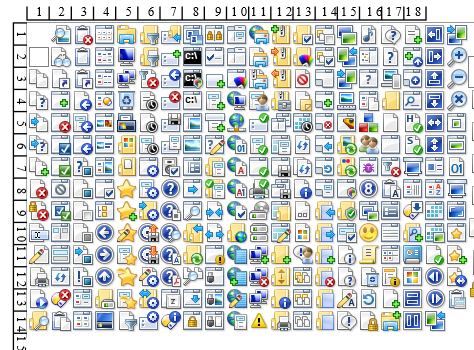
Here I've screen captured the left section of the default set and labeled the rows and cols:
So basically, I can put them in whatever order I want then?
I'm guessing that I have to use the same names though, if I wan't to replace the entire set of Opus icons -- yes?
Hmm... Okay, it looks like you activate a set with the bottom/right "Apply" button, as in the image below.
Oddly though, the button is gray/inactive unless I move one of the sets up of down in the list. Also, the change does not seem to appear in the toolbars unless I go to Customize toolbar and mess about with the settings there.
Push F1 or click the help button at the top-right of the Preferences dialog while on that page. It will take you to the documentation, which explains how it works.
Yea, I think I read that if Opus doesn't find the correct size in the current set, it will keep looking in other sets. I think that is what was happening with the Customize settings.
Not sure about the gray Apply button... I'll reRTFM.
The order the sets are listed determines which one will be used first if an icon name appears in multiple sets. The only changes that page lets you make is the order of the sets which is why Apply is grayed out until you move one up or down.
 ] if you go to the File menu you can export an icon template XML file. However, it seems like the set that is in the bottom preview window doesn't match up with the names in the XML file...