This is the most trivial of bug reports. It's a visual bug. Functionality is unaffected.
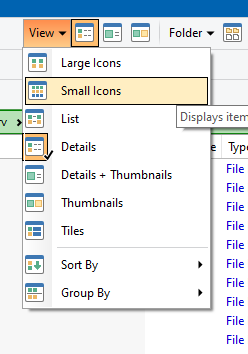
The icons in drop-down menus are shifted too far to the left until they are hovered over by the pointer. They center properly once they are hovered over.
Here's an example screenshot where I've moved the pointer over the top two menu items and then stopped. You can see the remainder of the icons are shifted left. The one for "Details" even has the black border being drawn outside of the box for the drop-down menu.
I'm on Windows 10 running Directory Opus 13.21 Build 9416 x64 OS 10.0 (B:19045 P:2 T:1) SP 0.0
I was able to fix it. It was a specific setting named "Use legacy office-style toolbars" in Preferences -> Colors and Fonts / Directory Opus Colors / Toolbars / Office-style.
The problem went away when I disabled "Use legacy office-style toolbars". Turning it on makes the issue come back even after applying the Default Light theme.
I'm fine with leaving it disabled. I didn't know it was enabled, or that any theme stuff had been applied in my config. Most of my DOpus settings are the default. I'm assuming this is some leftover artifact from upgrading DOpus in-place from previous versions.