Hi!
I would like to filter images which have GPS location data. Is it possible? For example with a Label Filter so i could highlight them by different colors?
Thanks!
You can use this script column to filter on it:

HasGPS.js.txt (1.2 KB)
// This is a script for Directory Opus.
// See https://www.gpsoft.com.au/DScripts/redirect.asp?page=scripts for development information.

function OnInit(initData)
{
	initData.name = "HasGPS";
	initData.version = "1.0";
	initData.copyright = "(c) 2018 Leo Davidson";
	initData.url = "https://resource.dopus.com/t/image-gps-location-filtering/30369";
	initData.desc = "";
	initData.default_enable = true;
	initData.min_version = "12.10";

	var col = initData.AddColumn();
	col.name = "GPS";
	col.method = "OnGPS";
	col.label = "GPS?";
	col.justify = "left";
	col.autogroup = true;
	col.match.push_back(ValueString(true));
	col.match.push_back(ValueString(false));
}

function OnGPS(scriptColData)
{
	var hasGPS = HasGPS(scriptColData.item);

	scriptColData.value = ValueString(hasGPS);
}

function ValueString(hasGPS)
{
	return hasGPS ? "GPS" : "No GPS";
}

function HasGPS(item)
{
	var imageMeta = item.metadata.image;
	if (imageMeta == null)
		return false;

	var lat = imageMeta.latitude;
	var lon = imageMeta.longitude;
	if (lat == null || lon == null || typeof(lat) != "number" || typeof(lon) != "number")
		return false;

	return true;
}
Thank you very much! Awesome!
Hi!
I have One minor issue with the script. If i leave it enabled, then restart Opus, the filter selects every single file and folder. If i switch it off/on, then the behaviour becomes normal. I defined the filter to only affect Type Match Filetypegroup "custom image group", but still when i start Opus with the filter enabled, every single image file is highlighted by the filter. If there is a simple solution for this, could you please modify the script accordingly? Otherwise this is an awesome functionality, im using it from now on!
Thank you very much!
How are you using the filter?
What is the full filter definition?
In a Label Filter defined like this:
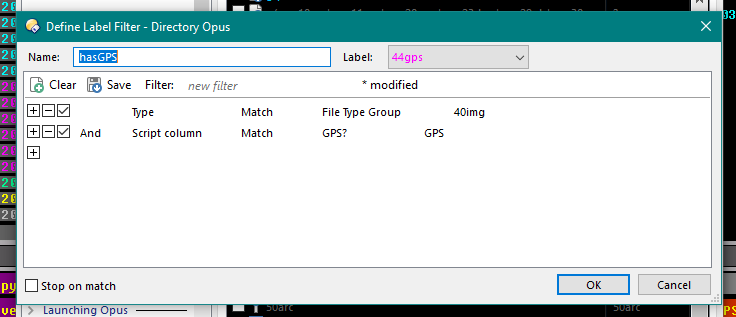
"40img" group contains different image extensions (like jpg,png,bmp etc)
And i put it on a button like:
Set ENABLELABELFILTER hasgps,toggle
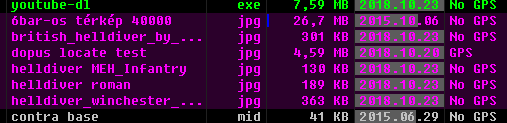
So when i start Dopus:
When i turn it off and on:
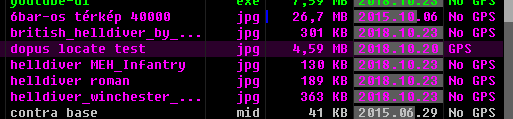
(note the purple background which is defined by the Label, it is not file-selection)
Thanks Leo, this is very useful.
Both those screenshots look the same to me. Is there another filter that also sets things to purple?
Nope, i have one that colors the filename, and one that colors the background. On the first image all purple files have purple background, with both the GPS and NO GPS column entries, on the 2nd screenshot only the "dopus locate test.jpg" has purple background with the correct GPS column entry (after turning the filter OFF and then ON)
Oh I see. I didn't notice the background color as it was so similar in both screenshots. Will take a look in more detail.
Thank you very much!
We got to the bottom of it. That's fixed for the next release.
Thank you Sir!
At my workplace i keep track of roads which have electricity line or gas line construction, so if the workers give me pictures it will be a lot easier to check which ones have gps coordinates so i can instantly check their work, and not have to search for the road myself. So with this im also using the new LOCATE command. I appreciate the help really!
Thanks!