I have a zip file of 2.75 GB holding a single file of 10.2 GB. When I open the zip file in DOpus, the file size is reported at 6,144 TB
The file unzips fine, just the file size display is inaccurate.
I have a zip file of 2.75 GB holding a single file of 10.2 GB. When I open the zip file in DOpus, the file size is reported at 6,144 TB
The file unzips fine, just the file size display is inaccurate.
[quote]I have a zip file of 2.75 GB holding a single file of 10.2 GB. When I open the zip file in DOpus, the file size is reported at 6,144 TB
[/quote]
After reading this, I remembered [u]this thread[/u] and I was lucky enough to find it.
Jon indicates in that thread that
[quote]Currently Opus only supports zip files up to 4GB in size containing a maximum of 65536 items. This limit will be increased in a future version.
[/quote]
Well, that's a little vauge as we have no idea if he really means the size of the contents or the size of the zip file.
I tried to zip, using Directory Opus, a 3.59GB disk image and it seems to work fine although I canceled before the zip completed.
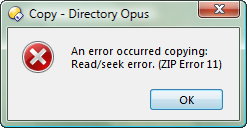
My attempts to zip a file larger than 4 GBs using Directory Opus result in an error message I have included at the bottom of my post.
For what it's worth, I know that 7zip does support archives of files larger than 4GBs.
Really though, short of a partition image, I use UltraISO for my large archives.
I hope this may help some or at least get this topic going.
Regards,
David
David,
Thanks for responding, but I think you mis-read my post. The problem isn't that DOPus can't handle the zip file (it is under the 4 GB limit, and does unzip it fine), but instead that when it shows the single 10 GB file inside the zip file, it mis-reports the file size in the lister.
Paul
OK, I tried it.
I joined two archives together using the DOpus Join command to create a 10.8 GB file.
I then used 7zip to create a zip ( not 7z ) archive of the file.
It opened in DOpus just fine as yours does.
Mine however does report the size of the zip archived file correctly as 10.8 GBs.
One thing I see here is that your zip archive achieved very high compression.
The zip archive is 2.75 GBs and the zipped file is 10.2 GBs.
That probably has nothing to do with the error you're experiencing,
but it's at least worth noting.
I'll have to try a different compression program. The zip files I've have this problem with (it's been consistent for some time now) have all been spanned zip files create with Winzip 10.
Paul,
I'm happy to report that I have a confirmation of this problem for you.
I downloaded a trial version of WinZip 12.0 ( 8252 ) and installed it without any file associations.
I opened the Winzip GUI and created a zip file of the same Dopus Joined 10.8 GB file I made a zip of using 7zip.
As the progress bar advanced,
I speculatively pondered as to what it could be about your file that resulted in a TB size finding when the archive was opened in Dopus.
Surely, I thought, when WinZip completes this operation Dopus will find a 10.8 GB file in the Winzip archive.
NOT, Dopus reports my 10.8 GB file in a Winzip archive as 6144 TB ,
the same size you found for your 10.2 GB file !
It turns out that if the size of any file in the contents of a Winzip archive exceeds 4 GBs,
Dopus reports the size of that file as 6144 TB .
It seems, as of tonight , that the size of any files < 4Gbs in the archive are reported correctly in Dopus.
Fantastic!
So it isn't just me, that's good. Do I need to email Support directly? Or is this thread enough for it be be a bug report. I know that Jon read this forum, but most of by previous issues have been direct emails since I was still in my 1 year of email support.
Paul
You can still email support if you want to (the 1-year thing isn't strictly applied) but there's no need to for this particular issue as it's already been reported to them.