The number of files shown in each sub-directory is incorrect... will this be fixed?
Please give examples as this has never been reported ... and would surely have been if that was the case.
There are 2 sub-directory numbers
- Folder Count - first level count only
- Folder Count (total) - recursive count of all sub-directories
How do I see how many files are in ONE directory only?
Please show some examples of the count being wrong.
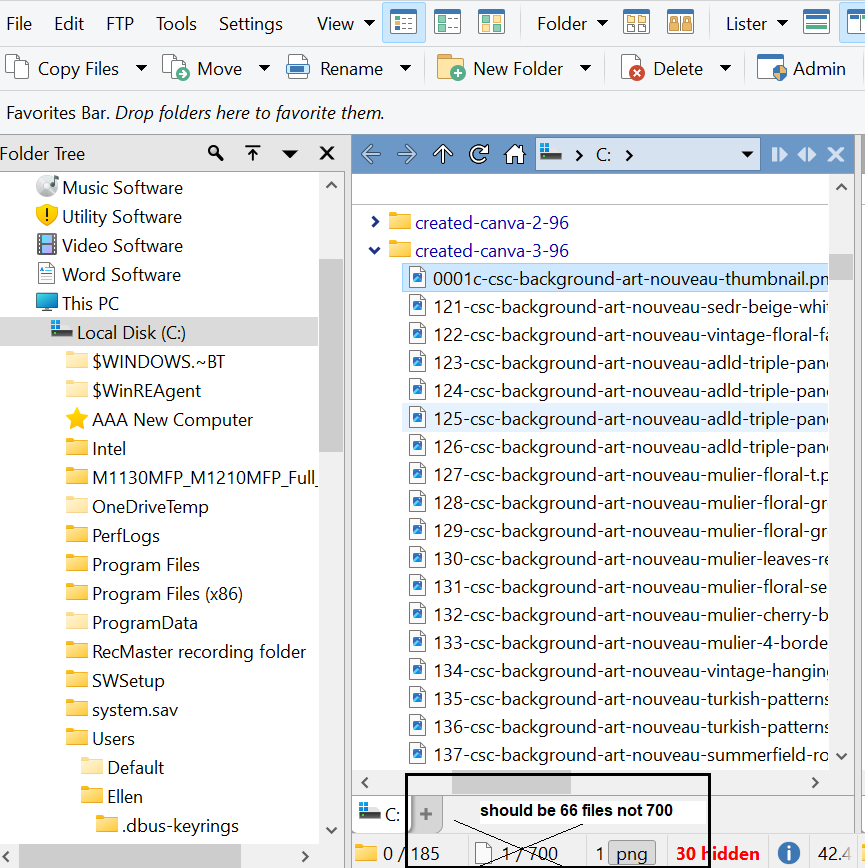
The count in the status bar shows the number of files visible in the file display, and how many are selected.
If you have expanded a sub-folder, like in your screenshot, then the count will include the files within it. This is by design and not a bug.
Then your design is a bug. I want to see how many files are in any given directory like Windows Explorer does... and like Power Desk Pro does. Both of these show 66 files in that directory and not 700.
You'd double click the "create-canva-3-96" folder to make it the current directory then it will show the number of files just in there, before you expand anything else at least.
But I imagine it's possible to configure the status bar to show the number of files in the selected folder somehow: Other Codes [Directory Opus Manual]
Definitely not supporting that way-off comment 
But it'd be great to have new status bar codes for the number of items (folders and files), both nested and non-nested. I'd love to be able to show how many folders and files are expanded.
Do Windows Explorer and Power Desk Pro let you expand folders inline in the file list? If not, your comparison isn't valid.
The reason the expanded files need to be included in the totals can be demonstrated by expanding a folder and then pressing Ctrl-A to select all files in the view. You would either end up with the nonsensical situation where the reported number of selected files was larger than the reported total number of files, or the selected files in expanded folders wouldn't be reported at all.
This code in the Status Bar will achieve your goal, selected files/total files with total files bolded:
{i:file} {sf}/<b>{tf}</b> Files
That's almost the same as what's on the default status bar, just with the total in bold.
It won't achieve the goal of making the status bar not count files in expanded folders. (But the goal doesn't make sense IMO, for reasons like the one Jon posted above.)
That is only just what I want and it is useful for me... but I am just a customer. Giving me an unfriendly string to use is NOT customer friendly. That is why I only use your product when the other file managers fail.
How many other software give you an unfriendly forum with direct access to a community help AND developers with a reactivity that usually counts in hours at most.
That doesn't seem to be an asset for you considering the time elapsed between the last answer and your feedback, but calling this (and the way answers are given when issues are raised) an unfriendly customer support really seems far fetched imho.
Merry Christmas !
Well, you know what they say: If it's not for you, it's not for you. 
A tip: if you really want to solve your issue, don't come in with that confrontational attitude. You can always learn something new every day.
Another tip: if you disable "make folders expandable..." in Preferences / File Displays / Folder Expansion, those numbers will show what you're looking for and you won't see the "discrepancy" you mentioned (Obviously you won't be able to expand folders inline either).