Hello!
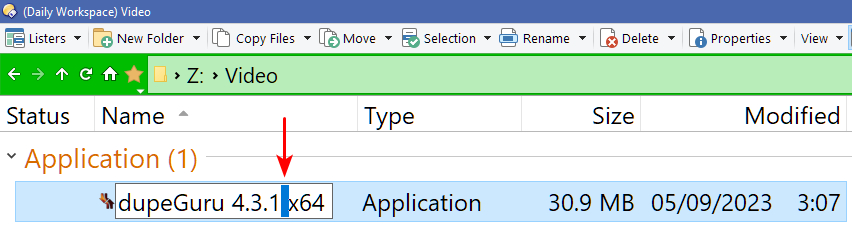
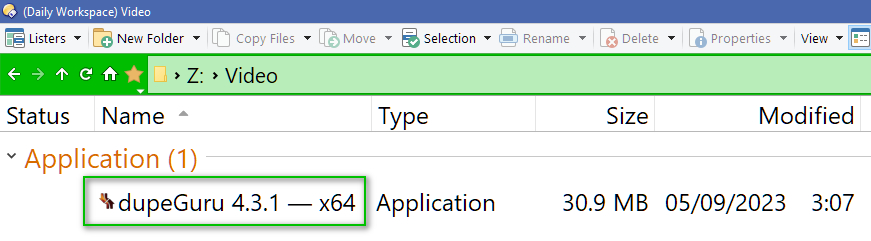
Is there a script or RegEx code to replace any selected space in the file/folder name with a dash and space before it and after it like that : ( – ) Or ( — )
The Result :-
Thanks! 
Not a RegEx but you could type:
Alt + 0150 (en dash) or
Alt + 0151 (em dash),
if it's just for occasional application.
Try
<?xml version="1.0"?>
<regexsel key="ctrl+X" name="Replace by —">
<eval>if (len(valsel) > 0 ) {
selstart = Len(valleft) + 1;
selend = selend + 2;
return valleft + " — " + valright;
}</eval>
</regexsel>
You can use a rename key:
selend = selend + 2;
valleft + Replace(valsel, " ", " — ") + valright
<?xml version="1.0"?>
<regexsel key="ctrl+shift+S" name="space2dash">
<eval>selend = selend + 2;
valleft + Replace(valsel, " ", " — ") + valright</eval>
</regexsel>
Paste in Preferences / File Operations / Renaming Files / Control Keys
That’s what the other two replies give.
Works perfectly!
Thanks 
Great!
Please can you modify it to replace any selected characters or spaces whatever it is length?
Doesn't @AlbatorV's rename key do this?
Just an update to select " — " after renaming.
<?xml version="1.0"?>
<regexsel key="ctrl+X" name="Replace by —">
<eval>if (len(valsel) > 0 ) {
selstart = len(valleft);
selend = len(valleft) + 3;
return valleft + " — " + valright;
}</eval>
</regexsel>
Yes! 
Excellent!
Thanks