Is it possible to trigger that drop-down list when the down key is pressed?
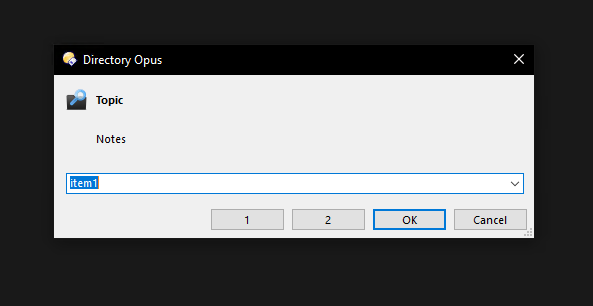
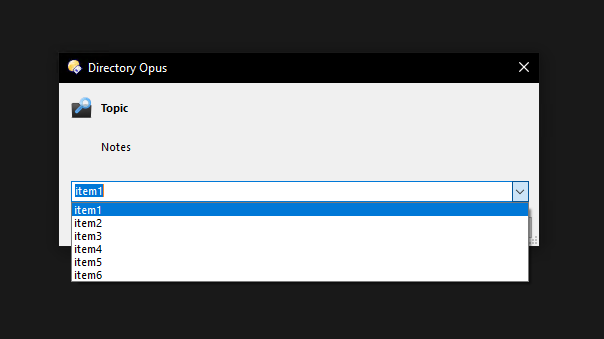
/*
===============================================================================
Name : ComboX
Function : Edit and drop-down Combo box template
Created : 2022-11-21
Modified : 2022-11-22
Version : v0.2
===============================================================================
*/
function OnClick(clickData)
{
var text = "item1, item2, item3, item4, item5, item6"; //Text
var dlg = DOpus.Dlg;
dlg.title = "Directory Opus"; // Title
dlg.template = "dlgCombox";
dlg.detach = true;
dlg.Create();
dlg.Control("static").style = "b";
dlg.Control("static").label = "Topic"; // Topic
dlg.Control("static2").label = "Notes"; // Notes
dlg.Control("static3").label = "D:\\Icons\\XYplorer Search Find.png"; // Icon
var myArray = text.split(", "); //Seprator
dlg.Control("combo").label = myArray[0]; // Defalut value
dlg.Control("combo").SelectRange(0, -1); // Select defalut value
for(i = 0; myArray[i]; i++) {
dlg.Control("combo").AddItem(myArray[i]); //Add each item to drop-down list
}
dlg.Show();
// msg loop
do
{
msg = dlg.GetMsg();
/*
// Selection
if(msg == true && dlg.Control("combo").focus == true) {
DOpus.Output(dlg.Control("combo").label);
}
*/
// Result
if(dlg.result == 1) {
DOpus.Output(dlg.Control("combo").label);
}
//If the button 1 is pressed
if(dlg.result == 3) {
DOpus.Output("Button 1 is pressed");
}
//If the button 2 is pressed
if(dlg.result == 4) {
DOpus.Output("Button 2 is pressed");
}
} while (msg == true);
}
==SCRIPT RESOURCES
<resources>
<resource name="dlgCombox" type="dialog">
<dialog fontsize="8" height="100" lang="english" resize="yes" standard_buttons="ok,cancel" title="Directory Opus" width="320">
<control edit="yes" height="40" name="combo" type="combo" width="305" x="8" y="60" />
<control close="3" height="14" name="btn1" resize="xy" title="&1" type="button" width="50" x="104" y="82" />
<control close="4" height="14" name="btn2" resize="xy" title="&2" type="button" width="50" x="158" y="82" />
<control halign="left" height="16" name="static" title="Topic" type="static" valign="top" width="279" x="28" y="11" />
<control halign="left" height="16" name="static2" title="Notes" type="static" valign="top" width="279" x="28" y="35" />
<control halign="center" height="14" image="yes" name="static3" title="Icon" type="static" valign="top" width="14" x="8" y="8" />
</dialog>
</resource>
</resources>