MG250
July 31, 2026, 9:00pm
1
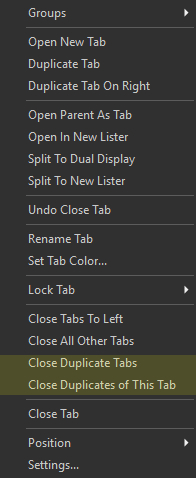
I often end up with duplicate tabs in my workflow. Is it currently possible to perform the following using an internal command?
Close all duplicate tabs (leaving only the first instance of each tab).
Close the duplicate tabs of a particular tab (leaving the selected tab open).
If not, could these be added as possible values for the TABCLOSEALL argument? Thank you.
I would use this functionality to add these buttons to the folder tabs context menu.
This could be done with some scripting.
Jon
July 31, 2026, 9:57pm
3
There's a script for it here:
David
July 31, 2026, 10:01pm
4
MG250:
Close all duplicate tabs (leaving only the first instance of each tab).
I have used @Leo 's DeDuplicate Tabs
It is simple and works quite well.@Jon has posted as I was typing.
Here's my copy of the working button.Close Duplicate Tabs.dcf (2.8 KB)