That is, I want to disable drag and drop with left mouse button, but still allow right mouse button to do drag and drop.
Is this possible?
Thanks!
That is, I want to disable drag and drop with left mouse button, but still allow right mouse button to do drag and drop.
Is this possible?
Thanks!
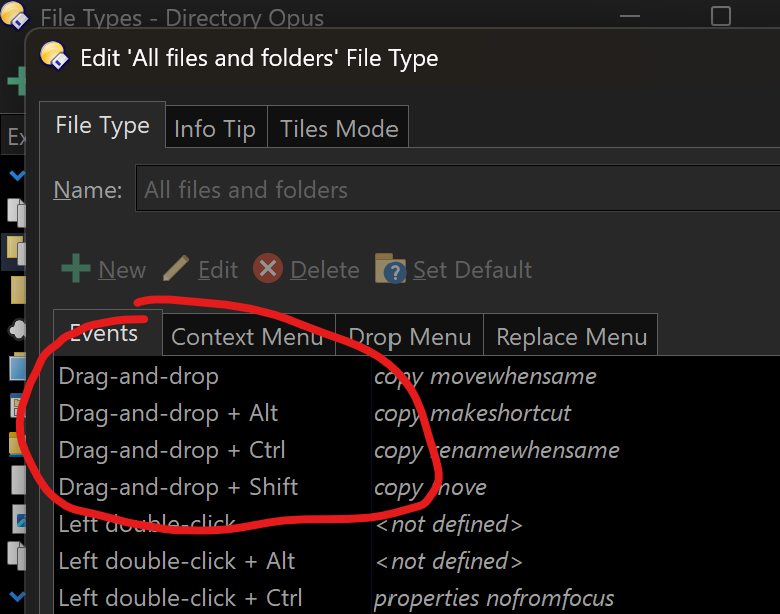
Settings > File Types > All files and folders > Events.
Remove all of the various Drag-and-drop functions.
Thanks for the reply! Tried this; but this disables right mouse button drag and drop too. Is there a way to only enable right click drag and drop?
You're right, that was unexpected! It shouldn't do that.
We'll look at improving this but in the mean time, set the base Drag-and-drop command to Set NOOP. This will stop anything happening when you drag and drop with the left button, and allow the right button drag to work as normal.
This is perfect! Yeah this does what I wanted exactly. Thank you!
Hi @Jon sorry to bother you again here. I found that the Set NOOP action only prevents left click drag and drop within Directory Opus operations - like, if I drag and drop to a folder it is correctly blocked; but for example if I drag a file and drop onto a Zip file (and my Zip default goes to WinRAR) it still will do the update archive action.
Any possibility to stop that from happening too?
There's a Preferences option for that:
Thanks @Leo - This works. Now right click is harder to handle (requires holding Ctrl to work when drop onto file or folders) but at least it works. Thanks!
In the next beta removing the actions completely will still allow right button drag & drop.