I basically want to create a collection (stored query) based on a file filter on a specific drive. I then want to sync these files to a specific folder (external USB) for backup. Can this be done?
I think I answered my own question. It looks like it works. Thanks!
Hmm, it behaves oddly. I created a Stored Query as a collection and am testing syncronizing it with a folder on a USB drive. There are 3200 files in the source collection and 3000 files in the destination folder. When I compare by any criteria, it shows that it wants to transfer ALL files even though most of them already exist in the destination folder. I am only wanting to transfer ones where the size is different. But not matter what criteria I use, it finds 0 matches in the destination folder, even though it should.
When I have a backup frustration I just delete the backup and copy over the fresh folder. This takes longer and is annoying but is a guaranteed mirror.
I’m sure the if statement would work for this. "if = (condition) then copy to:”
If the file name matches but not the date modified then copy to and replace all. That kind of thing, but I don’t think I’ve ever tried it.
But I just use Syncback Pro for backups. The amount of options is mind boggling.
For example, when you plug in your usb it can auto-backup from the folder/s to it. Or it can monitor folders, check and mirror two folders once per hour. That kind of thing. You can make rules about what happens when things match or don’t match etc.
If you're copying out of a collection to a flat directory, the Copy Files > Update All command is probably all you need:
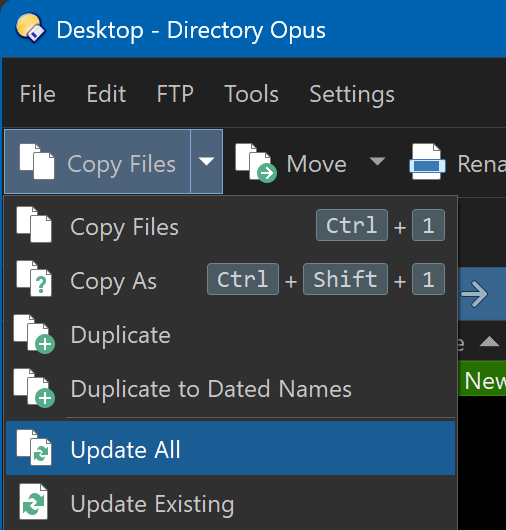
That will copy everything that's selected in the source over to the destination, skipping files with the same size and modified timestamp on both sides, and copying the others.
If the copy takes a long time, the Unattended Mode may also be useful, so you don't have to be there to respond to each error.
1 Like
Great! I will give that a try, thanks.