I wanted to find a simple way of identifying and rotating images based on EXIF information. Whilst researching DOpus image rotate capabilities, I came across an earlier thread from which it's clear that the DOpus image viewer can perform lossless rotate and buttons can be configured to do this to selected images.
I also discovered a quick and effective way of doing exactly what I want to a whole folder of images. The freeware FastStone Image Viewer context menu includes a JPEG Lossless Rotate item and one of the sub options is Auto-Rotate based on EXIF Rotation Tag. If I select all images in chosen folder end execute this option, those shown by EXIF to be rotated are losslessly converted and rewritten, preserving all other EXIF information and without changing the modified date.
Now to see if I can tie this all together with a DOpus button....
To clarify what Jon said, Opus does both things. It will automatically do a lossless JPEG rotation where possible and can rotate using the EXIF information.
Without backing off my earlier in any way, I observe two material differences...
[ol][li]DOpus updates the modified date. FS does not.[/li]
[li]DOPus takes longer to convert.[/li]/ol is a matter of preference and the ideal would be to be able to choose.
For my speed test, I used a folder with 37 images totalling 100MB and 8 needed rotating. DOpus took about 20 secs vs less than 10 secs for FS.
FYI, I use cPicture for photo culling and it complains about EXIF in images rotated by DO (only some part of EXIF is available, because of problem with a tag name). I've reported it to GPSoft some time ago, but haven't noticed a fix in any of the subsequent fix releases.
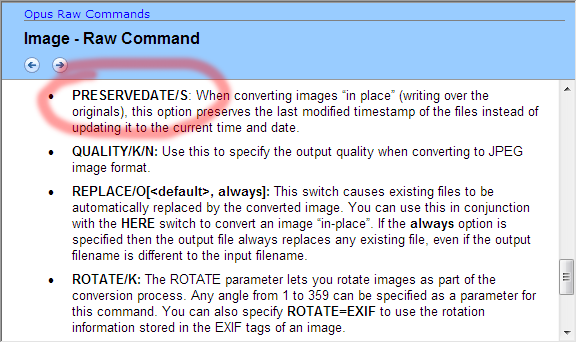
Thanks to this discussion I was prompted to re-examine the excellent Image toolbar which I have now modified to include a Rotate EXIF button in addition to the Rotate Left and Rotate Right buttons. I also made them 3-button format with LMB = rotate and preserve modify date, RMB = rotate and update modify date, MMB = rotate and prompt to rename.
I once set up a bug-report, where I described, that DO won't resize or
reduce jpg-quality, if you want to rotate by exif-informationen at the same time.
I now have to exif-rotate all my images, and in a second run, I reduce the quality to 85% (no change at pixel level, but file-size shrinks noticably).
Can anybody confirm my problem ?! The options to rotate and specify jpg-quality are both enabled, so I as the user asume, these work together,
but they seem not to.
Subject to any last-minute issues, the next version of Opus will include a NOLOSSLESS argument which you can give to the image converter to force it to re-compress JPEGs even if it could perform what you've asked losslessly.
No this ability was added in Opus 9. An easy way to see what parameters a command supports is to use the drop-down Arguments list in the advanced function editor (type in the name of the command, then use the drop-down to see the parameters).
Is it possible to do the contrary: rotate only the EXIF position while keeping the image intact?
(That would mean preserving the JPEG image size (well, maybe it just adds the EXIF bytes if missing) and getting the exact file if the image is rotated back.)

 in any way, I observe two material differences...